

Most Hoover WindTunnel problems come from clogs, dirty filters, worn belts, or a full dirt cup.
If your Hoover WindTunnel vacuum has lost suction, makes odd noises, or will not turn on, the fix is often simpler than it seems. I have seen this model respond well to basic checks, careful cleaning, and a few parts swaps, so this guide walks you through Hoover WindTunnel Vacuum Troubleshooting in a clear, practical way.

Common Hoover WindTunnel Vacuum Problems
Hoover WindTunnel Vacuum Troubleshooting usually starts with a few repeat issues. The good news is that these problems are often linked to airflow, brush roll movement, or power flow.
When a vacuum seems “dead,” it is often still trying to work. It just cannot move air the way it should. Think of it like breathing through a straw that is half blocked.
Common signs include:
- Weak suction
- Vacuum not turning on
- Brush roll not spinning
- Burning smell
- Loud rattling or grinding
- Vacuum shutting off during use
- Dirt blowing back out of the machine
In my experience, suction complaints are the most common. About half the time, the cause is a hidden clog in the hose, wand, or foot of the vacuum.
How the Hoover WindTunnel System Works
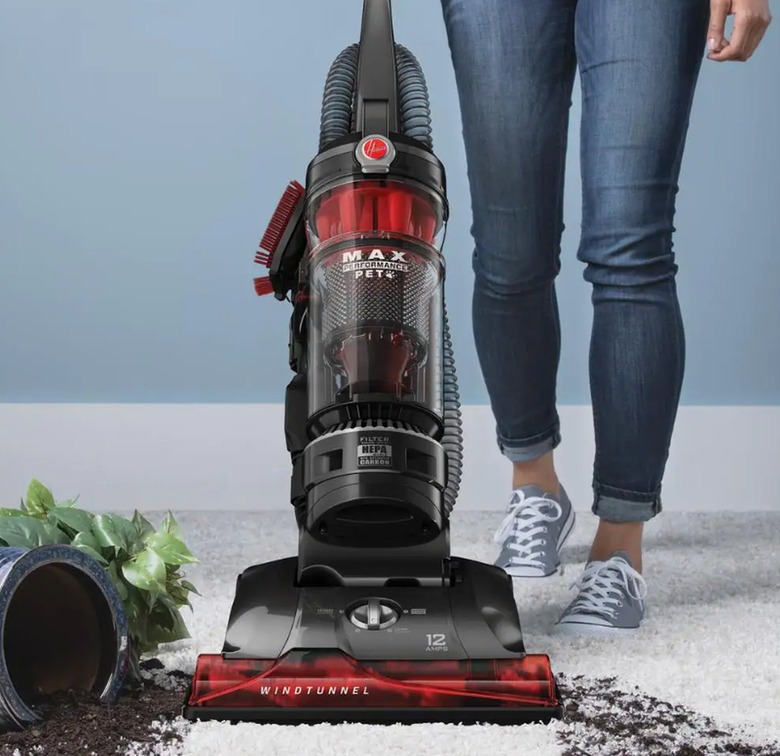
Understanding the airflow path helps a lot with Hoover WindTunnel Vacuum Troubleshooting. This vacuum uses suction, filters, and a brush roll to lift dirt from carpet and floors.
Air enters the cleaner head, moves through the hose or nozzle, and passes through filters and the dirt cup. If any point in that path is blocked, suction drops fast. The brush roll also matters because it lifts debris from carpet fibers and feeds it into the airflow stream.
Here is the simple version:
- The brush roll loosens dirt
- Suction pulls debris into the vacuum
- Filters catch fine dust
- The dirt cup stores what gets picked up
If one part gets clogged or worn out, the whole machine feels weaker. That is why a full troubleshooting check should cover airflow, filters, and moving parts.

Hoover WindTunnel Vacuum Troubleshooting Steps
Follow these steps in order. Start with the easiest checks first, then move to deeper fixes if needed.
1. Check the power source
If the vacuum will not turn on, start with the outlet. Plug another device into the same outlet to make sure it works.
Also check:
- Power cord damage
- Loose plug connection
- Reset button, if your model has one
- Overheated motor shutoff
If the vacuum stopped after a long cleaning session, let it cool for 30 to 60 minutes. Many vacuum motors have thermal protection that shuts the unit off when it gets too hot.
2. Empty the dirt cup
A full dirt cup can hurt suction more than people expect. Even if the cup is not packed solid, fine dust can block airflow around the cyclonic path.
Empty the cup before it gets too full. Wash it only if the user manual allows water cleaning, and let it dry fully before reinstalling it.
3. Clean or replace the filters
Dirty filters are one of the biggest causes of Hoover WindTunnel Vacuum Troubleshooting issues. If air cannot pass through the filter system, the motor works harder and suction drops.
Check for:
- Pre motor filter
- Post motor filter
- Foam or pleated filter layers
Washable filters should be fully dry before use. A damp filter can create a musty smell and reduce performance.
4. Look for clogs in the hose and wand
A clog can hide deep inside the hose. I have pulled out everything from pet hair to small toys to a clump of lint that looked harmless from the outside.
To check the hose:
- Detach it from the vacuum
- Hold it up to light
- Look for blocked areas
- Use a long flexible tool if allowed by the manual
- Never force sharp objects through the hose
If the hose is cracked, suction can leak before it reaches the floor nozzle. That often feels like a motor problem, but it is really a sealed-air problem.
5. Inspect the brush roll
If the vacuum picks up loose debris but struggles on carpet, the brush roll may be the issue. Hair, threads, and strings can wrap around the roller and stop it from turning.
Check for:
- Tangled hair
- Broken belt
- Debris trapped at the ends
- Worn bristles
A brush roll that does not spin cannot lift dirt well from carpet. It is like trying to sweep with a broom that has lost half its bristles.
6. Examine the belt
The belt connects motor power to the brush roll on many Hoover WindTunnel models. If the belt is stretched, cracked, or broken, the brush roll may stall.
Signs of belt trouble include:
- Brush roll not spinning
- Burning rubber smell
- Reduced carpet cleaning
- Strange squealing noise
Replace the belt if it looks worn. In my experience, a fresh belt can make an old vacuum feel much stronger right away.
7. Check the height setting
If the vacuum is hard to push or seems weak on some floors, the height adjustment may be off. A setting that is too low can block airflow on thick carpet. A setting that is too high can reduce deep cleaning.
Use:
- Lower settings for low pile carpet and hard floors
- Higher settings for plush carpet
Small changes here can make a big difference in Hoover WindTunnel Vacuum Troubleshooting.
8. Inspect the nozzle and base
The base of the vacuum can collect hidden debris. Coins, paper bits, and pet hair can sit near the cleaner head and block airflow.
Check under the nozzle cover if your model allows it. Clean the air path gently and make sure nothing is jammed around the brush roll or intake channel.
9. Check for odd noises
A loud sound can point to a specific part. A rattle may mean debris in the base. A high-pitched whine may mean a belt issue or motor strain. A grinding sound can mean worn bearings or a damaged brush roll.
Do not keep running the vacuum if the noise gets worse. That can turn a small repair into a bigger one.
10. Reset after overheating
If the vacuum shut down on its own, unplug it and let it rest. After cooling, check for a blockage before turning it back on.
Repeated overheating usually means:
- Clogged filters
- Airflow restriction
- Full dirt cup
- Jammed brush roll
- Weak motor
I always tell people not to ignore this step. A vacuum that keeps overheating is trying to tell you something.
Why Suction Drops on a Hoover WindTunnel
Weak suction is the most searched issue in Hoover WindTunnel Vacuum Troubleshooting because it is so common. The root cause is often simple, but the symptoms can feel serious.
Here are the most likely reasons:
- Dirty or clogged filters
- Blocked hose or wand
- Full dirt cup
- Air leak in the hose or seals
- Cracked internal housing
- Worn motor
- Misaligned dirt cup or lid
A useful trick is to test suction at different points. If suction is strong at one point but weak at another, the blockage is probably between those two spots. That kind of test saves a lot of guesswork.
Brush Roll Not Spinning
When the brush roll stops, carpet cleaning drops fast. This issue often shows up with hair wrap, a broken belt, or a jammed roller.
Try this:
- Turn off and unplug the vacuum
- Flip it over
- Check for tangled fibers
- Spin the brush roll by hand
- See if it turns freely
- Inspect the belt for damage
If the brush roll turns stiff or stops suddenly, clean the ends and remove any wrapped debris. If the belt is broken, replace it before using the vacuum again.
A jammed brush roll can overheat the motor, so do not keep forcing it. That is one of the easiest mistakes to avoid.
Strange Smells and Burning Odors
A burning smell is one of the more worrying signs in Hoover WindTunnel Vacuum Troubleshooting. It can come from a slipping belt, a jammed brush roll, or a motor working too hard.
Possible causes include:
- Hair wrapped around the brush roll
- Belt rubbing against a jam
- Dirty filters reducing airflow
- Debris stuck in the fan area
- Motor wear
If the smell is sharp and rubbery, stop the vacuum and inspect the belt path. If the smell is electrical or hot, give the machine time to cool and check for airflow blockage before using it again.
Maintenance Tips That Prevent Future Problems
Good maintenance keeps Hoover WindTunnel Vacuum Troubleshooting from becoming a regular weekend chore. A few small habits can help the vacuum last longer.
Try these simple steps:
- Empty the dirt cup often
- Clean filters on the schedule in the manual
- Remove hair from the brush roll weekly
- Check the hose for clogs each month
- Store the vacuum in a dry place
- Replace worn belts and filters as needed
I have found that basic upkeep matters more than people expect. A vacuum that gets cleaned regularly usually sounds better, runs cooler, and keeps suction longer.
When to Repair and When to Replace
Not every Hoover WindTunnel problem is worth fixing forever. If the vacuum has repeated motor issues, major cracks, or expensive part failures, replacement may be the smarter move.
Consider repair if:
- The issue is a clog, belt, or filter
- The vacuum still runs well after cleaning
- Parts are easy and affordable to replace
Consider replacing if:
- The motor is weak or failing
- The cord is badly damaged
- The housing is cracked
- Repair costs approach the price of a new vacuum
A good rule I use is simple: if the fix is cheap and the machine has been reliable, repair it. If the same problem keeps coming back, it may be time to move on.
Frequently Asked Questions of Hoover WindTunnel Vacuum Troubleshooting
Why is my Hoover WindTunnel vacuum losing suction?
Loss of suction usually comes from a clogged hose, dirty filter, or full dirt cup. Start by checking airflow from the nozzle all the way to the dirt bin.
Why does my Hoover WindTunnel smell like burning?
A burning smell often means the brush roll is jammed or the belt is slipping. It can also happen when airflow is blocked and the motor is under stress.
Why is the brush roll not spinning?
The most common causes are a broken belt, tangled hair, or a stuck roller. Unplug the vacuum and inspect the brush roll area before using it again.
Can I wash the filters in my Hoover WindTunnel?
Many Hoover WindTunnel filters are washable, but not all of them are. Check the manual for your exact model and make sure the filter is fully dry before reinstalling it.
Why does my Hoover WindTunnel keep shutting off?
This usually happens when the vacuum overheats from a blockage or dirty filter. Let it cool, then check for clogs, dirt cup buildup, and brush roll jams.
Conclusion
Hoover WindTunnel Vacuum Troubleshooting is usually about tracking down a simple cause before it turns into a bigger problem. Most issues come down to airflow, filters, clogs, the brush roll, or the belt, and those are all things you can check at home with a little patience.
If your vacuum is underperforming, start with the basics and work step by step. That steady approach saves time, protects the motor, and often brings the machine back to life without a repair bill.
Take a few minutes this week to clean your vacuum, inspect the moving parts, and test suction properly. If this guide helped, explore more maintenance tips, share it with someone dealing with the same issue, or leave a comment with the problem your Hoover WindTunnel is giving you.


1 Comment
Pingback: Dirt Devil Vision Turbo Vacuum Troubleshooting: Fix Fast - Vacuum Cleaner Tips