

Robot vacuums are supposed to hum quietly in the background, not scream like a leaf blower. So why is my robot vacuum making a loud noise? Nine times out of ten, it's not a dying motor.
It's a simple clog, a wrapped brush, or an overstuffed dustbin that you can fix in about ten minutes with basic household tools.
Manufacturer specifications list typical robot vacuum noise at 55 to 70 decibels, which is about the level of a normal conversation or a dishwasher. When yours starts pushing past that, something is physically interfering with a spinning part. This guide walks you through the diagnostic process from most common cause to least.
You'll likely find the culprit before you finish your coffee.
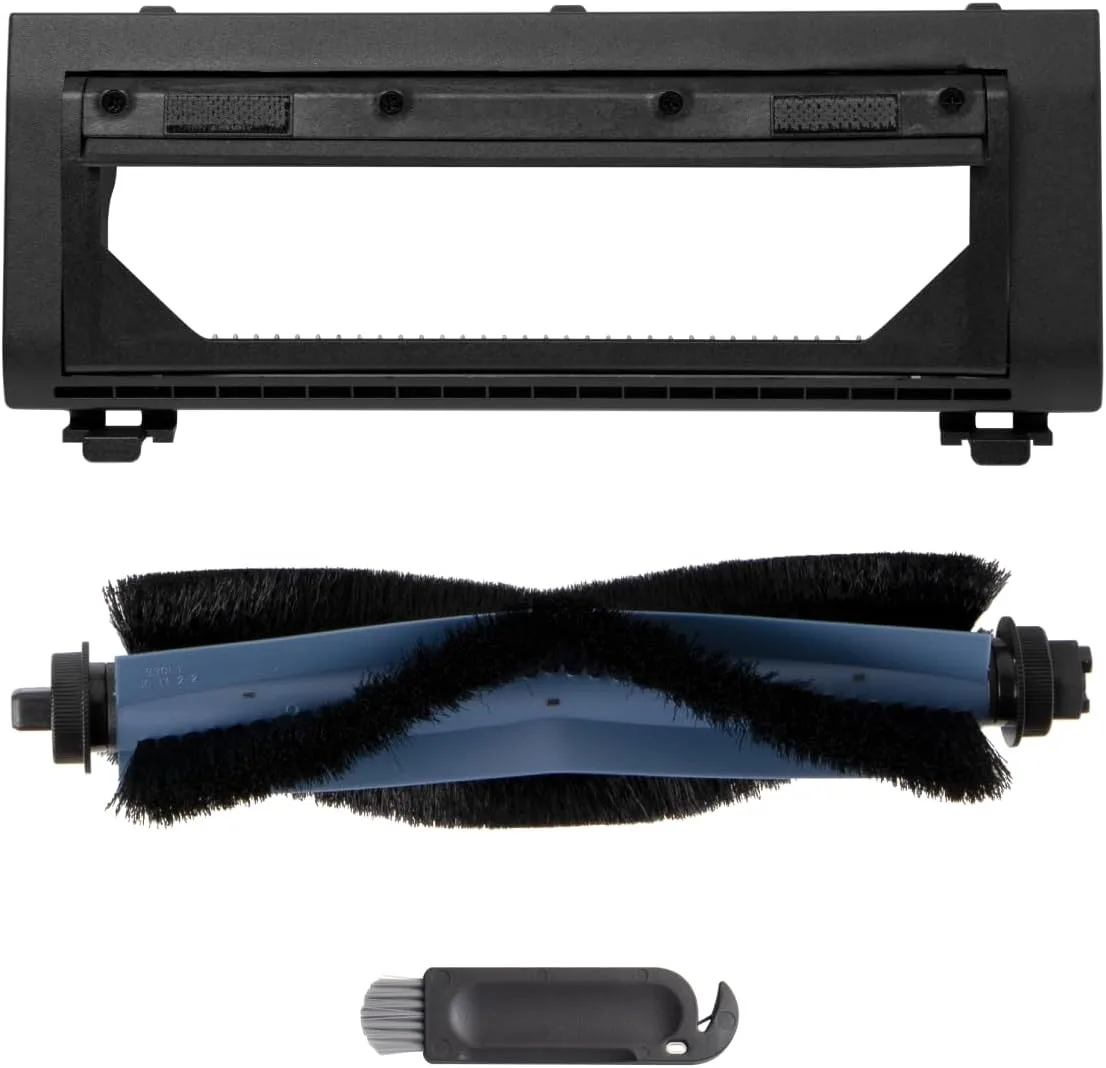
Image source: Web (Bing) / eufy.com (Web image (fair-use with source credit))
Quick Answer
A loud robot vacuum usually means something is stuck, wrapped, or blocked. The most common cause is hair wrapped around the brush roll. The second most common is a clogged filter or overstuffed dustbin.
Check those areas first. That fixes most noise problems.
First, Is This Noise Normal or a Problem?
Every robot vacuum makes noise. That's just physics. The motors spin fast, the brushes tap the floor, and the wheels roll over seams.
The real question is whether the sound has changed.
Here's what normal sounds like:
| Normal Noise | What It Usually Is |
|---|---|
| Low hum while cleaning | Suction motor running |
| Soft tapping on hard floors | Brush roll hitting the surface |
| Brief clicking when turning | Drive wheels adjusting |
| Whirring for 10 to 20 seconds after docking | Suction clearing the dustbin chute |
Problem noises are different. They're louder, more constant, and often rhythmic. A grinding sound usually means bearings or hair wrap.
A high-pitched whine points to an obstructed motor. A repeated clicking might mean a cracked fan blade.
Noise ratings for vacuums follow the IEC 62885-2 standard, which measures sound power during normal operation. As of 2026, most robot vacuums still sit between 55 and 70 decibels, with the quietest models around 52 dB. The CDC warns that sustained exposure to sounds above 85 decibels can harm hearing, so don't let a screaming robot run for hours.
The Main Culprits: Which Part of the Vacuum Is Making the Noise?
Brush Roll Issues
The brush roll is the spinning bar underneath. It's the number one source of loud robot vacuum noises. Hair, string, and carpet fibers wrap around the ends of the roller.
Once the wrap gets thick enough, the brush can't spin freely. The motor strains, and you hear a rhythmic grinding or clicking.
Pet hair is the worst offender. It tangles into a tight mass that acts like a brake. Aggregate owner reports indicate long human hair and pet fur cause around 70% of brush roll jams.
The fix is usually simple. Turn the vacuum over, pull the brush roll out, and cut away the debris. Most models pop the roller out with a small latch.
A seam ripper slides between the bristles and pulls out the wrap without cutting the roller. It's the same method we recommend for any vacuum's rotating bar.
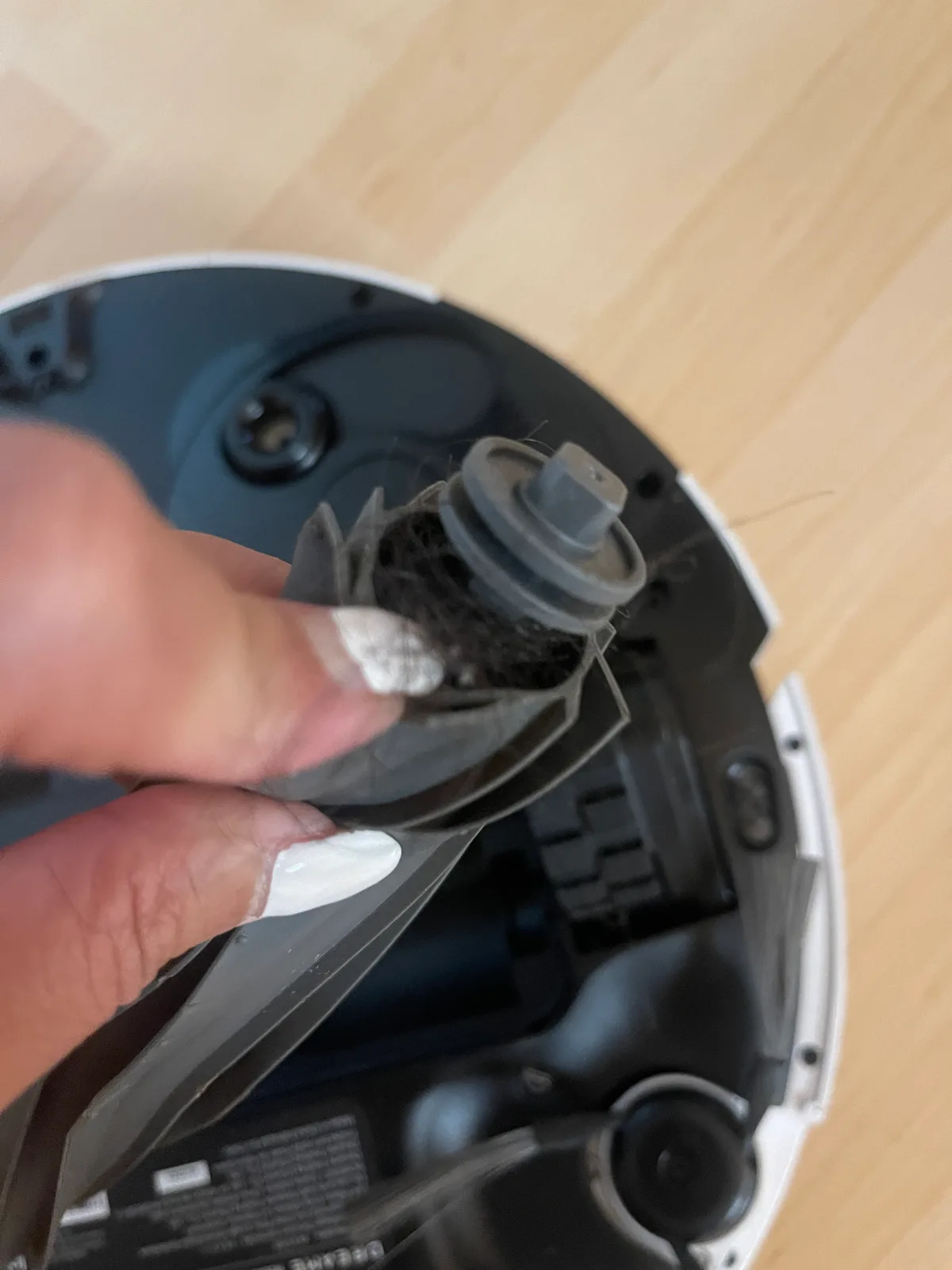
Image source: Web (Bing) / us.forum.dreametech.com (Web image (fair-use with source credit))
Side Brush and Wheels
The side brush is the little three-arm spinner that flicks debris toward the suction inlet. Because it sits right at the edge, it constantly bumps into walls and table legs. A bent or cracked arm makes a scraping sound.
A loose side brush rattles.
The drive wheels are another quiet troublemaker. Hair and dust accumulate around the axle. That debris drags against the wheel housing.
The noise shows up as a low stutter or a repetitive thump.
Check the caster wheel too. That's the small unpowered wheel at the front or rear. If it's clogged with grit, it wobbles and clicks.
Suction Motor and Fan
This one sounds scarier than it usually is. If the vacuum picks up a small object like a penny or a paper clip, it can wedge against the fan blade. The motor then struggles, creating a high-pitched whine or a loud buzzing.
A failing motor is less common. The sound is a grinding drone that stays consistent regardless of surface. If the vacuum still picks up debris but the noise won't stop, the fan may be cracked.
Debris in the Dustbin or Filter
The dustbin and filter are unsung villains. When the bin is overstuffed, the airflow path narrows. When the filter is clogged with fine dust, the motor works harder to pull air through.
That extra strain shows up as a rising whine that changes pitch when you increase suction.
Many modern robots use a HEPA filter to trap fine particles, but those filters clog quickly in dusty homes. Regular cleaning keeps the airflow pressure steady. For allergy-sensitive households, filter-focused vacuums come in robot and upright styles, and the maintenance principle is identical.
Step-by-Step Troubleshooting: Where to Start and What to Check First
Now that you know where the noise comes from, let's fix it. Set aside 15 minutes. You'll need a screwdriver, scissors or a seam ripper, and a microfiber cloth.
| Step | Task | Time |
|---|---|---|
| 1 | Turn off and inspect the bottom | 2 min |
| 2 | Clear the brush roll | 5 min |
| 3 | Clean side brush and wheels | 4 min |
| 4 | Inspect filter and dustbin | 3 min |
| 5 | Run a test pass | 1 min |
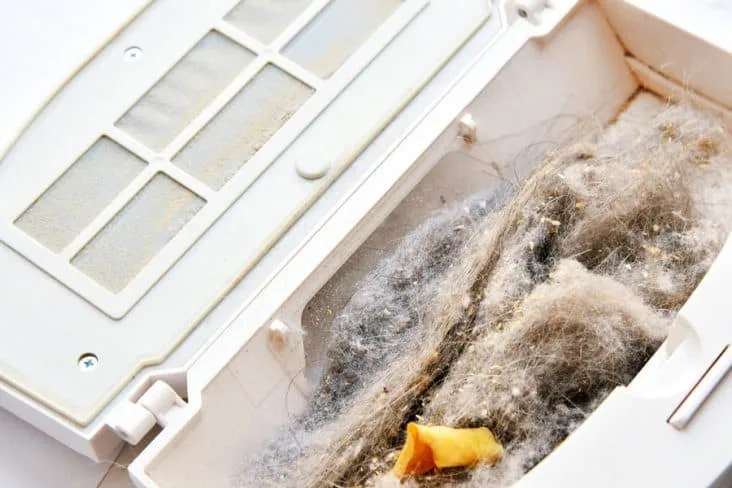
Image source: Web (Bing) / applianceteacher.com (Web image (fair-use with source credit))
Step 1: Turn It Off and Inspect the Bottom
Always power down and unplug the vacuum before touching anything. Place it upside down on a soft surface. Look for visible hair, string, or debris around the brush roll and wheels.
Check for cracks in the side brush arms. If something obvious is stuck, you've probably found your noise.
Step 2: Check the Brush Roll and Clear Tangled Hair
Remove the brush roll cover and lift out the roller. Most models have a release latch, though some require a screwdriver. Untangle hair from the ends and along the shaft.
If the brush roll looks worn or cracked, replace it. While it's out, wipe the brush chamber with a damp cloth.
If you want a deeper clean, give the roller a proper wash and let it dry fully before reinstalling.
Step 3: Clean the Side Brush and Wheel Assemblies
Pull the side brush off. It usually snaps or screws off. Remove any hair wound around the base.
Check each arm for bends. A warped side brush should be replaced.
For the wheels, use tweezers or your fingers to pull away accumulated hair. Spin the wheels by hand to confirm they move freely. Don't oil them unless the manual says so.
Most robot vacuums use sealed bearings that don't need extra grease.
Step 4: Inspect the Filter and Dustbin
Empty the dustbin over a trash can. Tap the bin to dislodge debris from the inlet. Then pull out the filter layer by layer.
HEPA filters need to be free of caked-on dust. If your filter is washable, rinse it and let it dry completely. The typical drying window for vacuum filters runs around 24 hours, so allow overnight before reinstalling.
Step 5: Run a Test and Isolate the Noise
Reassemble everything. Place the vacuum on a hard flat surface. Run it for two minutes without the dustbin, just suction.
Then run it with the brush roll engaged. That separates which motor is making the noise.
If the noise appears only when the brush spins, the issue is mechanical. If it happens during suction alone, focus on the filter, fan, and motor. For owners with smooth floors like LVP, some smooth flooring models use rubber brushes that are quieter and easier to clean.
How to Match the Sound to the Likely Cause
Still stuck? Match the sound you're hearing, then confirm with a quick inspection.
| Sound You Hear | Most Likely Cause | First Step |
|---|---|---|
| Rhythmic grinding or clicking | Hair wrap on brush roll | Remove brush roll and clear debris |
| High-pitched whine | Clogged filter or restricted airflow | Empty dustbin, clean filter |
| Scraping noise | Bent side brush or debris under the bin | Inspect side brush arms and vacuum bottom |
| Rattling | Loose screws or debris in wheel well | Check caster wheel and drive wheels |
| Loud buzzing | Obstruction in fan or failing motor | Inspect suction inlet, then contact support |
| Thumping | Thick debris caught under the brush | Clear the brush chamber entirely |
Use this if-then logic:
- If the noise changes when the vacuum turns, it's related to a moving part, not the motor.
- If the noise happens on carpet but not hard floor, the brush roll is likely tangled in fibers.
- If the noise rises when suction increases, the airflow path is the problem. Similar airflow issues can affect upright vacuums too.
- If the noise is constant across all settings, suspect the motor, fan, or bearings.
Once you've matched the sound to a source, the fix usually becomes obvious. The next step is deciding whether you can handle it yourself or whether a support call is the smarter move.
Mistakes to Avoid During Robot Vacuum Repairs
The biggest mistake is using raw force. Yanking a tangled brush roll can bend its axle. A bent axle creates a permanent rhythmic clicking, even after all hair is removed.
Use a seam ripper or small scissors to slice debris free.
A close second is ignoring error codes. Error codes exist to stop you from running the unit with a jam. Repeatedly powering through a jam can burn out the brush motor.
Check the manual before resetting anything.
Other common errors from service logs:
- Washing electrical components
- Reinstalling damp filters
- Oiling sealed wheel bearings
- Letting the dustbin overfill
- Forcing a part into place
If you remove the roller for a deep clean, let everything dry fully before reinstalling.
When to Fix It Yourself vs. Call Customer Support
Here's the simple rule. If the noise comes from visible debris, fix it yourself. If there's no visible debris but the noise persists, call support.
Manufacturer warranties typically cover motors and electronics for one year. Most units also have a 30-day return window. If your vacuum is under warranty and the noise is constant, don't open the motor housing.
That can void coverage.
Use this if-then guide:
- If you see hair wrap, clean it. You're done.
- If the filter is dirty, clean or replace it.
- If an error code points to a motor fault, call support.
- If the vacuum is out of warranty and grinds, a new brush roll usually costs $15 to $30. That's often all you need.
- If the noise continues after a new brush roll and clean filter, the motor bearings are likely worn. Compare a $60 to $90 repair against the price of a new model.
How to Prevent Loud Noises in the Future
Prevention beats repair. Set a simple schedule and stick to it. We recommend checking the underside once a week.
| Task | Frequency | Time |
|---|---|---|
| Empty the dustbin | Every 1 to 2 days | 30 seconds |
| Clear hair from brush roll | Weekly | 3 minutes |
| Wipe wheels and side brush | Weekly | 2 minutes |
| Tap out the filter | Every 2 weeks | 1 minute |
| Wash filter (if washable) | Monthly | 5 minutes plus dry time |
| Replace brush roll | Every 6 to 12 months | 5 minutes |
Most robot vacuum filters need a full 24 hours to dry after washing. Plan around that. Rotate between two filters to avoid downtime.
A clean vacuum runs quieter and picks up more. It also keeps the suction motor from straining.
For any vacuum, regular service intervals keep small issues from becoming loud failures. The EPA's indoor air quality guidance also confirms that clean filters lower airborne particle levels, which is a win for allergy sufferers.
Real-Life Scenario: A Pet Owner's Brush Roll Nightmare
Here's a common story from support forums. A household with a golden retriever ran their robot vacuum nightly for two weeks without checking the underside. The brush roll wrapped tightly with hair, and the motor strained against it.
The first symptom was a rhythmic scraping sound on the rug. After three days, the noise became a grinding groan that woke people up. The owner assumed the motor was dead and nearly bought a new vacuum.
A ten-minute inspection showed a glob of hair the size of a golf ball wrapped around the brush roll.
Once the roller was removed and the tangled mass cut away, the motor ran flawlessly. Total repair time was 15 minutes. Total cost was zero.
This isn't rare. Aggregate owner reports indicate matted hair jams are the leading cause of loud robot vacuums. The lesson: check the underside often, especially with pets in the house.
Frequently Asked Questions
Why does my robot vacuum sound like it's grinding?
A grinding sound almost always means hair is wrapped around the brush roll. Turn the vacuum off, remove the roller, and cut away the tangled debris. If the noise persists, check the wheel assemblies for wrapped fibers.
Worn bearings are the second most common cause.
How often should I clean the brush roll?
Clean it weekly if you have pets or long hair. Households without pets can stretch it to every two weeks. The goal is stopping hair from building up around the axle.
Once the wrap hardens, it can bend the brush roll mount.
Can I keep running my vacuum if it's making a loud noise?
No. Letting it strain can burn out the brush motor. The extra friction also drains the battery faster.
Stop the vacuum, inspect the underside, and clear any visible debris. If the noise continues, contact support before the damage gets worse.
Why does my robot vacuum make more noise on carpet?
Carpet creates more resistance. The brush roll works harder, and the motor pushes more suction through a deeper surface. That's normal.
If the noise is rhythmic or grinding, the brush is likely tangled. If it's just a deeper hum, the vacuum is working as designed.
How long should a robot vacuum last before repairs?
Most robot vacuums last three to five years with regular maintenance. Brush rolls and filters are consumable parts that need replacement every 6 to 12 months. If the main motor fails within warranty, the manufacturer usually covers it.
A one-year warranty is typical.
Final Verdict: Work Through the Noise, Don't Ignore It
Loud noises from a robot vacuum are rarely random. They follow a pattern. Once you learn that pattern, you can fix the problem in minutes without spending money.
Start with the brush roll because it fails first. Hair wrap jams it more often than any other part. Move to the wheels if the brush is clean.
Then check the filter and dustbin for airflow restriction. If all of those look good and the noise continues, contact the manufacturer.
If the sound changes with brush speed, it's mechanical. If it changes with suction power, it's airflow. If it sounds the same on every setting, it's likely the motor.
That distinction is your most valuable diagnostic tool.
Ignoring the noise makes the problem worse. A strained motor burns out. Worn bearings grind down plastic housings.
A small jam becomes a major failure when left to run for weeks.
The quick checks in this guide cover virtually every fix that costs less than a service call. Keep a seam ripper near the charging dock. Set the maintenance schedule and stick to it.
Your robot vacuum should be a background helper, not a source of frustration. Work through the noise, fix what you find, and it will get back to quietly doing its job.

