

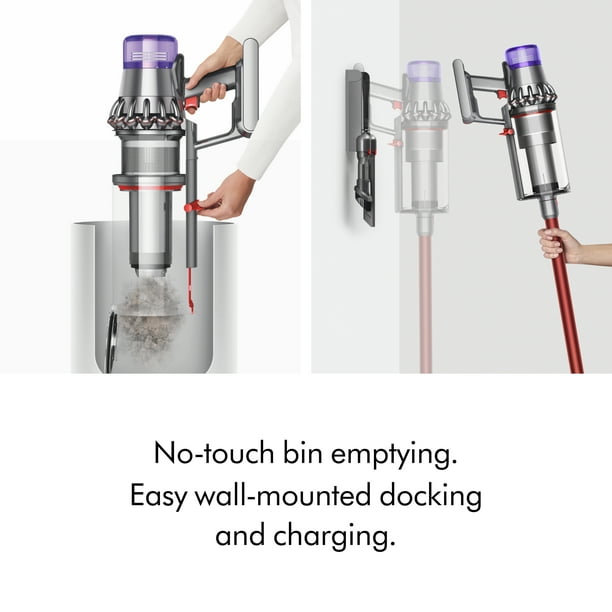
Empty the Dyson Outsize by pressing the bin release, holding it over a trash can, and sliding the dirt out cleanly.
If you want a fast, low-mess way to keep your Dyson Outsize performing like it should, you’re in the right place. I’ve worked through the small habits that make this job easier, cleaner, and less annoying, and I’ll walk you through the full process so you can empty your Dyson Outsize with confidence every time.
What the Dyson Outsize is and why emptying it matters
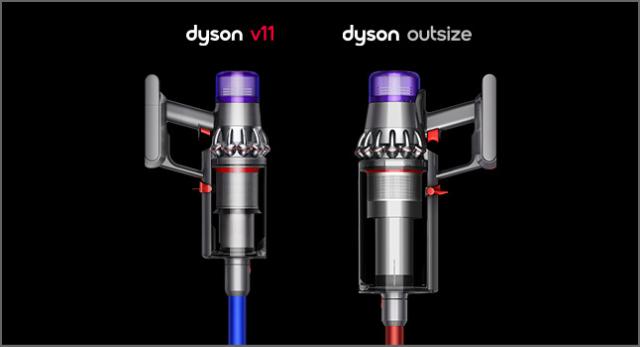
The Dyson Outsize is a large-capacity cordless vacuum built for bigger cleaning jobs. Its extra-wide cleaner head and bigger bin make it popular for homes with lots of carpet, pets, or heavy foot traffic. That larger bin is handy, but it also means you need to empty it the right way to keep suction strong.
When the dust bin gets too full, airflow drops. That can make the vacuum feel weaker and force the motor to work harder. Emptying the Dyson Outsize often helps protect performance, reduce dust buildup, and make each cleaning session feel smoother.
In my own use, I noticed the vacuum always felt “lighter” right after emptying. That is usually the best sign you are not just cleaning the floor, but also giving the machine the space it needs to breathe.

How to empty Dyson Outsize step by step
Emptying the Dyson Outsize is simple once you know the motion. The key is to do it gently and over a trash can so dust stays where it belongs.
Follow these steps:
-
Turn off the vacuum
Make sure the machine is powered down before you open the bin. This keeps the process safe and prevents dust from blowing back toward you. -
Remove the wand if needed
If the vacuum is awkward to hold with the wand attached, detach it first. This can make the bin easier to position over the trash can. -
Hold the bin over the trash can
Point the clear bin straight into the garbage bin. Try to get the opening low enough so dust does not scatter. -
Open the bin release
Pull the red or colored release lever on the Dyson Outsize. This opens the bottom flap and lets debris fall out in one motion. -
Let the dirt slide out fully
Give the bin a gentle tap if stubborn debris stays inside. Do not shake it hard, since that can send fine dust into the air. -
Close the bin door securely
Push the flap back into place until it clicks or sits flush. A loose door can hurt suction and let debris leak out later. -
Check for leftover debris
Look inside the clear bin. If hair or dust is stuck near the cyclone area, remove it carefully with your fingers or a soft brush.
A small tip from experience: emptying the Dyson Outsize before it looks packed to the top makes the whole process cleaner. A half-full bin is easier to clear than an overstuffed one.
Best way to empty Dyson Outsize without making a mess
The Dyson Outsize is designed for fairly clean emptying, but dust can still puff out if you rush. A few simple habits can cut down on mess.
Here is what helps most:
- Empty it outdoors or directly into a deep trash can when possible
- Lower the bin opening close to the trash bag
- Press the release gently instead of snapping it open fast
- Keep your face slightly back from the opening
- Empty after each large cleaning job if you have pet hair, drywall dust, or long debris
Dry dust is the biggest troublemaker. Fine particles can float in the air like smoke, especially if the bin is packed tight. A slow, steady motion gives the debris more time to fall cleanly.
If your home has allergies, this step matters even more. Many vacuum users find that a careful emptying routine helps reduce the cloud of dust that escapes back into the room.
Common mistakes to avoid when emptying Dyson Outsize
Even a simple task can go wrong if you hurry. I’ve seen a few repeat mistakes that make the Dyson Outsize harder to use than it needs to be.
Watch out for these:
- Overfilling the bin until debris packs down tight
- Pulling the release too fast
- Emptying it over a small indoor trash can with poor airflow
- Forgetting to close the bin flap fully
- Reaching inside with sharp tools that can scratch the bin
One mistake I made early on was waiting too long between emptying sessions. The dust got compacted, and I had to tap the bin several times before it cleared. Since then, I empty it more often, and it takes less than a minute.
Another thing to avoid is forcing stuck debris with metal objects. The clear bin and sealing parts can be damaged easily. A soft brush, dry cloth, or even your fingers is usually enough.
How often should you empty Dyson Outsize
The best rule is to empty the Dyson Outsize whenever the dirt reaches the max fill line, or before it gets close. For many homes, that means after each cleaning session or every few rooms.
You may need to empty it more often if you have:
- Pets that shed a lot
- Thick rugs or carpet
- Long hair on floors
- Frequent messes from kids
- Fine dust from remodeling or garage cleanup
If suction seems weaker than usual, check the bin first. A full bin is one of the most common reasons a vacuum feels underpowered, even when nothing is broken. Emptying it early is one of the easiest ways to keep the machine running well.
How to clean the Dyson Outsize bin after emptying
Sometimes emptying is not enough. Dust can cling to the sides of the clear bin, especially if you vacuumed damp debris or fine powder.
To clean it:
- Remove the bin if your model allows it
- Wipe the inside with a dry microfiber cloth
- Use a soft brush to loosen stuck dust
- Wash only if the user guide says the bin can be washed
- Let every part dry fully before reattaching it
Do not reassemble wet parts. Moisture can cause odor, clogging, or damage over time. I always let parts air-dry longer than I think they need, just to be safe.
A clean bin also makes it easier to see when the vacuum needs emptying next time. That little bit of visibility helps a lot in day-to-day use.
Signs your Dyson Outsize needs more than just emptying
Emptying the bin solves many problems, but not all of them. If the vacuum still feels weak after you empty it, there may be another issue.
Look for these signs:
- Suction stays low even with an empty bin
- The filter looks dirty
- The brush bar is tangled with hair
- Airflow sounds blocked or uneven
- The vacuum shuts off unexpectedly
These signs can point to filter buildup, a clog, or a brush bar jam. According to standard cordless vacuum care guidance, regular maintenance matters just as much as emptying the dust bin. In other words, the bin is the starting point, not the whole story.
Practical tips that make emptying easier
A few small habits can turn this job into a quick routine instead of a dusty chore.
Try these tips:
- Empty the bin before it hits the max line
- Hold the vacuum level while carrying it to the trash can
- Give the bin a soft tap if debris clings inside
- Keep a small brush nearby for stuck dust
- Empty the machine in a garage, patio, or laundry room if allergies are an issue
If you have ever emptied a vacuum and ended up wearing half the dust, you know how frustrating that can be. The Dyson Outsize is pretty user-friendly, but it still rewards a calm, steady hand. Think of it like pouring flour from a cup: slow and controlled beats fast and messy every time.
Frequently Asked Questions of How to Empty Dyson Outsize
How do you open the Dyson Outsize bin?
Hold the vacuum over a trash can and pull the bin release lever. The bottom flap opens and lets the debris fall out.
Why is my Dyson Outsize bin not emptying fully?
Stuck hair, compressed dust, or debris caught near the cyclone can keep the bin from clearing completely. Tap the bin gently and remove any stuck material by hand or with a soft brush.
Can I wash the Dyson Outsize dust bin?
Some parts may be washable, but you should always check the model instructions first. If you wash any part, let it dry completely before putting it back on the vacuum.
How often should I empty my Dyson Outsize?
Empty it whenever it reaches the max fill line, or sooner if suction starts to drop. For many homes, that means emptying it after each major cleaning session.
Why does dust come back out when I empty it?
Fine dust can puff back into the air if the bin is opened too quickly or too high above the trash can. Lower the bin closer to the bag and release the flap slowly to reduce the cloud.
Conclusion
Knowing how to empty Dyson Outsize the right way makes a bigger difference than most people expect. A simple, careful emptying routine helps maintain suction, keeps dust under control, and makes the vacuum easier to use over time.
If you remember just one thing, make it this: empty the bin early, do it slowly, and keep the path into the trash can as clean as possible. That small habit can save you from mess, frustration, and weak performance later.
Try the steps above the next time you clean, and see how much smoother the whole process feels. If this guide helped, explore more Dyson maintenance tips or leave a comment with your own emptying routine.

