

The Roomba J9+ is one of iRobot’s most advanced robot vacuums. It offers intelligent navigation, self-emptying, and a powerful cleaning system. However, for many buyers, there is one big question before they invest: How long does the Roomba J9+ battery last? Understanding battery life is key because it affects how much cleaning the robot can do before returning to its base. In this article, you’ll learn how long the battery lasts, what affects it, and how to maximize its performance.
Roomba J9+ Battery Basics
The Roomba J9+ uses a lithium-ion battery, which is common in high-end robot vacuums. These batteries are known for being lightweight, long-lasting, and reliable compared to older types like nickel-metal hydride (NiMH). The J9+ comes with a 2210 mAh battery—this is slightly smaller than some earlier Roomba models, but the robot’s energy-efficient design helps it do more on a single charge.
Typical Battery Run Time
Under normal conditions, the Roomba J9+ can clean for up to 120 minutes (2 hours) before it needs to recharge. This is the maximum run time when used on hard floors in standard cleaning mode. If you use higher suction power or clean thick carpets, the run time will be shorter—sometimes down to 60–80 minutes per charge.
Charging Time
The Roomba J9+ takes about 2 to 3 hours to recharge fully from empty. If the battery is not fully drained, the charging time will be shorter. The robot is smart enough to return to its base, recharge, and resume cleaning where it left off (a feature called Recharge and Resume).
What Affects Roomba J9+ Battery Life?
Battery life is not only about numbers from the manufacturer. Many factors change how long your Roomba J9+ can clean and how long the battery lasts before you need to replace it.
Cleaning Modes And Surfaces
The J9+ lets you choose different cleaning modes. For example, Eco mode uses less suction and saves battery. Max mode boosts suction for carpets but drains the battery faster. Cleaning thick rugs or high-pile carpets uses more power compared to hard floors.
Room Size And Layout
A large, open floor plan lets the Roomba move efficiently and use less energy. Small rooms with lots of furniture or clutter make the robot stop and turn often, using more battery for the same area.
Age Of Battery
All rechargeable batteries lose capacity over time. After about 1–2 years or 300–400 full charge cycles, the battery will not last as long as when new. You may notice the robot finishes less cleaning before it has to recharge.
Maintenance And Care
Simple steps can help keep your Roomba’s battery healthy:
- Clean the brushes and filters regularly to reduce strain on the motor
- Empty the dustbin so suction is not blocked
- Store and charge the robot in a cool, dry place

Roomba J9+ Battery Life In Real Homes
While lab tests are useful, real-world users care about practical results. Here are some examples of how long the Roomba J9+ battery lasts in everyday cleaning.
Example 1: Small Apartment
Sarah uses her Roomba J9+ in a 600 sq ft apartment with mostly hardwood floors. She runs it in standard mode 3 times a week. The battery easily lasts the full cleaning session (about 40 minutes), and she rarely needs to recharge during a job.
Example 2: Large House With Carpets
Mike lives in a 2,000 sq ft home with several carpeted rooms. His J9+ cleans for about 70–80 minutes on a single charge in Max mode before returning to the base to recharge. Thanks to the Recharge and Resume feature, it finishes the entire level in two sessions.
Example 3: Pet Owners
Lisa has two dogs that shed a lot. She uses her Roomba J9+ on high power every day. She notices the battery drains faster—sometimes in under an hour—but the robot still completes the job with one recharge.
Comparing Roomba J9+ Battery To Other Models
It’s useful to see how the J9+ stacks up against other popular Roomba robots. Here’s a comparison:
| Model | Battery Capacity | Max Run Time | Recharge & Resume |
|---|---|---|---|
| Roomba J9+ | 2210 mAh | Up to 120 min | Yes |
| Roomba i7+ | 1800 mAh | Up to 75 min | Yes |
| Roomba S9+ | 3300 mAh | Up to 120 min | Yes |
| Roomba 980 | 3300 mAh | Up to 120 min | Yes |
From this, you see that while the J9+ battery has a smaller capacity than the S9+ or 980, it matches them in run time due to efficient power use.
How Long Does A Roomba J9+ Battery Last Before Replacement?
Another common question is, “How many years before I need a new battery?” With good care, the J9+ battery can last 2–3 years. Some users may see longer life if they clean and maintain their robot well. Others may need a new battery sooner if they use high-power modes daily.
Signs you need a new battery:
- The robot cannot finish cleaning even small areas
- Battery drains much faster than when new
- The robot does not hold a charge
A replacement battery is easy to buy and install. Official iRobot batteries are recommended for safety and best performance.
Tips To Extend Roomba J9+ Battery Life
The way you use and care for your robot can make a big difference. Here are some proven tips:
- Use standard or eco mode for regular cleaning. Save high-power mode for deep cleaning.
- Keep the robot on its charging base when not in use. Modern lithium batteries are safe to leave plugged in.
- Clean the brushes, wheels, and sensors every week. This reduces motor strain.
- Let the robot run until the battery is low before charging fully, but do not let it sit empty for days.
- Store in a cool, dry place. High heat reduces battery life. Avoid leaving it in direct sunlight.
Many users miss that running the robot in high-power mode all the time will shorten battery lifespan. Also, not cleaning hair from the brushes means the motor works harder, using more battery.
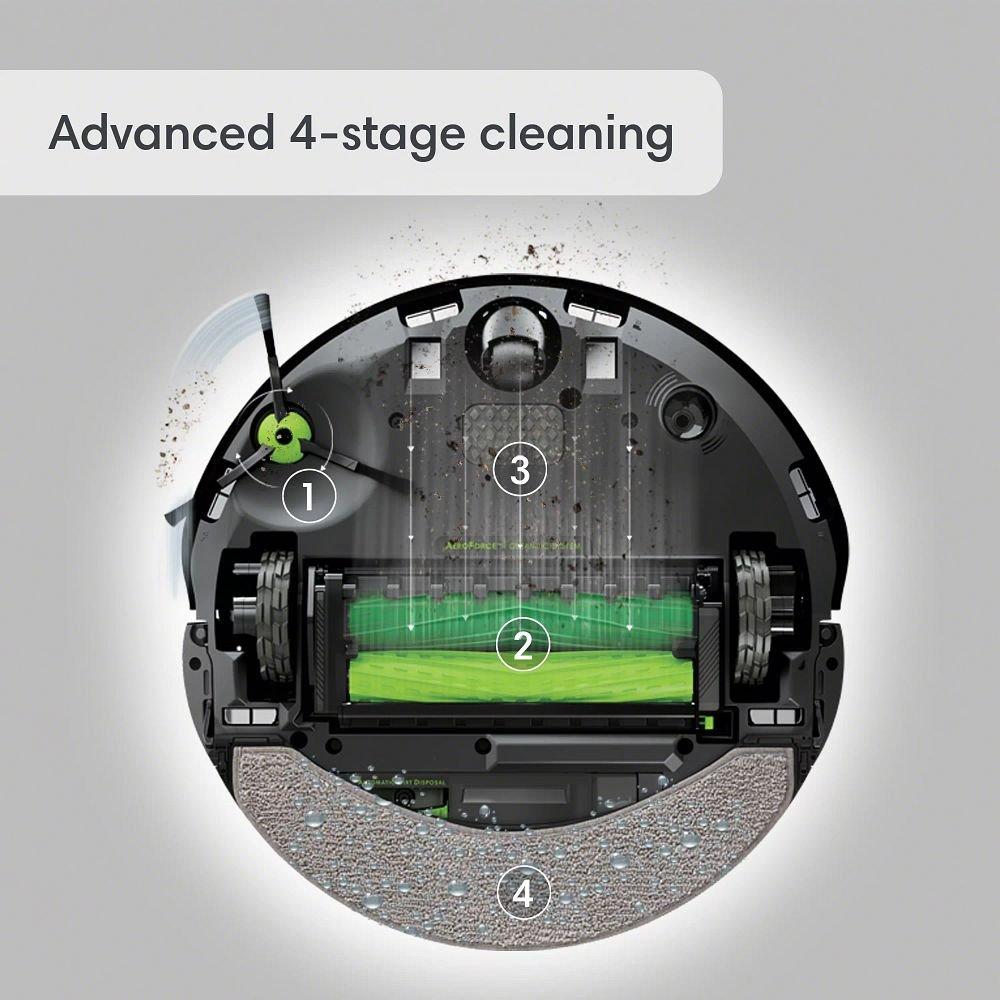
How Roomba J9+ Manages Its Battery
One advanced feature of the Roomba J9+ is its smart battery management. The robot tracks how much charge is left and plans its cleaning path to use energy efficiently. If it senses the battery is getting low, it returns to the dock, recharges, and resumes exactly where it stopped. This means you don’t have to worry about the battery dying in the middle of a job.
Automatic Adjustments
The J9+ uses sensors to adjust suction and cleaning patterns. For example, on hard floors, it lowers suction to save battery. On carpets, it increases power only when needed. This smart use of energy helps the robot clean more area per charge.
Common Battery-related Issues And Fixes
Even the best robots can have battery problems. Here are some issues you might see and how to solve them:
- Robot won’t start or charge: Check if the charging contacts are clean. Wipe them with a dry cloth.
- Short run time: Clean the brushes and wheels. Replace the filter if dirty.
- Battery error messages: Follow the app instructions or restart the robot. If errors keep coming back, the battery may need replacement.
- Robot stops before returning to base: Move the charging dock to an open area. Avoid placing it on thick carpet.
If you try these steps and still have problems, contact iRobot support for help or see the Roomba community on the official website.
Is Roomba J9+ Battery Life Enough For Large Homes?
One worry for buyers is whether the J9+ can clean a big house without running out of battery. For most homes up to 2,000 sq ft, the robot can finish in one or two sessions. Thanks to Recharge and Resume, even if the battery runs low, the robot continues after charging. This means you never have to restart the job yourself.
Here’s a simple look at how the J9+ compares to some competitors:
| Robot Model | Max Area per Charge | Recharge & Resume |
|---|---|---|
| Roomba J9+ | Up to 2,000 sq ft | Yes |
| Roborock S7 | Up to 2,150 sq ft | Yes |
| Ecovacs Deebot X1 | Up to 2,200 sq ft | Yes |
You see that the J9+ holds its own with other top robots in terms of area cleaned per charge.
Environmental Impact Of Roomba J9+ Battery
Lithium-ion batteries are safer and more eco-friendly than older types, but they still need proper disposal. When your Roomba J9+ battery no longer holds a charge, recycle it at an approved location. Do not throw it in the trash. This helps protect the environment and meets local recycling laws.
What Makes Roomba J9+ Battery Stand Out?
Two things make the J9+ battery system unique:
- Efficient Power Use: The robot uses sensors and smart mapping to use energy where it matters most. This means a smaller battery can clean as much as robots with bigger batteries.
- Self-Emptying Dock: Because the J9+ empties itself, it can keep cleaning for days without you touching it. This makes battery run time even more important, as the robot is designed for set-it-and-forget-it cleaning.
When Should You Replace The Roomba J9+ Battery?
Most users replace the battery after 2–3 years or if they see a big drop in cleaning time. Only use official iRobot batteries or trusted third-party brands. Low-quality batteries can damage your robot and may not last as long.
Replacement is simple:
- Turn the robot upside down and remove the battery cover.
- Take out the old battery.
- Insert the new battery, making sure it fits snugly.
- Replace the cover and charge fully before first use.
Never try to repair a battery yourself. Always recycle used batteries responsibly.

Frequently Asked Questions
How Long Does The Roomba J9+ Battery Last On A Single Charge?
The Roomba J9+ can clean for up to 120 minutes on a single charge in standard mode, depending on your floor type and cleaning mode.
How Many Years Will The Roomba J9+ Battery Last Before Needing Replacement?
With normal use and good care, the battery typically lasts 2–3 years before replacement is needed.
Can I Use The Roomba J9+ While It’s Charging?
No, the Roomba J9+ cannot clean while charging. It must be fully charged before starting a new cleaning session.
Is It Safe To Leave The Roomba J9+ On Its Charging Base All The Time?
Yes, modern lithium-ion batteries are designed to stay on the charging base without damage. This keeps the robot ready for use.
Where Can I Get More Information About Roomba J9+ Batteries?
For more details and official guides, visit the iRobot support page.
The Roomba J9+ offers strong battery life for most homes, thanks to smart energy use and advanced features. With good care, you’ll enjoy years of reliable cleaning. If you need even longer run time, eco and standard modes can help stretch battery life.
Always keep your robot clean and follow best practices to get the most from your investment.

