

When you own a Dyson V15 Detect vacuum, keeping it in top shape means more than just using its powerful suction and smart laser features. One of the most important but often overlooked tasks is emptying the bin properly. Doing this right keeps your machine running at full power and helps avoid messes or damage. Many new owners are unsure about the correct steps, safety tips, and how often to empty the vacuum. If that sounds familiar, you’re in the right place. This guide walks you through every detail, with 15 key points, so you can empty your Dyson V15 Detect quickly, cleanly, and with confidence.
Why Properly Emptying Your Dyson V15 Detect Matters
The Dyson V15 Detect is designed to collect even the tiniest dust particles, thanks to its advanced filtration and laser technology. When the bin is full or not emptied correctly, you might notice a drop in suction or even see dust leaking out. Over time, this can cause filters to clog, reduce cleaning efficiency, and even shorten the vacuum’s lifespan. It’s not just about cleanliness—it’s about protecting your investment.
1. Power Off And Unplug The Vacuum
Before you start, always turn off the vacuum. For extra safety, detach it from any charging dock or unplug the charger. This prevents accidental activation. Many people skip this step, but it’s important for your safety and to avoid any electrical issues.
2. Remove The Wand
The wand connects the main body to the cleaning head. Press the red release button where the wand meets the bin. Pull the wand away gently. Removing the wand gives you better control and makes the next steps much easier, especially if you’re standing over a trash can.
3. Locate The Red Bin Release Lever
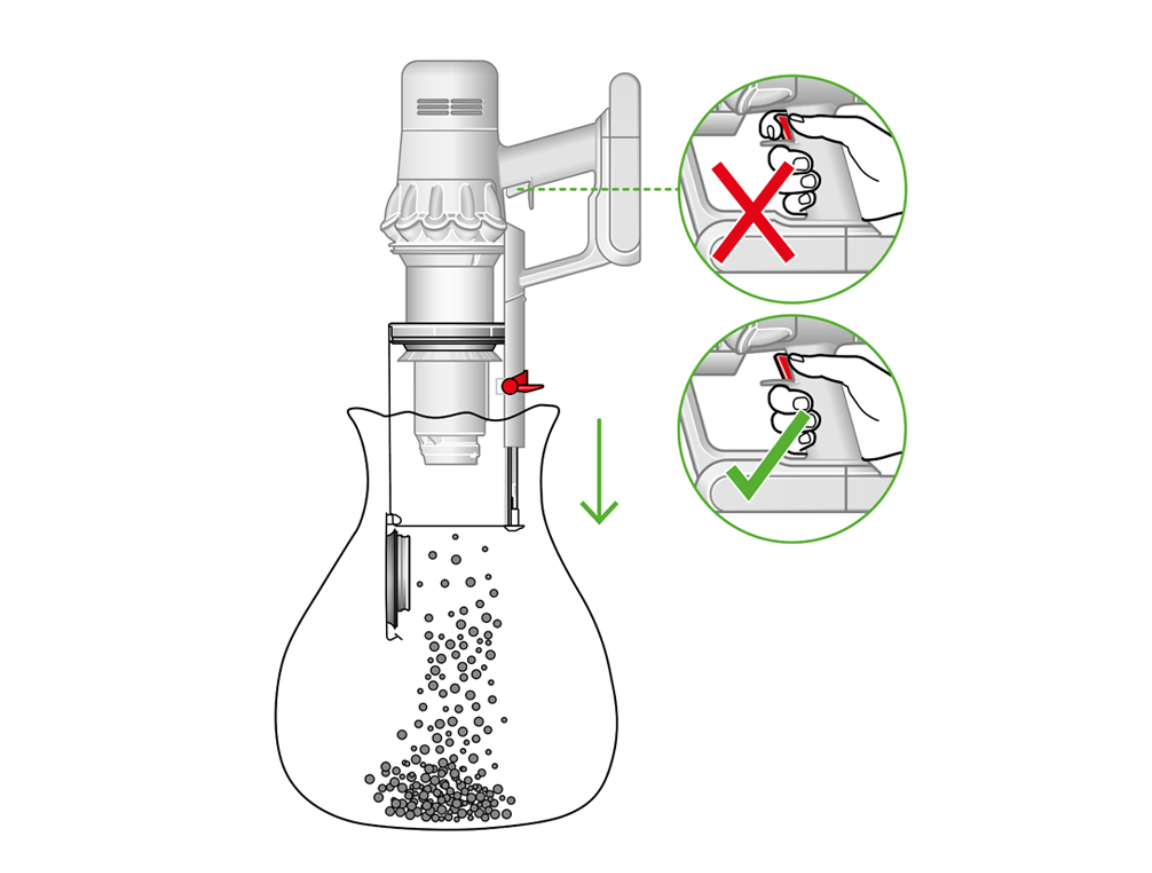
Look for the red lever on the underside of the clear bin. It’s bright and easy to spot. This lever is central to Dyson’s hygienic point-and-shoot emptying system—a feature that keeps your hands away from dust.
4. Hold Over A Trash Can
Before you open the bin, move the vacuum over your trash can. For best results, use a deep or wide trash can. This reduces the chance of dust escaping or bouncing out. Some owners prefer to empty the bin outside, especially if they have allergies.
5. Pull The Bin Release Lever Down Firmly
With one hand holding the vacuum, use your thumb to pull the red lever down. This action slides the bin’s base open and pushes the dirt out in one movement. It’s normal to hear a click. If you have not done this before, the movement may feel stiff the first few times.
6. Wait For All Debris To Fall Out
Pause for a few seconds so all the dust and debris can fall. Sometimes hair or larger particles get stuck near the edge. A gentle shake (while keeping the bin open) helps. Avoid tapping the vacuum too hard, as this could damage the mechanism.
7. Check For Stubborn Debris
Inspect the inside of the bin. Sometimes, pet hair, string, or large dust balls cling to the shroud or bin walls. If you see any, you can use a long brush, a chopstick, or a gloved hand to remove them.
Never use sharp objects as they can scratch the bin.
8. Clean The Bin Seal
The bin seal (rubber ring around the opening) collects fine dust over time. Use a dry cloth or tissue to gently wipe it. Keeping this seal clean ensures the vacuum maintains strong suction and doesn’t leak dust.
9. Close The Bin Securely
Push the bin base upward until it clicks back into place. Check visually to make sure it’s completely closed. If the bin isn’t locked, it may open during use, spilling dust. Many users rush this step and regret it later.
10. Reattach The Wand
Slide the wand back onto the main body until you hear a soft click. This connection must be tight for the vacuum to work correctly. If you notice the wand is loose or doesn’t connect, double-check for any dirt around the connectors.
11. Wash Your Hands After Emptying
Even with Dyson’s hygienic system, fine dust can escape. Always wash your hands after emptying the bin. If you have allergies, consider wearing a mask during the process. This small step protects your health, especially after cleaning dusty areas.
12. How Often Should You Empty The Bin?
Dyson recommends emptying the bin after every cleaning session. However, if you have pets or a large home, you may need to empty it mid-way. The V15 Detect’s transparent bin makes it easy to see when it’s time. Never let the debris reach the MAX line, as this reduces suction and can clog the filters.
13. Cleaning The Bin (monthly Or As Needed)
About once a month, or if you notice buildup, remove the bin completely for a deeper clean. Press the bin release button and gently slide the bin off the vacuum. Wash it with cold water only—never detergents or hot water, as these can damage the bin.
Let it dry completely before reattaching.
14. Replacing The Bin (if Damaged)
If you see cracks, a broken latch, or a failing seal, it’s time to replace the bin. Using a damaged bin can lead to leaks and reduced performance. Replacement bins are available on Dyson’s official website and from certified retailers.
15. Common Mistakes To Avoid
Many Dyson owners make simple mistakes that can shorten their vacuum’s life or reduce cleaning power. Here are a few:
- Waiting too long to empty the bin, causing blockages.
- Forcing the release lever or bin, which can break parts.
- Using water or cleaning products inside the vacuum motor.
- Ignoring stuck debris or not closing the bin fully.
Understanding these mistakes helps you avoid them and keep your Dyson V15 Detect in top shape.
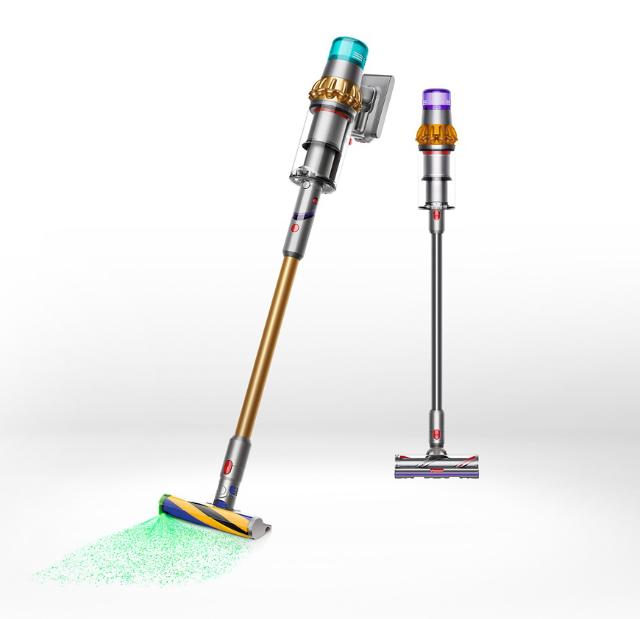
Side-by-side Comparison: Emptying Dyson V15 Vs. Other Dyson Models
To help you see why the V15 Detect’s system is unique, here’s a comparison with other Dyson models.
| Feature | Dyson V15 Detect | Dyson V11 | Dyson V8 |
|---|---|---|---|
| Bin Release | Point-and-shoot, red lever | Point-and-shoot, red lever | Pull tab, less hygienic |
| Bin Size | 0.77 liters | 0.76 liters | 0.54 liters |
| Cleaning Frequency | Every use | Every use | Every use, fills faster |
| Ease of Cleaning | Easy to detach and wash | Easy to detach and wash | More parts, less smooth |
This shows the V15 Detect offers a larger, easier-to-clean bin system, making your cleaning routine smoother.
Signs You Need To Empty The Bin Immediately
Knowing when to empty your vacuum can prevent problems. Here are clear signs:
- Loss of suction – If you notice the vacuum isn’t picking up as well, check the bin.
- Visible debris at the MAX line – Never allow debris to touch or pass this line.
- Dust escaping from the bin – If you see dust clouds, empty and check the seal.
- Motor sounds strained – A full bin makes the motor work harder.
Don’t ignore these signs; acting quickly keeps your Dyson V15 Detect working perfectly.
Special Tips For Allergy Sufferers
If you have allergies or asthma, emptying the vacuum can be stressful. Here are extra tips:
- Wear a mask to prevent inhaling dust.
- Empty the bin outdoors whenever possible.
- Use a trash bag with a tight seal to trap dust.
- Clean the bin more often, even if it’s not full.
For more on allergies and vacuum maintenance, visit the Asthma and Allergy Foundation of America.
Quick Reference: Steps To Empty Your Dyson V15 Detect
Here’s a summary for busy users.
| Step | Action |
|---|---|
| 1 | Turn off and unplug vacuum |
| 2 | Remove the wand |
| 3 | Locate the red bin release lever |
| 4 | Hold over trash can |
| 5 | Pull lever down firmly |
| 6 | Wait for debris to fall |
| 7 | Check for stuck debris |
| 8 | Wipe bin seal if needed |
| 9 | Close bin securely |
| 10 | Reattach wand |
| 11 | Wash hands |
Keep this table handy for quick reminders.
Cleaning Frequency And Maintenance Schedule
Regular care keeps your Dyson V15 Detect performing at its best. Here’s a simple guide:
| Task | How Often |
|---|---|
| Empty bin | After every use |
| Wipe bin seal | Monthly |
| Wash bin | Monthly or as needed |
| Check for damage | Quarterly |
Following this schedule prevents most common problems.
Frequently Asked Questions
How Do I Know If My Dyson V15 Detect Bin Is Full?
Look for debris reaching the MAX line on the clear bin. If you notice a loss of suction or dust escaping, these are also signs the bin needs emptying.
Can I Wash The Dyson V15 Detect Bin With Soap?
No. Only use cold water to wash the bin. Avoid soaps, detergents, or hot water, as they can damage the plastic and seals.
What Should I Do If Debris Is Stuck And Won’t Fall Out?
If debris is stuck, use a soft brush or a stick (not sharp) to gently loosen it. Never force the debris or use sharp tools, as this can scratch or damage the bin.
Is It Safe To Empty The Dyson V15 Detect Indoors?
Yes, but for people with allergies, it’s better to empty outdoors or in a well-ventilated area. Always empty directly into a trash can to avoid spreading dust.
When Should I Replace The Bin On My Dyson V15 Detect?
Replace the bin if you see cracks, a broken latch, or a loose seal. Continuing to use a damaged bin can lead to leaks and reduce cleaning performance.
Properly emptying your Dyson V15 Detect might feel like a small task, but it has a big impact on your vacuum’s performance and your home’s cleanliness. With these 15 detailed steps, you’ll avoid common mistakes and keep your machine running like new.
Regular care is simple, and with the right habits, your Dyson will serve you well for years.


