

How do you empty a robot vacuum? It depends entirely on which type you own. Some models have a small onboard dustbin you tap into the trash, while others roll into a self-emptying base station.
Both are simple once you know the routine.
There's no mess involved when you follow the right steps. As of 2026, manufacturer specifications show that most manual dustbins hold between 300 ml and 600 ml of dirt. Self-emptying dock bases store 1.5 L to 3 L, either in a disposable bag or a bagless compartment.
This guide walks you through both systems so you can empty your robot vacuum correctly.
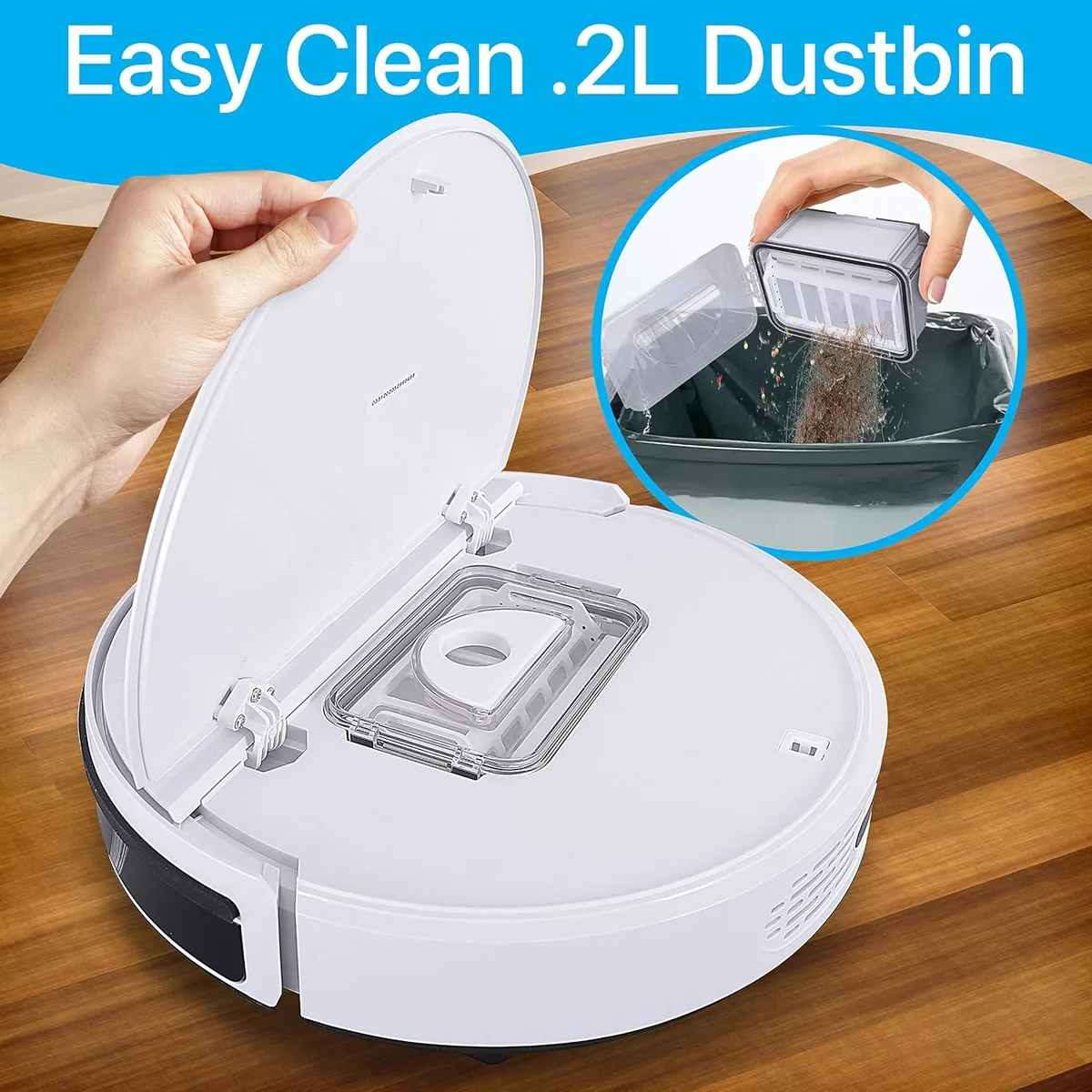
Image source: Web (Bing) / manuals.plus (Web image (fair-use with source credit))
Quick Answer: How to Empty a Robot Vacuum Without the Mess
Press the dustbin release latch and slide the bin out. Open the lid over a trash can and tap the debris out. For self-emptying docks, swap the bag or empty the base bin.
Filters need rinsing every few weeks.
First, Which Type Do You Own? (Manual Bin vs. Self-Emptying Dock)
Before you touch anything, figure out which system your robot uses. This single detail changes the entire emptying process.
If Your Robot Has a Manual Dustbin (Press the Latch, Tap, Replace)
Manual robots carry a small bin onboard, usually 300 to 600 ml. You remove it, dump it, and slide it back in. Budget and mid-range models from brands like Eufy, Roborock, and Roomba use this design.
Expect to empty every 2 to 4 days in an average home, more often with pets.
If this sounds like your setup, jump to the manual dustbin steps below.
If Your Robot Has a Self-Emptying Dock (Bagged or Bagless Base Station)
Self-emptying models charge on a base station that's clearly taller than the robot. When the robot returns, the dock pulls debris through a chute and into a larger compartment. That compartment holds 1.5 L to 3 L, so you can often ignore it for a month or more.
Two types exist: bagged and bagless. Bagged docks use a disposable dust bag. Bagless docks have a hard collection bin you empty over the trash.
Both are covered step by step below.
If you're unsure which you have, open the dock's top cover. See a paper bag? You have a bagged system.
See a plastic bin? It's bagless.
Step-by-Step: Emptying a Manual Dustbin the Right Way
This takes about 30 seconds once you know the flow. Here's the exact process, in order.
- Press the release latch on the dustbin. It's usually a grey or black button on the rear or top of the bin. Slide the bin straight out.
- Open the lid over a trash can. Hold the bin upside down and tap it twice. Most debris falls right out.
- Pull stuck hair and fluff loose with the robot's cleaning brush tool or a chopstick. Don't use wet hands, since moisture makes dirt stick to everything.
- Check the filter. Tap it against the trash can to knock out fine dust. If the manual says it's washable, rinse it under lukewarm water.
- Rinse the dustbin itself if the manufacturer permits it. Most are plastic and water-safe. Let it air-dry completely before reinstalling.
- Slide the bin back in until it clicks. You should feel the latch engage.
| Step | What you're doing | Time needed |
|---|---|---|
| 1 | Release and slide out bin | 5 seconds |
| 2 | Open lid over trash, tap out debris | 5 seconds |
| 3 | Clear hair from brush roll and bin | 30 to 60 seconds |
| 4 | Tap or rinse the filter | 30 seconds |
| 5 | Dry the filter and bin | Up to 24 hours |
| 6 | Reinsert until it clicks | 5 seconds |
Watch the dustbin window too. Most manual bins have a clear plastic strip. When debris sits near the top, suction drops noticeably.
If the app still says "dustbin full" after reinserting, the sensor lens is dirty. Wipe it with a dry cotton swab and restart the robot.
One thing people routinely skip is cleaning the filter when they empty the bin. That's a mistake. A clogged filter chokes airflow, and the robot starts leaving lines on carpets or missing dust on hard floors.
If you're used to replacing vacuum filters on an upright model, the same logic applies here, robot filters catch the same fine dust.
The drying time for a washed filter is usually 24 hours. Fit the filter only when it's bone dry. A damp filter leads to mold and a musty smell.
Your robot will smell like a wet dog if you skip this step.
How often you empty also depends on your floors. Hard surfaces like LVP flooring create less fibre, so the bin fills slower than it does on carpet. Homes with rugs and pets will hit the full line much faster.
Step-by-Step: Emptying a Bagged Self-Emptying Dock
Bagged docks are the lowest-maintenance option. There's no bin to rinse, just a paper bag to swap. Most bagged stations hold about 2.5 to 3 L of debris, which translates to 30 to 60 days of cleaning in a typical home.
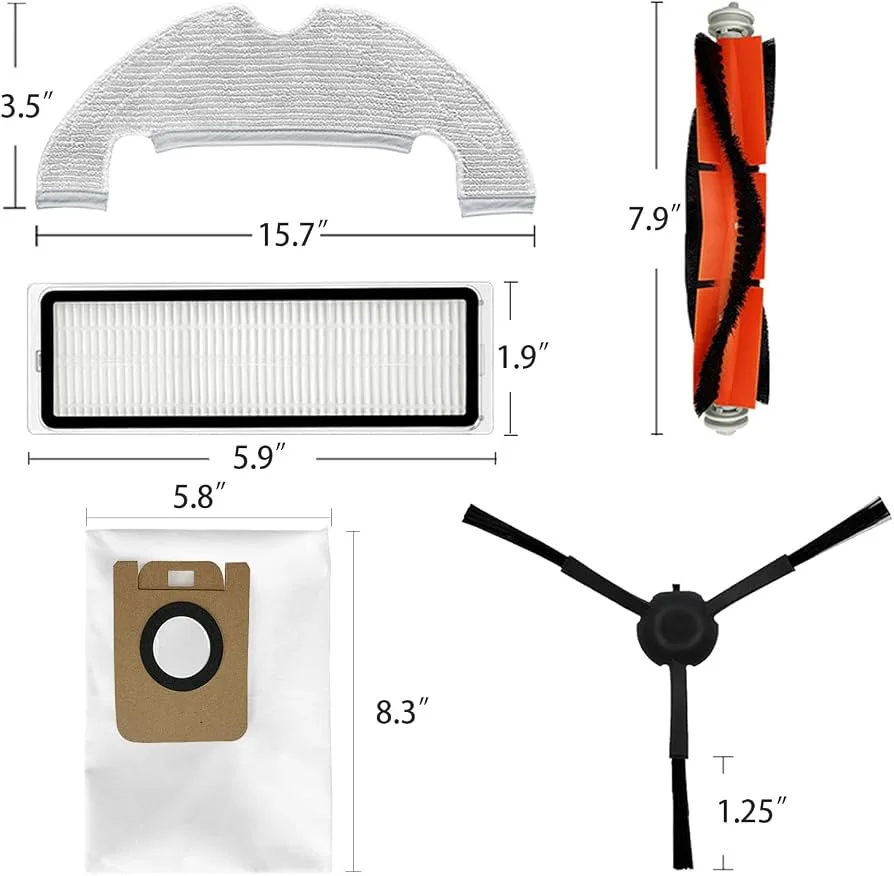
Image source: Web (Bing) / biltonpark.co.uk (Web image (fair-use with source credit))
- Check the indicator. The dock has a small light or the app shows a "dust bag full" alert. Don't wait until the robot stops mid-clean.
- Open the dock's top cover. Pull the dust bag straight up. A cardboard tab seals the bag as you lift, so there's no dust cloud.
- Drop the sealed bag in the trash. No need to rinse or wipe anything.
- Insert a new bag. Slide it in until the cardboard collar clicks into place. Close the cover.
- Reset the alert in the app. Most apps have a "reset bag" button. Do it before the next cleaning run.
That's the entire job. For most homes, this happens every 4 to 8 weeks. Pet owners should check the bag at 3 weeks, since hair compacts faster than dirt.
A few notes: buy bags from the same brand as your robot. Third-party bags sometimes fit poorly and let dust escape. Your manufacturer's official support pages list the correct part number.
Also, if the dock keeps showing "full" with a new bag, the suction chute is clogged. Clear it with a long brush before inserting another bag.
Step-by-Step: Emptying a Bagless Self-Emptying Station
Bagless docks, common on newer Ecovacs and Dreame models, collect debris in a hard plastic bin inside the base. Emptying it is closer to a traditional vacuum.
- Open the dock lid to expose the collection bin.
- Pull the bin straight up and carry it to the trash can. Hold it level so debris doesn't spill out the sides.
- Open the bin's top flap and dump the contents. Tap the bin twice to release fine dust.
- Wipe the bin interior with a dry paper towel. If you vacuumed up wet debris, rinse it with water and dry it fully.
- Clean the dock's inlet filter while the bin is out. A quick tap against the trash can clears most of it. Some models have a small washable foam filter, rinse it if the manual says so.
- Reinstall the bin and close the lid. The dock should sync with the app automatically.
The bagless approach saves money over time because there are no bags to buy. The trade-off is that you touch dust more often. For allergy sufferers, wearing a mask during this step cuts down on inhaling fine particles.
That's also where filtration quality comes into play. Fine dust recirculates indoors, and the EPA's guidance on indoor air quality highlights how particulates stay suspended in the air we breathe. Good filtration matters far more than people think, especially in robotic vacuums that run on a schedule and trap dust inside the bin.
For allergy-prone households, a sealed HEPA system makes a real difference. HEPA-equipped vacuums prevent fine dust from escaping back into the air, unlike a bagless bin that puffs out a little cloud every time you tap it.
Along with emptying the bin, keep the robot's sensors and charging contacts clean. Routine servicing keeps any vacuum running at full suction, and robots are no exception.
The Filter Is Part of the Emptying Flow: Don't Skip It
Image source: Bing (Web (fair-use with source credit))
Filtration is the step most owners rush past. It's also the one that determines whether your robot keeps picking up dirt or just pushes it around. An empty bin with a clogged filter performs worse than a full bin with a clean one.
Robot vacuums use two main filter types. The first is a foam or mesh pre-filter that catches hair and lint. The second is a HEPA filter that traps fine dust, pollen, and allergens.
Some models combine both into a single washable unit.
Here's the rule of thumb: tap the filter every time you empty the bin. If the manufacturer says it's washable, rinse it under lukewarm water every 2 to 4 weeks. A damp filter is a mold magnet, so dry it for a full 24 hours before reinstalling.
Washing vacuum filters correctly depends on following the same manufacturer guidance that applies to upright models.
If your filter is disposable, don't rinse it. Water destroys the paper media inside HEPA filters. Replace it per the manual, usually every 3 to 6 months.
A fresh filter restores suction instantly.
For allergy-prone households, the filter matters even more. Fine particles can pass straight through a damaged filter and recirculate in the air. Check the filter for tears or warping while you're tapping it.
If the frame is bent or the media is ripped, swap it out rather than trying to clean it.
When "Dustbin Full" Still Appears: How to Fix Sensor and Clog Issues
A persistent "dustbin full" alert with an empty bin means one of three things: a dirty sensor, a blocked chute, or a stuck brush roll. Diagnose it in that order.
- Wipe the sensor lens. The sensor sits inside the dustbin opening or under the clear bin window. Dust builds up on it just like it does on furniture. Use a dry cotton swab to clean it gently. Never use water or compressed air, moisture can damage the infrared emitter.
- Check the dock's transfer chute. For self-emptying models, debris can pack into the passage between the robot and the base station. A long brush or a straightened wire hanger clears it. If the chute is blocked, the dock reports the bin is full even when it isn't.
- Inspect the brush roll. Hair wrapped around the main brush restricts airflow. The robot reads that as a full bin because suction drops. Untangle the brush roll and remove any hair from the end caps. Removing hair from a vacuum brush follows the same principle on robot models.
- Reset the alert in the app. Some robots need a manual reset after a sensor cleaning. Open the app, find the dustbin or maintenance status, and tap reset.
If the alert persists after all four steps, the sensor itself may have failed. Contact the manufacturer. Most robot vacuums have a 1 to 2 year warranty that covers sensor defects.
One more culprit: compressed debris. A full bin of pet hair compacts into a dense mat that blocks the sensor's view. Tap the bin firmly on the trash can to loosen the mat, then check the windows on the bin.
If they're clouded with dust, wipe both sides clean.
How Often Should You Empty? Capacity, Pets, and Real-World Timelines
There's no universal answer, but here's what the numbers suggest. Manual dustbins fill fast. A 300 ml bin in a home with a shedding dog will fill every day.
A 600 ml bin in a tidy apartment might last a week.
| Situation | Manual bin (300 to 600 ml) | Bagged dock (2.5 to 3 L) | Bagless dock (1.5 to 2.5 L) |
|---|---|---|---|
| Average home, no pets | Every 2 to 4 days | Every 4 to 6 weeks | Every 3 to 5 weeks |
| Home with one dog or cat | Every 1 to 2 days | Every 2 to 4 weeks | Every 2 to 3 weeks |
| Home with multiple pets | Daily | Every 1 to 2 weeks | Every 1 to 2 weeks |
| Large home (over 2,000 sq ft) | Daily | Every 2 to 3 weeks | Every 2 to 3 weeks |
Run time also affects bin fill rate. A robot cleaning a 1,500 square foot home picks up far more debris than one cleaning a single bedroom. If you run daily scheduled cleans, you'll hit the full line sooner.
Pet owners should plan their maintenance around the seasons too. Shedding peaks in spring and autumn. During those months, empty manual bins daily and check dock bags at half the normal interval.
A useful habit is checking the app after a cleaning run. Most robot apps show the bin status in real time. When it says "dustbin full, cleaning stopped," your bin needs emptying before the next scheduled run.
Here's a practical tip: if your robot keeps stopping mid-clean because the bin is full, you have two options. Empty the bin more often, or upgrade to a model with a self-emptying dock. The extra cost is worth it for large homes and pet owners who want truly hands-off cleaning.
Manual Bin vs. Auto-Empty Dock: Pros and Cons at a Glance
Both systems work. They just trade off convenience against cost and maintenance.
| Feature | Manual bin | Auto-empty dock |
|---|---|---|
| Price | Included with budget and mid-range robots | Adds $100 to $300 to the robot cost |
| Hands-on time | 30 seconds every few days | 30 seconds every few weeks |
| Replacement costs | Occasional new filters | Dust bags (if bagged system) |
| Mess level | Moderate, dust can puff during dumping | Minimal, sealed bags capture dust |
| Failure points | Clogged filters, sticky latches | Clogged chutes, full bags |
Manual bins are simpler. There's less to break, and the robot itself is lighter and easier to carry between floors. If you don't mind basic maintenance, a manual bin is honestly fine.
Aggregate review data suggests most owners don't mind the quick daily dump at all.
Auto-empty docks shine in pet homes and large spaces. The convenience of ignoring dirt for a month is huge. Some systems hold up to 60 days of debris.
That's a removal of chores from your mental load.
The trade-offs matter though. Bagged docks require buying proprietary bags, which run $3 to $8 each depending on the brand. Bagless docks avoid that cost but still need manual dumping of the base bin, so they're not truly hands-off.
If you're trying to decide, think about your tolerance for daily chores. A traditional upright vacuum already needs emptying, so a manual robot bin adds just one more step. An auto-empty dock removes that step entirely and makes the robot feel genuinely autonomous.
Best Emptying Workflow for Your Home Size and Pet Situation
Here's how to build a routine that fits your life, based on the system you own.
For manual bin owners: Empty the bin in the morning after the first scheduled clean. Pair it with a quick filter tap. This takes 60 seconds and keeps the robot ready for the next run.
Set a recurring reminder on your phone for filter rinsing every 3 weeks.
For bagged dock owners: Check the app's bag status each Sunday. Swap the bag when it hits 80 percent full, not when it's completely stuffed. Buy replacement bags in packs of three so you never run out mid-week.
For bagless dock owners: Empty the base bin every two weeks as a rule of thumb. If you have pets, do it weekly. Wipe the bin interior each time to prevent fine dust from crusting onto the plastic.
For allergy sufferers: Wear a mask while emptying any bin, manual or dock. Tap the bin gently to avoid creating a dust cloud. Consider a model with sealed HEPA filtration for maximum protection.
For multi-level homes: Keep the charging dock on the floor where you clean most often. Carrying the robot upstairs to empty it defeats the purpose. If your manual bin robot runs on two floors, get a second dock or a smaller robot for the upstairs level.
For pet owners: Brush your pet's hair out of the robot's brush roll every 3 to 4 days. This prevents the hair from compacting into the bin and triggering false "full" alerts. Preventing carpet lines from a dirty brush roll also saves you from re-cleaning the same spots.
Your workflow should match the robot's workload, not the calendar. A robot that runs daily and picks up pet hair needs attention more often than one that cleans twice a week. Watch the app's status indicators and empty before the robot tells you to.
That single habit prevents most common robot vacuum headaches.
Emptying Mishaps to Avoid (Moldy Filters, Torn Bags, Dust Clouds)
Never rinse a HEPA filter unless the manual says it's washable. Water destroys the pleated media and breeds mold. Overstuffing a bagged dock tears the bag and sprays dust everywhere.
Reinstalling a damp bin invites mildew and stale odors. Keep the bin seal clean to prevent leaks.
Pro Maintenance Tips: Keeping the Bin, Filter, and Dock Clean Longer
Wipe the bin seal after every empty to keep an airtight fit. Tap the filter each time you dump dirt to extend its life. Clean the dock's suction chute monthly with a long brush.
Stock spare dust bags so you never run out at the wrong time.
Frequently Asked Questions About Robot Vacuum Emptying
Can I wash my robot vacuum's dustbin?
Yes, if the manual says the bin is water-safe. Rinse with lukewarm water, dry it fully, then reinsert. Never submerge the bin while the filter is inside.
How do I know when to empty?
Check the app's bin status or look at the clear window on the dustbin. Empty when it hits 80 percent full. Sensors trigger earlier than expected on thick carpet or pet hair.
What if the robot says "dustbin full" after emptying?
Clean the sensor lens and dock chute first. Then restart the robot to reset the alert. If it still appears, check the brush roll for hair tangles.
How often should I replace the filter?
Disposable HEPA filters last 3 to 6 months. Washable filters should be replaced every 6 to 12 months, or sooner if the media tears. Always follow the model-specific manual.
Final Decision Guide: Which Emptying Method Should You Stick With?
Manual bins fit tight budgets and small homes. Auto-empty docks fit busy households and large spaces. Pet owners should go auto-empty with a bagged dock.
Allergy sufferers should choose sealed bag systems.
If you're still torn, think about your weekly time. Manual bins cost about 5 minutes of your week. Auto-empty docks cost about 5 minutes per month.
The right choice comes down to what you're willing to trade. Match the method to your schedule and cleaning habits.

