

Imagine coming home and seeing clean floors without lifting a finger. Robot vacuums have made this reality for millions. But how do these clever machines know where to clean? It’s not magic—robot vacuums use different technologies to map your home. This mapping is the secret behind their smart cleaning and efficient navigation. If you want to know how robot vacuums map spaces, avoid obstacles, and remember rooms, you’re in the right place. Let’s dive into the world of robot vacuum mapping and see what really happens inside these smart helpers.
Why Mapping Matters In Robot Vacuums
A robot vacuum’s map is more than a picture—it’s a guide for cleaning. Mapping helps the robot:
- Avoid missing spots
- Clean faster and more efficiently
- Prevent bumping into furniture
- Return to its charging dock
Early robot vacuums used simple bump sensors. They moved randomly, often missing areas or wasting time. Now, with mapping, cleaning is smarter and more reliable. Mapping is especially important in larger homes, where a vacuum must remember multiple rooms and different floor types.
Main Mapping Technologies In Robot Vacuums
Robot vacuums use several mapping methods. Each has strengths and weaknesses. Here’s a breakdown of the main mapping technologies:
1. Infrared And Optical Sensors
Some robot vacuums use infrared sensors and camera-based navigation. Infrared sensors help detect walls, furniture, and drop-offs. Cameras capture images of the ceiling or walls to create a visual map.
- Infrared sensors: Emit light and detect how it bounces back.
- Cameras: Take photos to understand the robot’s location.
These sensors are simple but effective for basic navigation. However, camera-based mapping can struggle in dark rooms or low-light conditions.
2. Lidar (light Detection And Ranging)
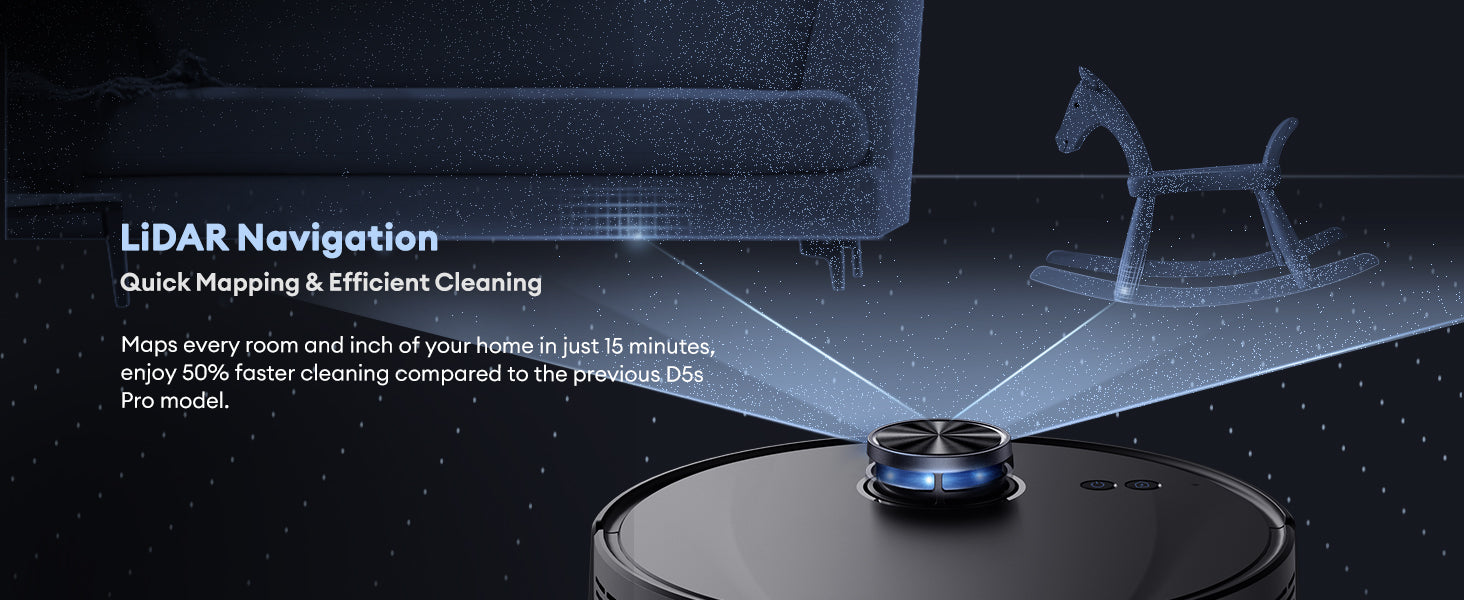
LIDAR is a laser-based technology. The vacuum emits laser beams and measures how long they take to bounce back. This creates a detailed map of your home.
- LIDAR mapping is accurate and works in darkness.
- It creates 360-degree scans for real-time navigation.
LIDAR is popular in high-end robot vacuums, offering fast and reliable mapping even in cluttered rooms.
3. Slam (simultaneous Localization And Mapping)
SLAM combines sensors, cameras, and algorithms. The robot builds a map while figuring out its position in real-time.
- SLAM uses data fusion: Combines information from different sensors.
- It adapts to changes—like moved furniture or new objects.
SLAM is powerful and flexible, used in robots that need to handle complex spaces.
4. Gyroscope And Accelerometer
Some vacuums use a gyroscope and accelerometer to track movement. These sensors help the robot understand direction and speed.
- Gyroscope: Measures rotation.
- Accelerometer: Measures movement.
These sensors are often paired with other mapping methods for extra accuracy.
5. Ultrasonic Sensors
Ultrasonic sensors emit sound waves and measure how they bounce back. This helps detect obstacles and measure distances.
- Works well for detecting soft objects (like curtains).
- Not as detailed as LIDAR or camera mapping.
Ultrasonic sensors are usually found in budget models, helping avoid basic obstacles.
How Robot Vacuums Build And Use Maps
Mapping isn’t just about sensors—it’s about how the robot uses the data. Here’s what happens step by step:
- Initial Exploration: The robot starts by moving through your home. It scans rooms, detects walls, furniture, and obstacles.
- Data Collection: Sensors gather information—distances, shapes, and locations.
- Map Creation: The robot’s software processes the data and builds a map. This map shows rooms, pathways, and no-go zones.
- Navigation: The robot uses the map to plan efficient cleaning routes. It knows where to go and avoids areas already cleaned.
- Memory and Updates: Many robot vacuums remember maps and update them if your home changes—like moving a chair or adding a rug.
Example: If you close a door, the robot updates its map and skips that room until you open it again.
Comparing Mapping Technologies
Different mapping methods suit different needs. Here’s a quick comparison:
| Technology | Accuracy | Speed | Works in Dark? | Cost |
|---|---|---|---|---|
| LIDAR | High | Fast | Yes | Higher |
| Camera-based | Medium | Medium | No | Medium |
| Infrared | Low | Slow | Yes | Low |
| SLAM | Very High | Fast | Yes | Higher |
| Ultrasonic | Low | Medium | Yes | Low |
The Role Of Artificial Intelligence (ai) In Mapping
Modern robot vacuums use AI to make mapping smarter. AI helps the robot:
- Recognize common obstacles (like shoes or toys)
- Adapt to changes (like moved furniture)
- Optimize cleaning paths
Some robots can even identify floor types (carpet, tile, wood) and adjust suction power. AI-based mapping is becoming more common, making robot vacuums smarter each year.
Map Storage And Privacy
Robot vacuums store maps in different ways:
- Local storage: The map is kept inside the robot.
- Cloud storage: The map is uploaded to a server.
Cloud storage lets you see your home’s map on your phone and set cleaning schedules. But it also raises privacy questions. Some people worry about home maps being stored online. If privacy is important, look for robots with local-only storage.

Real-life Examples Of Robot Vacuum Mapping
To see mapping in action, let’s look at popular robot vacuums:
- Roomba i7+ uses camera-based mapping and SLAM. It creates detailed maps and lets you choose which rooms to clean.
- Roborock S7 uses LIDAR and AI. It builds accurate maps and recognizes carpets automatically.
- Eufy RoboVac 11S uses basic infrared sensors. It cleans randomly, missing some spots and repeating others.
Here’s a side-by-side comparison:
| Model | Mapping Technology | Map Detail | Custom Cleaning? | Price Range |
|---|---|---|---|---|
| Roomba i7+ | Camera + SLAM | High | Yes | $600-$900 |
| Roborock S7 | LIDAR + AI | Very High | Yes | $500-$700 |
| Eufy RoboVac 11S | Infrared | Low | No | $150-$250 |
Non-obvious insight: Many buyers assume all robot vacuums map the same way. But the mapping quality affects cleaning results, speed, and the ability to avoid obstacles. Models with LIDAR or SLAM are much better at cleaning larger or more complex homes.
Common Mapping Challenges
Robot vacuums can face mapping problems. Here are some typical issues:
- Reflective floors: Mirrors or shiny surfaces confuse lasers and cameras.
- Low-light rooms: Camera-based robots struggle in dark areas.
- Moving objects: Pets, people, or moved furniture require the robot to update its map.
- Multi-story homes: Most robots can only map one floor at a time; switching floors needs remapping.
Tip: If your robot vacuum gets stuck or cleans poorly, check for obstacles, close doors, or try updating the map.

How Robot Vacuums Handle Obstacles
Robot vacuums must deal with unexpected objects—like socks, cables, or pet bowls. Here’s how mapping helps:
- Obstacle detection: Sensors spot objects and update the map.
- Avoidance: The robot changes its cleaning path to go around obstacles.
- Memory: If an obstacle is moved, the robot will check again next time.
Some advanced models use object recognition. They can identify items and suggest avoiding certain areas. This prevents problems like getting stuck or damaging delicate objects.
User Control And Customization
With smart mapping, users can control cleaning in new ways:
- No-go zones: Mark areas the robot should avoid (like playrooms or pet beds).
- Room selection: Choose which rooms to clean and when.
- Scheduling: Set times for cleaning specific areas.
Smartphone apps let users see the map, control cleaning, and get updates. This makes robot vacuums flexible and easy to use.
The Future Of Robot Vacuum Mapping
Mapping is improving fast. In the next few years, expect:
- Better AI: Robots will recognize more objects and learn from mistakes.
- Multi-floor mapping: Vacuums will remember maps for different floors.
- Shared maps: Multiple robots will share one map for faster cleaning.
- Integration with smart homes: Robots will work with other devices, like smart lights or security systems.
Non-obvious insight: As mapping gets better, robot vacuums will do more than just clean. They could help with security, monitor pets, or support elderly care.
Frequently Asked Questions
How Accurate Are Robot Vacuum Maps?
Most high-end robot vacuums are very accurate. LIDAR and SLAM models can map rooms within a few centimeters. However, basic models using infrared sensors are much less accurate and can miss spots.
Can Robot Vacuums Map Multiple Floors?
Some advanced models allow multi-floor mapping. They store separate maps for each floor. However, most vacuums need to remap when moved to a new floor. Check the product features before buying if you have a multi-story home.
Do Robot Vacuums Remember Changes In My Home?
Yes, most robots update their maps if you move furniture or add new objects. AI-based mapping adapts quickly. But some basic models may not update maps and can get confused by big changes.
Is My Home’s Map Stored Online?
It depends on the model. Some vacuums use cloud storage so you can access maps on your phone. Others keep maps locally. If privacy matters, choose a robot that stores maps only on the device.
What Happens If My Robot Vacuum Gets Stuck?
If the vacuum gets stuck, it will try to update its map and find a new path. Most modern robots send alerts to your phone. You can remove the obstacle or mark the area as a no-go zone in the app.
Robot vacuums are getting smarter every year. Their mapping technology shapes how well they clean, avoid obstacles, and fit your home’s needs. If you want the best results, look for models with advanced mapping features like LIDAR or SLAM. For more details on robot vacuum mapping, you can visit Wikipedia. The future of home cleaning is bright—and robot vacuums are leading the way.

