

If you’ve ever turned on your vacuum cleaner and noticed that it’s just not picking up dirt like it used to, you might find the vacuum brush is not spinning. This can be frustrating, especially if you have pets or heavy foot traffic at home. The spinning brush, also called a beater bar or roller brush, is key for lifting debris and deep cleaning carpets. When it stops working, your vacuum’s performance drops quickly. Let’s explore why this happens, how to fix it, and how to prevent it from happening again.
What Does The Vacuum Brush Do?
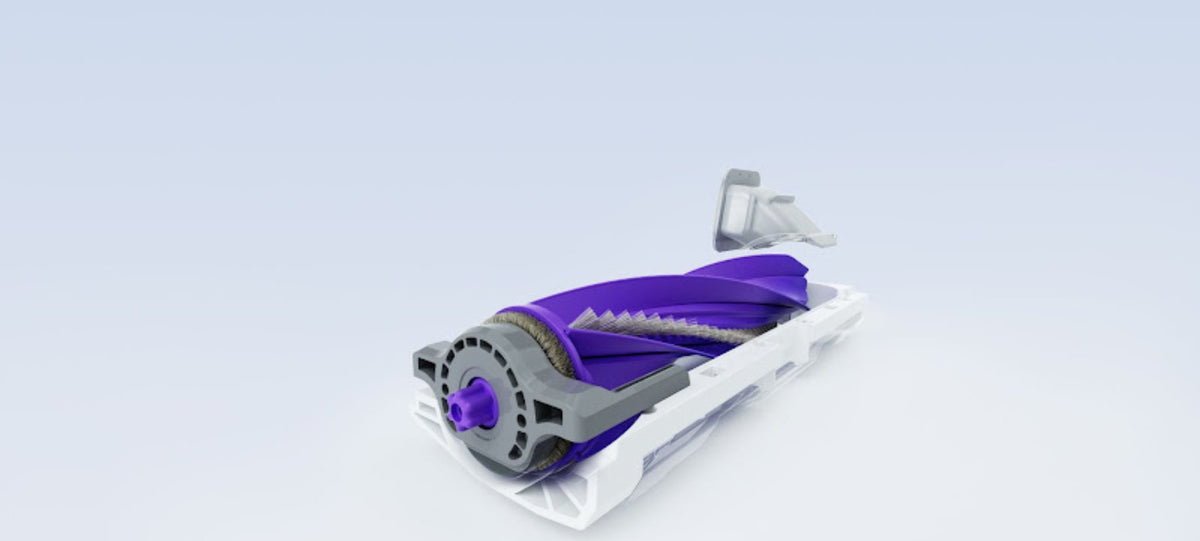
The roller brush is not just a simple add-on—it’s a core part of most upright and canister vacuums. Its job is to agitate carpet fibers so dirt and dust loosen up for suction. On hard floors, it sweeps particles toward the vacuum inlet.
When the brush stops spinning, several things happen:
- Poor cleaning on carpet and rugs
- Pet hair and debris remain stuck
- Reduced airflow, sometimes causing the vacuum to overheat
This is why a non-spinning brush is more than a small inconvenience.
Common Reasons The Vacuum Brush Stops Spinning
Several things can cause this problem. Let’s break down the most frequent causes and how to check for each.
1. Brush Roll Is Jammed
Hair, string, and fibers can wrap around the brush. Over time, this forms a tight blockage.
Signs:
- You hear a “clicking” or “ratcheting” noise
- The brush stops suddenly after turning on
Solution: Unplug the vacuum. Remove the brush cover and clear away all tangled debris. Scissors can help, but avoid cutting the bristles.
2. Broken Or Stretched Belt
Most vacuums use a rubber belt to spin the brush. These belts stretch, snap, or slip off.
Signs:
- The brush doesn’t move, but the vacuum motor runs
- You smell burning rubber
Solution: Open the brush compartment to check the belt. If broken or loose, replace it. Belts are cheap and available at most hardware stores.
3. Brush Motor Failure
Some vacuums (especially newer models or uprights) use a small motor just for the brush.
Signs:
- No sound or movement from the brush area
- The vacuum runs, but the brush stays still
Solution: Test the motor with a multimeter or consult a repair professional. Motors are more expensive and tricky to replace.
4. Brush Switch Is Off Or Faulty
Many vacuums let you turn off the brush for hard floors. The brushroll switch may be off or stuck.
Signs:
- No brush movement, but the rest of the vacuum works
- The switch feels loose or won’t click
Solution: Make sure the switch is ON. If it’s broken, you’ll need a repair or replacement switch.
5. Height Adjustment Is Too High
Some vacuums let you adjust the carpet height. If set too high, the brush won’t touch the carpet.
Signs:
- The brush spins, but doesn’t touch the floor
- Weak suction on carpet
Solution: Lower the vacuum height to match your floor type.
6. Worn-out Brush Bearings
The ends of the roller brush have bearings that let it spin smoothly. These can get clogged or wear out.
Signs:
- The brush feels stiff or stuck when you turn it by hand
- Squeaking noises
Solution: Clean or lubricate the bearings. If damaged, replace the entire brush roll.
7. Power Supply Issues
A break in the wiring or a loose connection can cut power to the brush.
Signs:
- The brush sometimes works, sometimes not
- Wiggling the cord or handle causes the brush to start/stop
Solution: Inspect the cord and connections. If you find a broken wire, a repair is needed.
8. Blocked Air Path
A clog in the vacuum can reduce suction and affect brush movement, especially in some bagless models.
Signs:
- Weak suction and brush slows down
- Visible debris stuck in the hose or wand
Solution: Remove clogs from the hose, wand, and dust bin.
How To Diagnose The Problem Step-by-step
If your vacuum brush isn’t spinning, use this logical approach to solve it:
- Unplug the vacuum before inspecting.
- Turn the brush by hand. If it’s hard to turn, check for hair, string, or debris.
- Open the brush compartment. Look for a broken or loose belt.
- Check the brushroll switch. Make sure it’s set to ON.
- Inspect for clogs in the hose and air paths.
- Test the brush motor (if your model has one) or listen for unusual noises.
- Examine the brush bearings for stuck or worn parts.
- Adjust the carpet height setting to match your floor.
This basic process solves 80–90% of vacuum brush issues.
Comparing Common Vacuum Types And Their Brush Mechanisms
Different vacuum types use different systems for spinning the brush. Here’s a side-by-side look:
| Vacuum Type | Brush Drive System | Common Problems |
|---|---|---|
| Upright | Belt-driven (rubber belt) | Belt breaks or stretches |
| Canister | Motorized powerhead (separate motor) | Motor failure or wiring issues |
| Stick/Handheld | Direct-drive or gear | Blockage, gear wear |
| Robot Vacuum | Small motor, direct to brush | Hair jams, motor burnout |
Signs It’s Time To Replace Parts
Knowing when to replace a belt, brush, or motor saves you time and money. Here are some guidelines:
- Belt: Replace every 6–12 months, or if it feels loose/stretchy
- Brush: Replace if bristles are worn, or every 1–2 years
- Bearings: If they squeak or freeze up after cleaning
- Motor: If you smell burning, hear grinding, or the brush never spins
A quick visual check each month helps avoid sudden breakdowns.
How To Replace A Vacuum Brush Belt
Changing a vacuum belt is a common DIY task. Here’s how to do it safely:
- Unplug the vacuum and lay it flat.
- Remove the brush cover. This usually needs a screwdriver.
- Lift out the roller brush. The belt should be looped around it.
- Slide off the old belt. Check for cracks or stretching.
- Install the new belt around the motor shaft and brush.
- Reinstall the brush and cover. Make sure everything fits tight.
- Plug in and test. The brush should spin smoothly.
Most belts cost under $10 and take less than 15 minutes to replace.
Table: Belt Lifespan And Replacement Cost
Here’s a quick look at common belt lifespans and what you might pay for parts:
| Vacuum Brand | Average Belt Life | Replacement Cost |
|---|---|---|
| Hoover | 6–12 months | $5–$10 |
| Shark | 12–18 months | $6–$15 |
| Dyson | 12–24 months | $8–$20 |
| Bissell | 6–12 months | $5–$12 |
Tips To Prevent Your Vacuum Brush From Stopping
To keep your vacuum brush spinning smoothly:
- Cut away hair and string after every few uses
- Replace the belt on schedule, don’t wait for it to snap
- Don’t vacuum up large items (coins, rocks, socks)
- Adjust the height for your carpet or floor type
- Check the brush bearings for dirt and hair
A simple cleaning routine can double the life of your vacuum parts.

Real-world Example
Ana, a pet owner, noticed her vacuum stopped picking up cat hair. After checking, she found a clump of hair jammed in the brush. Removing it fixed the problem instantly. Later, she set a monthly reminder to clean the roller—no more problems since.
Many users ignore the brush until the vacuum fails. Regular checks prevent most issues.
When To Call A Professional
If you’ve tried all the steps above but the brush still won’t spin, it’s time to seek help. Some signs you need a repair shop:
- Electrical smell or visible sparks
- Repeated belt failures
- No power to the brush even after replacing parts
- Warranty coverage (using a pro keeps warranty valid)
Professional repairs cost more but prevent further damage. For high-end vacuums, a $50–$100 repair might be worth it.
Table: Diy Vs Professional Repair Costs
Here’s how costs compare:
| Repair Type | DIY Cost | Professional Cost | Time Needed |
|---|---|---|---|
| Belt Replacement | $5–$15 | $40–$75 | 10–20 min |
| Brush Motor | $20–$60 | $80–$200 | 1–2 hrs |
| Brushroll Replacement | $10–$30 | $50–$120 | 30–60 min |
Advanced Troubleshooting: What Beginners Miss
There are a few details many users overlook:
- Hidden reset buttons: Some vacuums have a reset switch for the brush motor, often underneath. Pressing this can restore function after a jam.
- Thermal cut-off: If the brush motor overheats, it may shut off automatically. Letting the vacuum cool for 30 minutes can bring it back to life.
- End cap cleaning: On some brushes, you can remove the end caps to clean inside—this clears tough blockages that normal cleaning misses.
Understanding these features can save you from replacing parts unnecessarily.
Where To Find Help And Parts
Always use your vacuum’s manual for diagrams and part numbers. For trusted repair guides and genuine parts, sites like the manufacturer’s website or iFixit are helpful. Avoid generic, unbranded parts that might not fit properly.
Final Thoughts
When your vacuum brush stops spinning, it can make your cleaning routine stressful. But in most cases, the solution is simple—check for jams, replace the belt, or clean the bearings. Stay ahead with regular maintenance, and your vacuum will serve you well for years. If you run into deeper problems, don’t hesitate to call a pro or check the manufacturer’s support resources.

Frequently Asked Questions
Why Does My Vacuum Brush Only Spin Sometimes?
This usually means there’s a loose wire, a failing switch, or a stretched belt. Wiggle the cord and test the switch—if it feels unreliable, replacement may be needed.
Can I Use My Vacuum If The Brush Isn’t Spinning?
You can vacuum hard floors without a spinning brush, but you’ll get poor results on carpet. Pet hair and deep dirt will remain. It’s best to fix the issue for full performance.
How Often Should I Clean The Vacuum Brush?
Clean the brush every 2–4 weeks, or more often if you have pets or long hair in your home. Regular cleaning prevents jams and increases part lifespan.
Is It Worth Repairing An Old Vacuum With A Broken Brush?
If your vacuum is more than 8–10 years old or parts are hard to find, replacement might be better. For newer or high-end vacuums, a repair is often worth the cost.
Where Can I Find My Vacuum’s Reset Button?
Check the underside of your vacuum near the brush or wheels. Look for a small button labeled “reset.” Consult your manual if you can’t locate it.
With these tips, you’ll be able to solve most vacuum brush problems confidently and keep your floors spotless.


1 Comment
Pingback: Why Does My Canister Vacuum Make A Clicking Sound: Fixes - Vacuum Cleaner Tips