

Empty the Dyson V15 Detect by opening the bin over a trash can and pressing the red release button.
If you want your Dyson V15 Detect to keep strong suction and stay easy to use, knowing how to empty it the right way matters. I’ve found that a clean bin makes a big difference in airflow, dust control, and overall performance, and the process is simple once you know the small details that prevent mess.
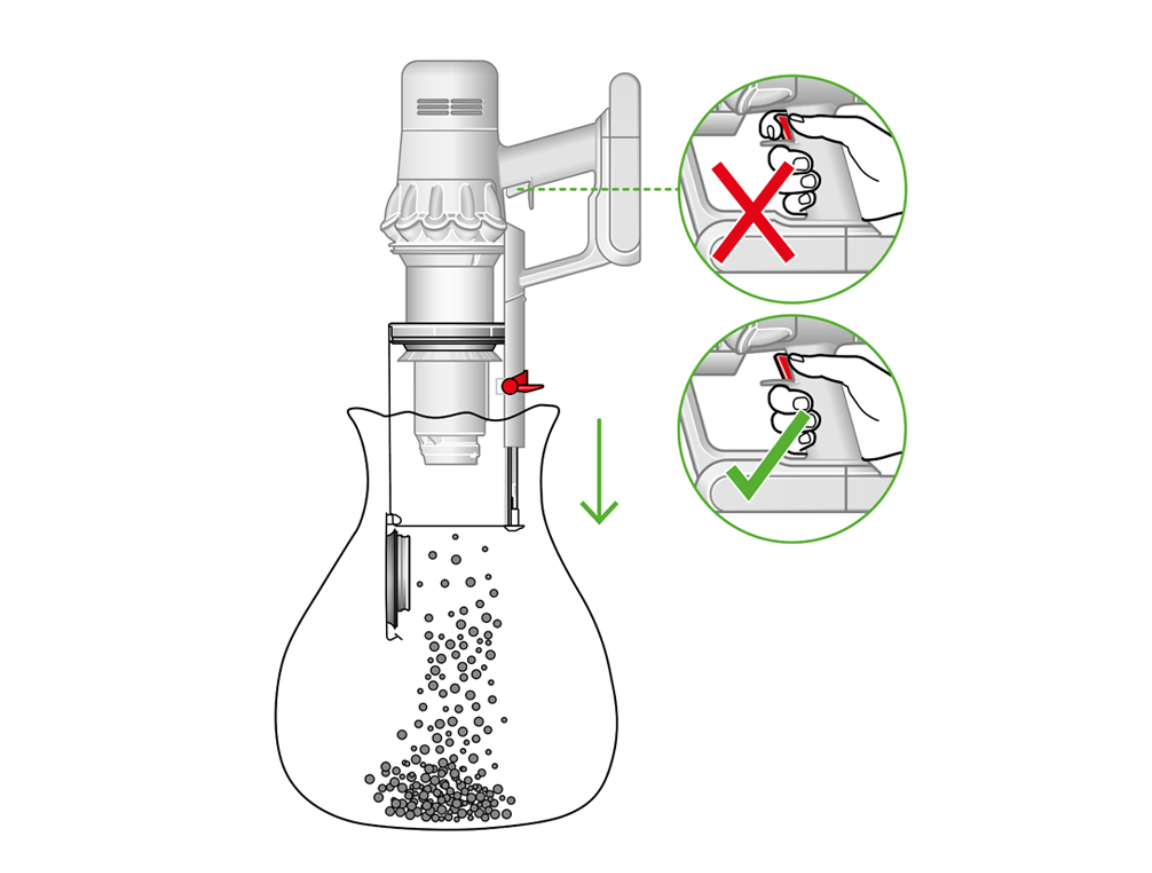
How to Empty Dyson V15 Detect Step by Step
Emptying the Dyson V15 Detect is fast, but doing it the right way helps avoid dust clouds and stuck debris. The design is meant to be hands-free, which is one of the reasons many people like this vacuum.
Here’s the basic process:
- Hold the vacuum over a trash can
- Locate the red bin-emptying lever near the top of the clear dust bin
- Push the lever forward or down, depending on how the unit is oriented
- Let the bottom flap open and release the debris
- Close the bin flap securely after the dirt falls out
A trick I learned after using Dyson stick vacuums for years is to tap the bin lightly before emptying it. That helps loosen fine dust and pet hair that can cling to the inside walls.

What Makes the Dyson V15 Detect Bin Different
The Dyson V15 Detect uses a clear, bagless dust bin with a point-and-shoot emptying system. That means you can see exactly when it is full, and you do not need replacement bags.
This design is convenient, but it also means the bin can pack down debris tightly. Fine dust, crumbs, and hair may cling to the sides if the bin is too full. From experience, emptying it before it reaches the top edge keeps the release smoother and less messy.
The V15 Detect also includes Dyson’s high-seal filtration system. That helps trap tiny particles, but it does not change the fact that the bin should be emptied often to protect airflow and suction.
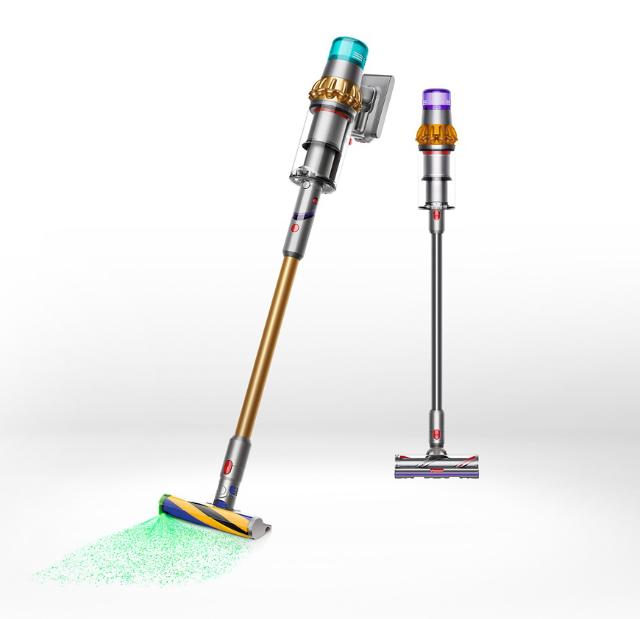
When You Should Empty the Dyson V15 Detect
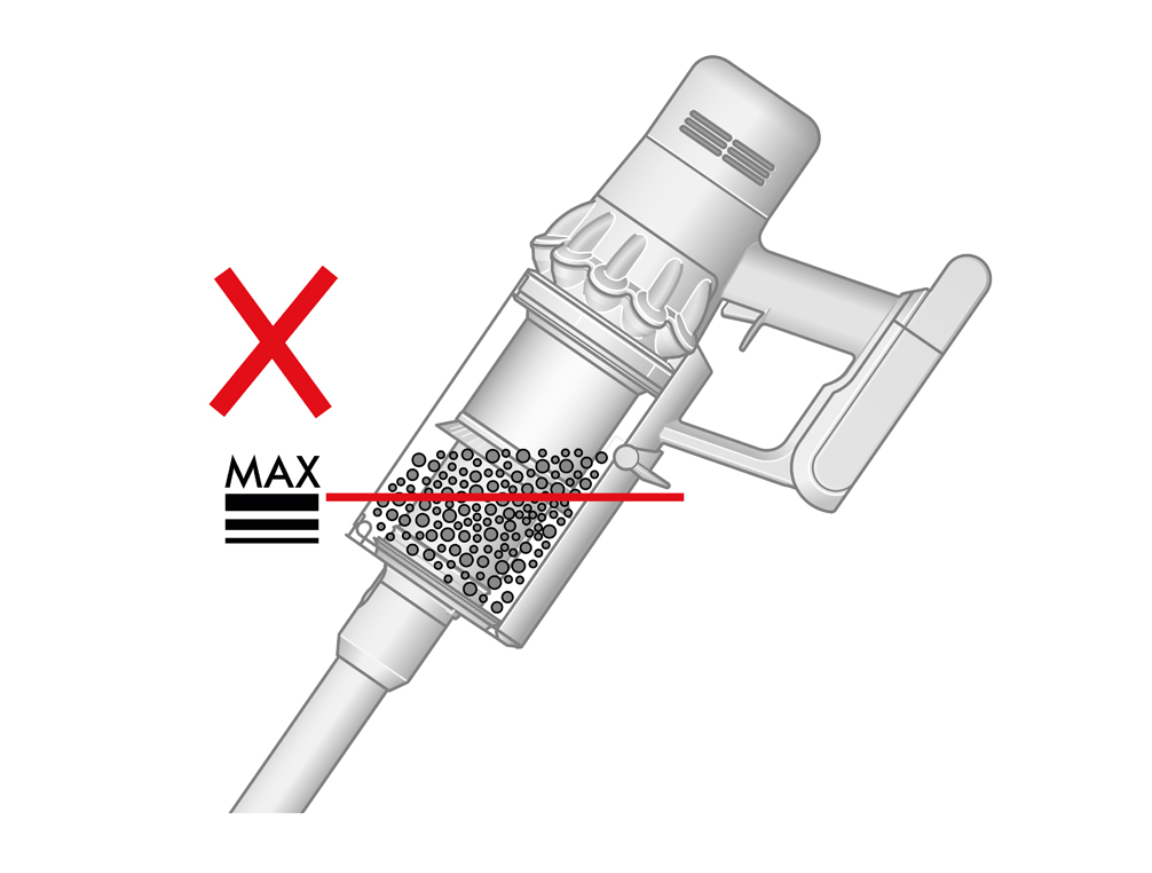
You should empty the Dyson V15 Detect whenever debris reaches the max line or when suction starts to feel weaker. For most homes, that may mean after one cleaning session. If you have pets or a lot of dust, you may need to empty it more often.
Common signs it is time to empty it include:
• The clear bin looks more than half full
• Suction feels lower than normal
• Hair is wrapping around the debris inside
• Dust is visible near the max fill line
• The vacuum sounds more strained than usual
A good habit is to empty the bin before each major cleaning task. That keeps the airflow open and makes the vacuum feel lighter and more efficient.

How to Empty Dyson V15 Detect Without Making a Mess
If you want to keep the process clean, a few small habits help a lot. The V15 Detect is designed to reduce contact with dust, but a little technique goes a long way.
Try these practical tips:
• Hold the vacuum deep inside the trash can so dust falls straight in
• Press the emptying lever slowly instead of snapping it open
• Shake the vacuum gently if debris stays stuck
• Empty it outdoors if you are sensitive to dust
• Use a trash bag with good depth to catch falling debris
I once made the mistake of emptying a nearly full bin too quickly over a small bin. Dust puffed back toward me like a tiny cloud. Since then, I always lower the vacuum deeper into the trash can and empty it more slowly.

How to Clean the Bin After Emptying
Emptying the Dyson V15 Detect is usually enough, but the bin may need a deeper clean now and then. Sticky dust, pet dander, and fine powder can build up on the clear chamber.
To clean it safely:
- Make sure the vacuum is turned off and disconnected from power
- Remove the bin if your model setup allows it
- Wipe the inside with a soft dry cloth
- Use a slightly damp cloth for stubborn dust
- Let all parts dry fully before reassembly
Do not use harsh chemicals or soak the bin unless the user guide specifically allows it. Water trapped inside can damage performance or create odors later.

Common Mistakes to Avoid When Emptying the Dyson V15 Detect
A few small mistakes can make bin emptying harder than it should be. Most of them are easy to avoid once you know what to watch for.
Avoid these problems:
• Emptying the bin only when it is packed full
• Forcing the release flap if debris is jammed
• Not holding the vacuum low enough over the trash can
• Reassembling the bin before it is fully closed
• Ignoring dust buildup on the seals and edges
One of the most common issues I’ve seen is people trying to yank out trapped hair with their fingers. That can tug on the mechanism or spread dust around. A gentle tap or a soft brush is usually better.
Why Regular Emptying Helps Performance
Regular emptying is not just about cleanliness. It also helps the Dyson V15 Detect maintain suction, keep airflow strong, and reduce strain on the motor.
Here is why it matters:
• Better suction because air can move more freely
• Less odor from trapped debris
• Lower chance of clogging in the bin or wand
• More consistent cleaning on carpets and hard floors
• Easier maintenance over time
Think of the dust bin like a backpack. The fuller it gets, the heavier and less efficient it becomes. Emptying it on time keeps the vacuum working at its best.
Troubleshooting If the Dyson V15 Detect Won’t Empty Properly
Sometimes the bin flap does not open smoothly, or debris gets stuck inside. That usually happens when hair, damp dirt, or compressed dust blocks the release path.
Try this:
- Turn off the vacuum first
- Hold it over a trash can
- Tap the bin lightly
- Open and close the flap again
- Check for clogs near the lower chamber or cyclone area
If the issue keeps happening, inspect the bin seals and the release mechanism for buildup. Dyson’s official care guidance emphasizes keeping the dust bin clean and dry so the mechanism can move freely.
Expert Tips for Easier Dyson V15 Detect Maintenance
A few small habits make ownership easier and more pleasant. These are the kinds of things that save time over weeks and months.
My best tips are:
• Empty the bin before it reaches the max line
• Clean the clear chamber regularly so dust does not stick
• Check the filter on the schedule listed in the user guide
• Keep the vacuum dry after cleaning parts
• Store it upright so debris does not shift oddly inside
I also recommend doing a quick visual check after each use. That tiny habit helps you catch tangled hair, lingering dust, or a bin that needs a deeper clean.
Frequently Asked Questions of How to Empty Dyson V15 Detect
How do I open the Dyson V15 Detect bin?
Hold the vacuum over a trash can and press the red bin release lever. The bottom flap should open and drop the debris out cleanly.
How often should I empty my Dyson V15 Detect?
Empty it whenever the bin reaches the max line or after each cleaning session if needed. Homes with pets, kids, or heavy dust may need more frequent emptying.
Why is my Dyson V15 Detect hard to empty?
Compressed dirt, hair tangles, or sticky dust can block the release path. Tapping the bin gently and cleaning the inside walls usually helps.
Can I wash the Dyson V15 Detect dust bin?
Some parts may be cleaned with a damp cloth, but you should avoid soaking anything unless the user guide says it is safe. Always let parts dry completely before reusing them.
What should I do if dust flies out when I empty it?
Lower the vacuum deeper into the trash can and open the bin more slowly. Emptying it before it becomes overly full also helps reduce dust clouds.
Conclusion
Emptying the Dyson V15 Detect is simple once you know the right motion, the right timing, and a few easy cleanup habits. If you empty it before it gets packed full, keep the bin clean, and handle the release gently, the vacuum stays easier to use and works more efficiently.
A little maintenance goes a long way here. Take a minute after each cleaning session to empty the bin properly, and your Dyson V15 Detect will reward you with smoother performance and less mess. If you found this helpful, keep exploring more vacuum care tips or leave a comment with your own best trick for keeping the bin clean.

