

Clean the Shark Matrix by emptying dust, washing filters, clearing brushes, and wiping sensors regularly.
Keeping a Shark Matrix robot vacuum clean is the easiest way to protect suction, battery life, and smart navigation. I’ve found that most performance issues come from simple buildup, not big mechanical failures, so this guide walks you through the full cleaning process in a clear, practical way. If you want your Shark Matrix to keep mapping well, picking up debris fast, and avoiding clogs, this is the routine that makes the biggest difference.
Why regular cleaning matters for the Shark Matrix
A robot vacuum is a little like a runner with dust in its shoes. It can still move, but not at its best. The Shark Matrix works hardest when its airflow stays open, its brushroll spins freely, and its sensors can “see” the room clearly.
When the vacuum gets dirty, you may notice weaker suction, missed crumbs, brush noise, charging issues, or navigation problems. In my experience, the first warning sign is usually not a full stop. It is a small drop in cleaning performance that people ignore for too long.
Regular maintenance helps with:
- Stronger suction and better pickup on carpets and hard floors
- Fewer clogs in the dust path and bin
- Longer life for the brushroll, filter, and battery
- Better obstacle detection and mapping
- Less odor from trapped dust and pet hair
The good news is that cleaning the Shark Matrix robot vacuum does not take long. A short routine each week can prevent most of the common problems people run into.
What you need before you start
Before you clean the Shark Matrix robot vacuum, gather a few simple tools. This keeps the process quick and helps you avoid damage.
You will usually need:
- A dry microfiber cloth
- A small cleaning brush or soft toothbrush
- Scissors for cutting tangled hair
- Compressed air, used lightly if needed
- Mild soap and water for washable parts only
- A clean, dry towel
One thing I always suggest is checking your model’s manual before washing anything. Some parts are washable, but not all are meant to get wet. That small step saves a lot of trouble later.
How to clean Shark Matrix robot vacuum step by step
1. Turn off the robot and remove it from the dock
Start by powering off the vacuum. If it is charging, take it off the base first so you can work safely. This protects the unit and makes it easier to handle.
I like to clean mine on a flat table with good light. That way, I can spot fine dust, hair, and debris stuck in corners. It is much easier than trying to clean it on the floor.
2. Empty the dustbin
Remove the dustbin and dump the debris into the trash. Tap it gently to loosen dust stuck in the corners. If the bin has fine dust clinging to the walls, use a dry cloth or soft brush.
For best results:
- Empty the dustbin after every cleaning cycle if you have pets
- Empty it every few runs if your home has light dust only
- Make sure the bin is fully dry before putting it back in place
A packed dustbin can reduce airflow fast. Even when the vacuum sounds normal, it may be collecting far less dirt than you expect.
3. Clean the filter
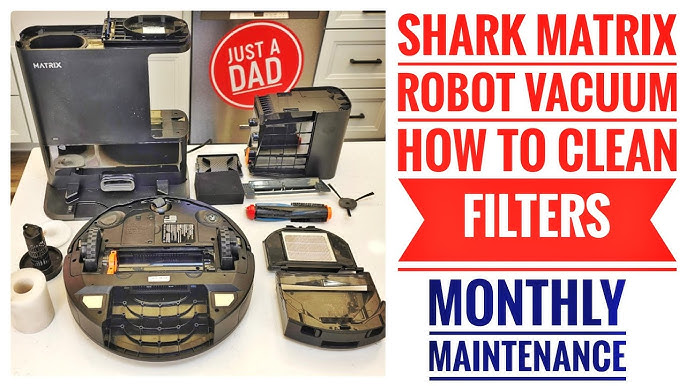
The filter is one of the most important parts to keep clean. A clogged filter is a common reason the Shark Matrix loses suction. Remove the filter and tap it gently over a trash can to shake out loose dust.
If your model uses a washable filter, rinse it only if the manual says it is safe. Then let it air-dry completely before reinstalling. Never put a damp filter back into the vacuum, since that can trap moisture and damage the machine.
Helpful filter tips:
- Tap the filter weekly
- Wash only when the manual allows it
- Let washable filters dry for at least 24 hours
- Replace worn filters when they look thin, torn, or permanently gray
In my experience, a clean filter often brings back more suction than people expect. It is one of the smallest tasks with the biggest payoff.
4. Remove hair and debris from the brushroll
Flip the vacuum over and inspect the main brushroll. Hair, string, and carpet fibers often wrap around it like thread on a spool. Use scissors or a seam ripper carefully to cut the tangled material free.
Then pull off the debris by hand or with a brush. Rotate the brushroll to check both ends, because buildup often hides near the edges. If the brushroll is removable, take it out and clean the end caps too.
What to look for:
- Long hair wrapped around the roller
- Threads stuck in the bristles
- Dirt packed near the brush bearings
- Signs of wear like bent bristles or cracks
This step matters a lot if you have pets. Pet hair can choke the brush system faster than regular dust, especially on carpet.
5. Check and clear the side brushes
Side brushes help sweep dirt into the vacuum’s path. They also collect hair and lint easily. Remove any tangled strands and wipe the arms clean with a dry cloth.
If a side brush looks bent out of shape, you may be able to straighten it gently. If the bristles are worn down or the brush is cracked, replace it. A damaged side brush can miss debris along walls and corners.
6. Clean the sensors
Sensors help the Shark Matrix avoid stairs, walls, and furniture. When they get dusty, navigation can become sloppy. Use a dry microfiber cloth to wipe the sensor windows and camera-like openings.
Focus on these areas:
- Front bumper sensors
- Cliff sensors on the underside
- Charging contacts
- Dirt-detect or navigation sensors, if your model has them
Do not use wet cloths or sprays on sensor areas unless the manual clearly allows it. A dry wipe is usually enough. This is one of those tiny habits that keeps the vacuum smart, not confused.
7. Wipe the wheels and underside
Dust and hair can wrap around the wheels and slow the vacuum down. Turn the robot over and inspect the front caster wheel and drive wheels. Remove debris with your fingers or a soft brush.
Also wipe the underside with a dry cloth. If dirt builds up here, the vacuum may struggle to move smoothly over floors. I have seen robots behave like they are “thinking too hard” when the real issue was just grime in the wheels.
8. Clean the charging contacts
Charging problems often come from dirty contacts rather than battery failure. Use a dry microfiber cloth to wipe the metal charging points on both the robot and the dock. If buildup is stubborn, a cotton swab lightly dampened with rubbing alcohol can help, but use very little.
Make sure the contacts are dry before docking the vacuum again. Clean contacts help the robot charge reliably and return to cleaning without interruption.
9. Reassemble and test the vacuum
Once everything is clean and dry, put the parts back in place. Make sure the dustbin clicks in securely, the filter is seated correctly, and the brushroll spins freely. Then place the vacuum on the dock and run a short test cycle.
Listen for unusual sounds and watch how it moves. If it sounds smoother and picks up debris better, your cleaning routine worked. If not, check for a hidden clog or a part that is worn out.
How often should you clean the Shark Matrix
The right cleaning schedule depends on your home. A house with pets, long hair, or heavy foot traffic needs more frequent care than a low-traffic apartment. The key is consistency, not perfection.
A simple routine looks like this:
- After every use: empty the dustbin if it is full
- Weekly: clean the filter, brushroll, and sensors
- Every 1 to 2 weeks: check the wheels and charging contacts
- Monthly: inspect all removable parts for wear
- As needed: replace filters and brushes based on use
If you run the Shark Matrix daily, weekly maintenance is usually the sweet spot. If you only use it a few times a week, you may be able to stretch that a little. Still, a quick check keeps small issues from becoming big ones.
Common mistakes to avoid
A lot of people clean their robot vacuum the wrong way without meaning to. The biggest mistakes are simple, and they are easy to fix once you know them.
Avoid these mistakes:
- Washing parts that are not water-safe
- Reinstalling damp filters
- Forgetting to clean under the brushroll
- Using harsh chemicals or soaking the vacuum body
- Ignoring charging contacts
- Letting hair wrap around the wheels for too long
One mistake I made early on was rushing the drying step. The filter felt dry on the outside, but moisture was still inside. That led to a musty smell later, so now I always give washable parts plenty of time to dry.
Signs your Shark Matrix needs a deeper clean
Sometimes the vacuum needs more than the usual weekly wipe-down. If you notice performance changes, it is worth doing a deeper check.
Look for these signs:
- Lower suction than usual
- The vacuum stops more often
- Loud rattling or grinding noises
- Hair visible around the brush or wheels
- Poor mapping or missed spots
- Dust left behind after a cleaning run
- A burning smell or musty odor
These signs usually mean there is buildup somewhere in the airflow path, brush system, or sensors. A deeper clean can solve the problem before it turns into a repair issue.
Extra tips for better Shark Matrix performance
A clean robot vacuum works best when the home setup helps it. Small changes around the house can reduce wear and make cleaning easier for the machine.
Try these tips:
- Pick up cords, socks, and loose toy parts before a run
- Keep rugs with long fringe out of the robot’s path
- Trim pet hair buildup near baseboards
- Place the dock on a flat surface with open space around it
- Clean high-dust areas more often, like entryways and kitchens
Think of the vacuum like a helper, not a hero. The less clutter it has to fight through, the better it performs.
Frequently Asked Questions of How to Clean Shark Matrix Robot Vacuum
How do I clean the Shark Matrix robot vacuum filter?
Remove the filter and tap out loose dust over a trash can. If your model has a washable filter, rinse it only if the manual says it is safe, then let it dry fully before reinstalling.
Can I wash the Shark Matrix dustbin?
Many Shark dustbins can be wiped out or rinsed, but you should always check your specific model instructions first. If you wash it, make sure it is completely dry before placing it back in the vacuum.
Why is my Shark Matrix not picking up dirt well?
A dirty filter, full dustbin, or tangled brushroll is often the reason. Sensor dirt and wheel buildup can also affect performance, so a full cleaning usually helps restore pickup.
How often should I replace the Shark Matrix filter?
Replacement timing depends on use, pets, and dust levels in your home. Many owners replace filters every few months, but if the filter looks damaged, permanently clogged, or worn out, replace it sooner.
What should I do if the brushroll keeps getting tangled?
Cut away hair and fibers after each few uses, especially if you have pets. You can also reduce tangles by checking the brushroll weekly and removing buildup before it gets packed tight.
Conclusion
Keeping a Shark Matrix robot vacuum clean is simple, but it makes a huge difference. When you stay on top of the dustbin, filter, brushroll, wheels, sensors, and charging contacts, the vacuum cleans better and lasts longer. That small routine is often the difference between a robot that struggles and one that feels truly reliable.
If you want the best results, make cleaning part of your regular schedule instead of waiting for problems. Start with the steps in this guide, test the vacuum afterward, and adjust your routine based on how your home uses it. If this helped, save the article, share it, or leave a comment with your own Shark Matrix cleaning tips.

