

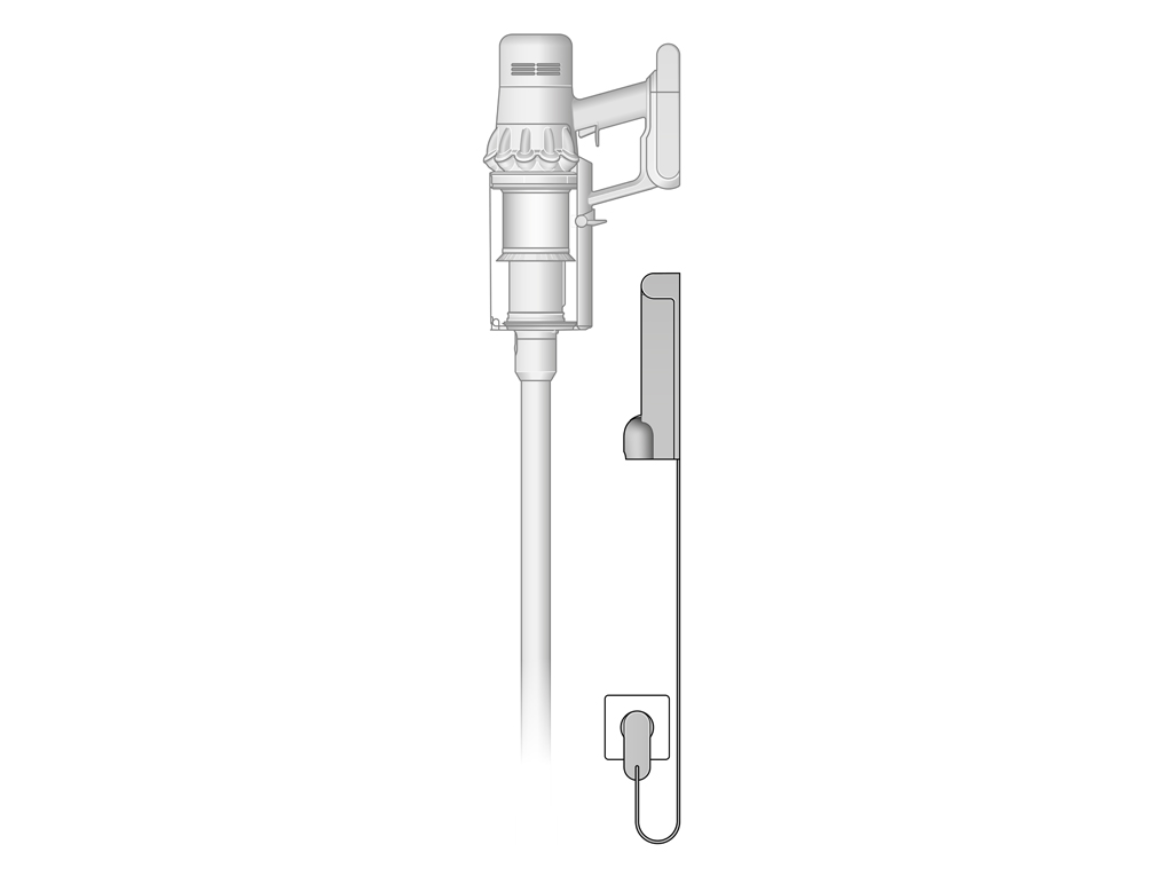
Charge the Dyson V15 Detect with the wall dock or directly using the charger until the battery indicator shows a full charge.
The Dyson V15 Detect is a powerful cordless vacuum, but like any lithium-ion device, it works best when you charge it the right way. If you want longer battery life, fewer charging issues, and a vacuum that is always ready when you need it, it helps to understand the charging process from start to finish. In this guide, I’ll walk you through how to charge Dyson V15 Detect the right way, what the lights mean, and the small mistakes that can shorten battery life over time.
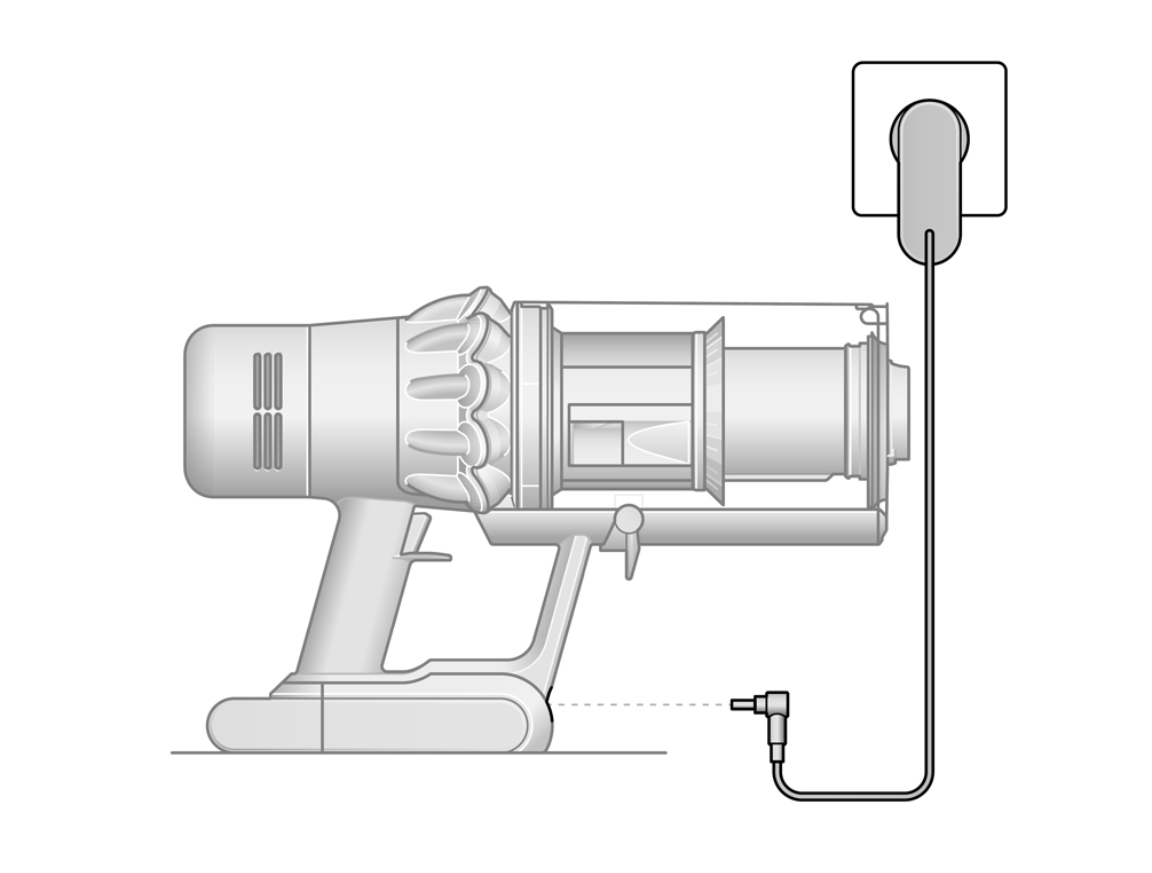
How to Charge Dyson V15 Detect
Charging the Dyson V15 Detect is simple, but there are a few details that matter. In my experience, most charging problems come from small setup mistakes, not from the vacuum itself. The good news is that once you know the basics, how to charge Dyson V15 Detect becomes very easy.
To charge it correctly:
- Plug the charger into a wall outlet
- Connect the charger to the vacuum or place the vacuum in the wall dock
- Make sure the battery is seated properly
- Wait for the battery light to show that charging has started
If the vacuum is mounted on the dock, it should begin charging automatically. If you charge it directly, the charger connects to the machine and powers the battery the same way. A full charge usually takes several hours, depending on the battery level and model condition.
The Dyson V15 Detect uses a lithium-ion battery, which means it does not need to be “fully drained” before recharging. In fact, that old habit can be harmful to battery health. I’ve seen people let the vacuum run down to zero every time, but that usually adds wear without giving any real benefit.
Understanding the Dyson V15 Detect Charging System
The Dyson V15 Detect has a smart battery system that helps protect the battery while charging. This is useful because lithium-ion batteries are sensitive to heat, deep discharge, and poor charging habits. Dyson designs the charger and battery to work together for safe daily use.
You may notice the battery indicator light during charging. That light gives you a quick status update. In general, it helps you know whether the vacuum is still charging, already full, or has a possible issue.
A few things to know:
- A flashing or changing light usually means charging is in progress
- A solid full indicator often means the battery is charged
- No light may point to a power issue, loose connection, or outlet problem
From a practical point of view, it is a little like charging a phone. You do not need to babysit it, but you do need to plug it in correctly and avoid bad habits.

Step-by-Step: How to Charge Dyson V15 Detect
Here is the simplest way to charge your vacuum at home.
-
Check the charger and cord
Make sure the charger is not damaged, bent, or frayed. A worn cord can interrupt charging. -
Plug the charger into a working outlet
If possible, test the outlet with another device first. That saves time when troubleshooting. -
Connect the charger to the vacuum or dock
If you use the wall dock, make sure the vacuum is aligned correctly. If charging directly, the connector should fit snugly. -
Confirm the charging light
The battery indicator should show that power is flowing to the unit. -
Let it charge fully
For best results, allow enough time for a full charge before the next cleaning session.
I always recommend charging the Dyson V15 Detect after use, especially if you use it for longer cleaning jobs. That way, it is always ready the next time you need it.
Best Charging Practices for Longer Battery Life
If you want your vacuum battery to last, the way you charge Dyson V15 Detect matters just as much as how often you clean with it. A few simple habits can make a big difference over time.
Best practices include:
- Charge it in a cool, dry place
- Avoid exposing the vacuum to direct sunlight while charging
- Use only the official Dyson charger
- Do not use cheap third-party power adapters
- Store the vacuum with some charge if it will sit unused for a long time
One mistake I made early on was leaving a cordless vacuum in a hot laundry room near a dryer. It charged, sure, but heat is not kind to batteries. Once I moved it to a cooler spot, the battery performed more consistently.
Also, try not to leave the vacuum on a charger in a place with poor airflow. Heat buildup is one of the main enemies of battery life.
How Long Does It Take to Charge Dyson V15 Detect?
The charging time for the Dyson V15 Detect usually depends on how much battery is left. A nearly empty battery will take longer than one that is only partially drained. In everyday use, a full charge often takes a few hours.
A few factors can affect charging time:
- Battery level before charging
- Age of the battery
- Room temperature
- Whether the charger is the correct Dyson charger
If the vacuum is taking much longer than normal, that may mean the battery is aging or the charger is not working properly. In my experience, a gradual increase in charging time is often the first sign that a battery is wearing out.
What the Battery Light Means
The Dyson V15 Detect uses light signals to help you understand charging status. This is helpful because you do not need to guess what is happening.
Common light behavior includes:
- Flashing light while charging
- Solid light or full indicator when charged
- No light when there may be a power or connection problem
If the light seems unusual, check the basics first. Is the charger fully inserted? Is the outlet working? Is the dock aligned correctly? Most charging issues are simple connection problems, not major failures.
Common Charging Problems and How to Fix Them
Even a well-made vacuum can run into charging issues now and then. The good news is that many of them are easy to solve.
Here are common problems and practical fixes:
-
Vacuum not charging
Check the outlet, charger, and dock connection. Try a different outlet if needed. -
Charging light not turning on
Inspect the charger and battery connection. Make sure the battery is seated firmly. -
Battery charges too slowly
Let the battery cool down if the vacuum was just used. Heat can slow charging. -
Vacuum does not hold charge well
The battery may be aging or damaged. If the problem gets worse, contact Dyson support. -
Dock does not seem to work
Verify that the dock is installed correctly and that the machine is aligned on it.
I always tell people to start simple. Before assuming the battery is dead, check the cord, outlet, and fit. That alone solves a lot of “charging problems.”
Can You Leave Dyson V15 Detect on the Charger?
Yes, in normal use, the Dyson V15 Detect can stay on its charger or dock when not in use. That is one reason cordless vacuums are so convenient. The charging system is designed to manage power safely.
That said, I still recommend following good battery habits:
- Use the official charger
- Keep the charging area cool
- Avoid charging in extreme heat
- Do not store the vacuum in a damp space
Leaving it docked is fine for everyday life. Just do not treat heat, moisture, and damaged cords lightly. Those are the kinds of small issues that can shorten battery life faster than most people expect.
Charging Tips for Better Performance
A few small habits can help your Dyson V15 Detect stay reliable for years.
Try these tips:
- Charge after cleaning instead of waiting until the battery is almost dead
- Keep the filter clean so the motor does not work harder than needed
- Empty the bin regularly to reduce strain on the machine
- Store the vacuum in a stable indoor location
- Use the charger that came with the device
I like to think of battery care like caring for a car tire. You do not need to obsess over it, but regular attention keeps things running smoothly. Small habits often prevent the big headaches later.
Frequently Asked Questions of How to Charge Dyson V15 Detect
How do I know if my Dyson V15 Detect is charging?
The battery light should show activity when charging begins. If there is no light, check the outlet, charger, and connection points first.
Can I charge Dyson V15 Detect without the wall dock?
Yes, you can charge it directly with the Dyson charger. The dock is just a convenient storage and charging option.
How long should I charge my Dyson V15 Detect for the first time?
You should charge it until it reaches a full charge, which usually takes several hours. A full first charge helps ensure the battery starts off ready for normal use.
Why is my Dyson V15 Detect not charging?
Most of the time, the issue is a loose connection, faulty outlet, or damaged charger. If those are fine and it still does not charge, the battery may need service.
Is it bad to keep Dyson V15 Detect plugged in all the time?
No, the vacuum is designed for regular docking and charging. Still, it is smart to keep it in a cool, dry spot and use only the official charger.
Conclusion
Knowing how to charge Dyson V15 Detect the right way makes a real difference in daily use. With proper charging, a good outlet, and a little battery care, you can keep the vacuum ready, reliable, and strong for much longer. The process is simple, but the small details matter more than most people think.
If you follow the steps in this guide, you will avoid common charging mistakes and help protect battery life over time. Try these tips today, and if you want to get even more from your vacuum, keep learning about battery care and maintenance.

