

A standing desk raises your work surface so you can stand, sit, or move while you work.
I’ve designed and tested workspaces for years, and I’ll walk you through exactly how a standing desk works, why it matters, and how to choose and use one well. This article explains the mechanics, types, health effects, ergonomic setup, common problems, and practical tips from real-world experience so you can make an informed decision about adding a standing desk to your routine.

How a standing desk works: basic mechanics and principles
A standing desk changes the height of your work surface. It lets you move between sitting and standing by raising or lowering the desktop. The core idea is simple: place your screen and keyboard at ergonomic heights whether you sit or stand.
Key mechanical approaches
- Manual crank systems: You turn a handle to raise or lower the desk. They are simple and durable.
- Electric motors: An electric standing desk uses one or more motors to lift the desktop smoothly with a button press.
- Gas-spring or counterbalance: A spring or gas piston helps lift the surface. These are often used in converters or lighter desktops.
- Converter units: A converter sits on top of an existing desk and uses springs, gas pistons, or small motors to change height.
Core components inside most standing desks
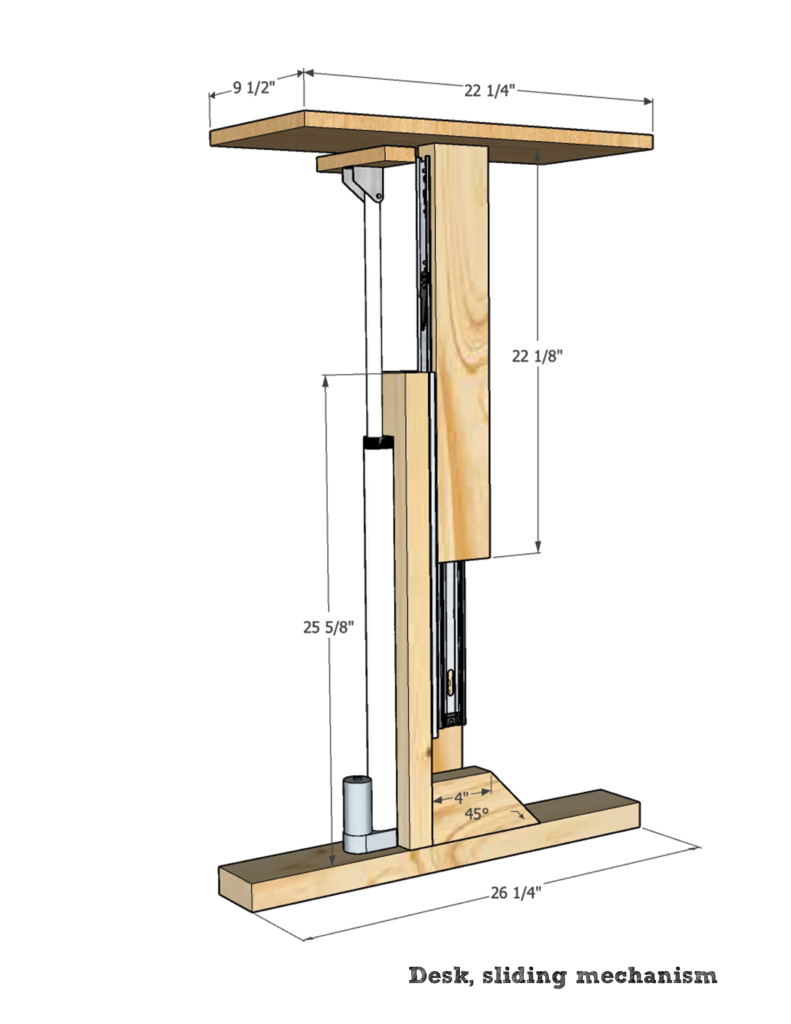
- Lifting column or legs: Telescoping legs that move up and down.
- Motor or spring assembly: Provides force to lift and lower the desk.
- Control unit or switch: Buttons, keypads, or memory controls for preferred heights.
- Desktop and frame: The surface you use and the structure that supports it.
- Safety stops and load limits: Prevents overloading and protects the mechanism.
How movement and ergonomics matter
- Adjustability provides the right screen and keyboard height.
- Movement reduces static strain and encourages better posture.
- Smooth transitions protect equipment and keep your workflow steady.

Types of standing desks and how each one works
Sit-stand desk classes
- Full sit-stand desks: These replace your old desk and adjust the full desktop up and down. They use motors, cranks, or gas springs.
- Desk converters: These sit on top of an existing desk and lift a keyboard and monitor area. They are portable and lower cost.
- Fixed-height standing desks: A tall desk set at one standing height only. No moving parts.
- Hybrid desks with memory presets: Electric desks with programmable buttons remember preferred heights.
Pros and cons by type
- Electric desks: Very easy to use, precise height control, higher cost and slightly more maintenance.
- Manual crank desks: Low cost, reliable, but slower to adjust.
- Gas-spring converters: Lightweight and quick, but fewer height presets and limited range.
- Fixed-height desks: Simple and cheap, but no sitting option.
How load and size affect operation
- Motor torque depends on weight. A heavy desktop or many monitors requires a stronger motor or additional columns.
- Desk stability is tied to frame design and leg width.
- Most desks specify a load capacity; exceeding it can strain or damage the mechanism.
Health benefits and productivity effects of a standing desk
Why standing desks are popular
- Standing reduces prolonged sitting time, which is linked to some health risks.
- Movement boosts blood flow and can reduce back stiffness.
- Many users report better focus and shorter fatigue spans when they alternate positions.
What the evidence generally shows
- Short-term studies find reduced discomfort and improved energy when people alternate between sitting and standing.
- Long-term benefits for weight or cardiovascular health are modest unless paired with activity and overall lifestyle changes.
- Ergonomics and proper setup matter more than simply standing all day.
Practical aim for health
- Aim to alternate every 30 to 60 minutes rather than standing for hours at a time.
- Use a standing desk as a tool to increase movement and reduce long stretches of static posture.
Limitations, risks, and evidence-based cautions
Common pitfalls
- Standing too long: Can cause leg or foot pain and increase fatigue.
- Poor setup: Wrong screen height or keyboard position can cause neck or wrist strain.
- Overreliance: A standing desk is not a cure-all for inactivity.
Scientific caution
- Studies show mixed results on long-term disease prevention just from standing.
- Ergonomics, overall movement, diet, and exercise remain key to health outcomes.
How to avoid risks
- Wear comfortable shoes and use an anti-fatigue mat when standing.
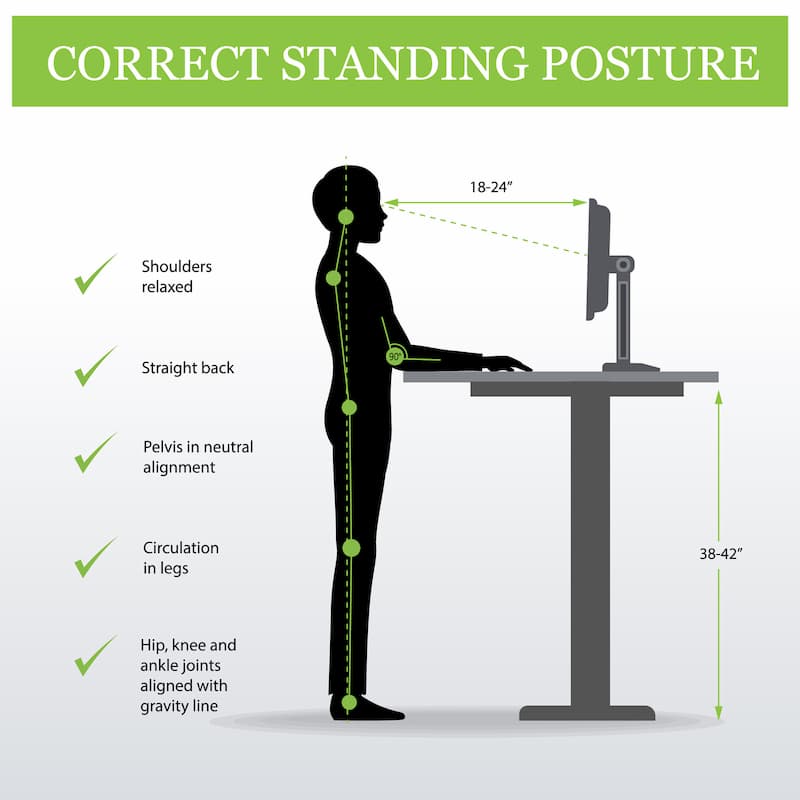
- Keep elbows at about 90 degrees and screen at eye level.
- Start slowly and build standing time over days or weeks.
How to use a standing desk effectively: setup and routine
Ergonomic setup steps
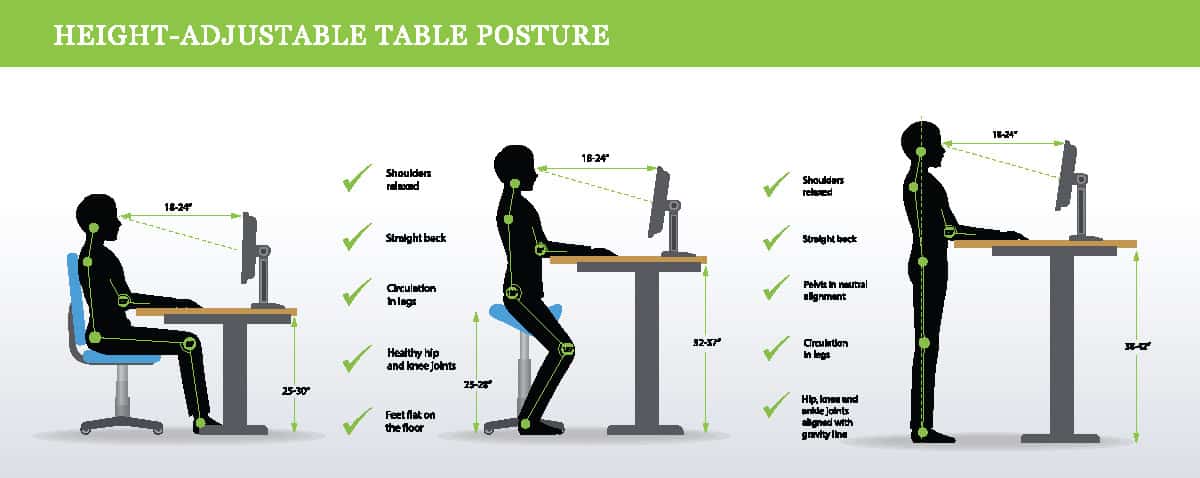
- Adjust screen height so the top third of your monitor is at eye level.
- Set keyboard height so elbows bend roughly 90 degrees and wrists stay neutral.
- Keep the mouse close to reduce reaching and shoulder strain.
Transition and timing tips
- Start with 15–20 minutes of standing every hour, then increase gradually.
- Use a timer or app to remind you to change position.
- Alternate sitting and standing tasks, such as standing for calls and sitting for focused typing.
Accessories that help
- Monitor arm for precise screen height.
- Anti-fatigue mat to reduce leg strain while standing.
- Footrest or small step to shift weight and encourage micro-movements.
PAA-style quick questions
Can a standing desk improve posture?
Yes. When set up correctly, a standing desk encourages a neutral spine and reduces slouching. Posture improves only when combined with mindful adjustments and breaks.
How long should I stand at a standing desk?
Start with short intervals—15 to 30 minutes per hour—and build up based on comfort. Frequent changes in position are more important than long standing periods.
Will a standing desk burn a lot of calories?
Standing burns slightly more calories than sitting, but the total difference is small. Combine standing with walking breaks and exercise for meaningful calorie burn.

Maintenance, troubleshooting, and buying tips
Routine maintenance
- Keep the track and legs clean and free of debris.
- Tighten bolts and check the motor or crank regularly.
- Follow the manufacturer’s load limits and warranty suggestions.
Troubleshooting common issues
- Desk jerks or stalls: Check for overloaded surface or blocked telescoping legs.
- Unresponsive motor: Reset the control unit per manual instructions or check power supply.
- Wobble: Ensure the desk is level and tighten frame screws.
Buying tips and priorities
- Prioritize stability and load capacity over extra features.
- Look for warranties on motors and frames.
- Test height range in person if possible to confirm ergonomic fit.
Personal experience: what I learned using a standing desk
Lessons from real use
- Start slow and track comfort. I began with 10-minute standing blocks and grew them over weeks. That prevented sore calves and helped build a routine.
- Invest in a good anti-fatigue mat. The small cost made standing far more comfortable for long tasks.
- Choose a stable frame. A wobbly desk took time away from work and increased frustration.
Common mistakes I made
- Setting the monitor too high. I corrected to a slight downward gaze and felt less neck strain within days.
- Packing the desktop with heavy items. Moving weight to shelves and a monitor arm improved lift performance.
Practical tips you can use today
- Mark two height presets: one for sitting, one for standing.
- Pair standing time with specific tasks, such as phone calls or quick edits.
- Keep motion small and frequent—shift weight, tap each foot, or use a footrest to stay comfortable.
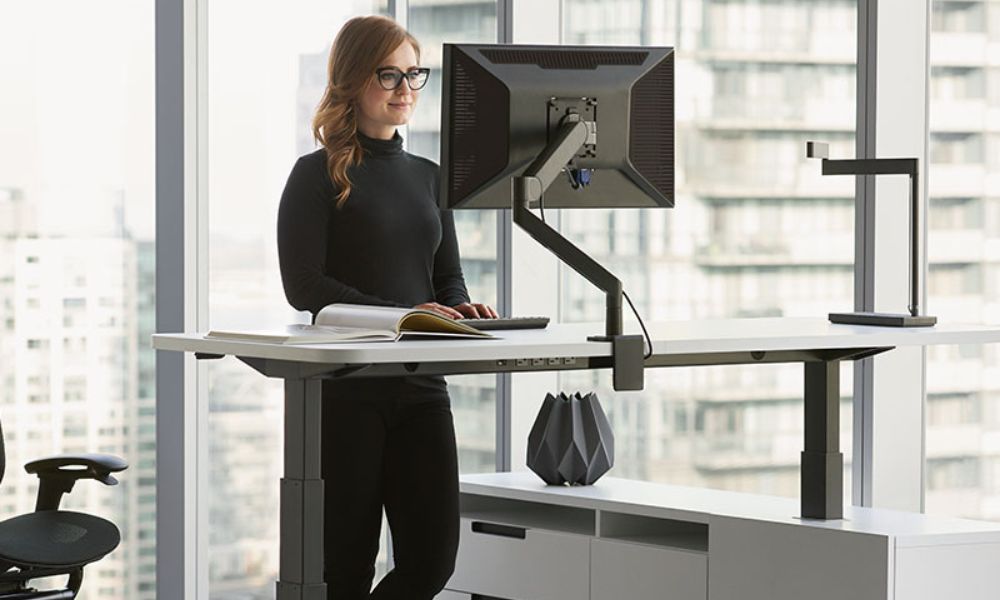
Frequently Asked Questions of How does a standing desk work?
How does an electric standing desk work?
An electric standing desk uses one or more motors and a control unit to raise and lower telescoping legs. You press buttons or use presets to move the desk smoothly to chosen heights.
Can I put a standing desk on a carpet?
Yes, but check stability. Carpet can reduce stability, so choose a desk with a wide base or use a firm floor mat to level the surface.
Do standing desks require much maintenance?
No. Basic maintenance is cleaning tracks, tightening bolts, and avoiding overload. Motors may need checks after heavy use, but most desks run years without major work.
Is a standing desk good for lower back pain?
For many people, alternating between sitting and standing reduces lower back stiffness. Proper ergonomic setup and regular movement are essential to see benefits.
How heavy can a standing desk lift?
Load capacity varies by model; light converters may hold 20–30 pounds, while full electric desks often support 150 pounds or more. Always check the manufacturer’s load rating.
Are standing desk converters noisy?
Some converters use gas springs and are nearly silent; motorized converters can make a soft whir. Noise level depends on mechanism quality and build.
Conclusion
A standing desk works by changing your work surface height to let you sit, stand, and move through the day. Choosing the right type, setting it up correctly, and using it with short, frequent changes will deliver the best results for comfort and focus. Try small steps: set two height presets, swap positions every 30–60 minutes, and add an anti-fatigue mat. If you want to reduce sitting and boost movement, start today by testing a standing interval and notice how it affects your energy and posture. Share your experience or questions below, subscribe for more ergonomic tips, or try a demo at a local store to find the right fit.

