

The Dyson Gen5Detect is one of the latest additions to Dyson’s cordless vacuum lineup. It promises strong suction, advanced filtration, and smart features for home cleaning. But for many buyers, the most important question is simple: How long does the Dyson Gen5Detect battery last? Battery life affects not just how long you can clean, but also how often you need to recharge, and whether the vacuum fits your cleaning routine.
Let’s dive deep into this question. We’ll explore official battery claims, real-world usage, what affects battery performance, how Gen5Detect compares to older Dyson models, and practical tips to make your battery last longer. If you’re considering this vacuum or already own it, this guide will help you get the most from your investment.
Official Dyson Gen5detect Battery Specifications
Dyson claims the Gen5Detect offers up to 70 minutes of run time on a single charge. This figure is based on using the vacuum in the lowest suction mode with non-motorized tools. It’s important to understand what this means, since actual battery life changes based on how you use the vacuum.
- Battery type: Lithium-ion
- Capacity: 3600 mAh (approximate)
- Charging time: About 4.5 hours for a full charge
- Max run time: Up to 70 minutes (Eco mode, non-motorized tools)
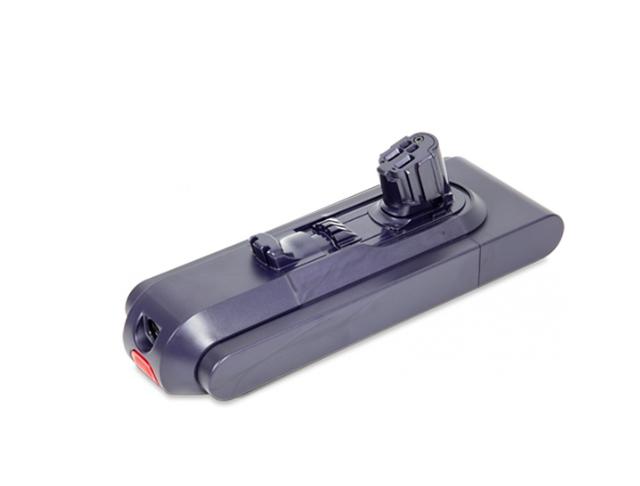
The vacuum includes a removable battery. This lets you swap batteries for extended cleaning sessions, but extra batteries cost more.
Real-world Battery Performance
Most users don’t clean their homes on the lowest suction setting, and often use motorized tools like the brush bar. So, what does battery life look like in real situations?
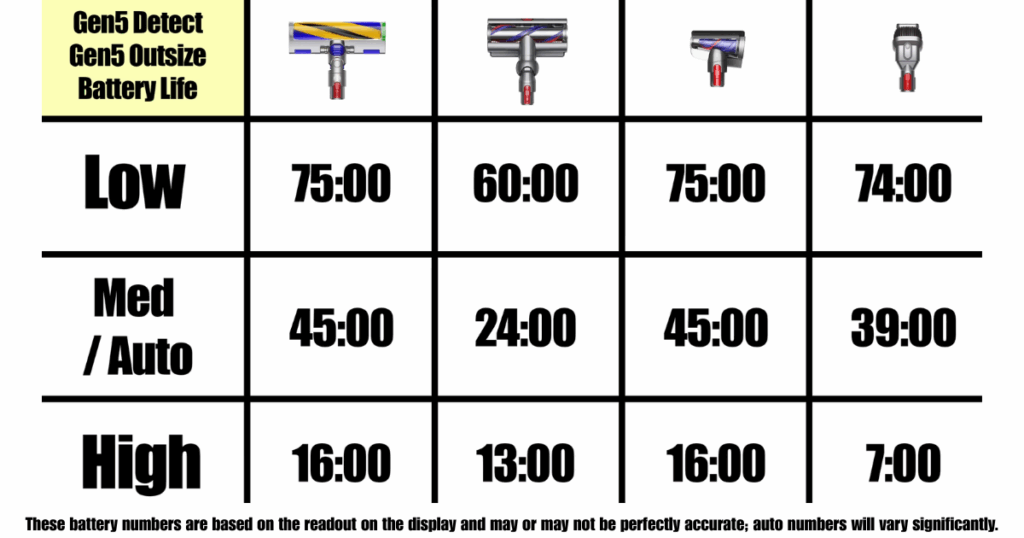
Here’s a breakdown of typical run times for each mode:
| Cleaning Mode | Tool Used | Expected Run Time |
|---|---|---|
| Eco | Non-motorized | ~70 minutes |
| Eco | Motorized head | ~60 minutes |
| Auto | Motorized head | ~35-40 minutes |
| Boost | Motorized head | ~10-12 minutes |
These numbers come from both Dyson’s own tests and independent reviewers. If you clean your whole house in Auto mode, expect about 40 minutes. Using Boost mode for deep cleaning carpets will drain the battery faster.
What Factors Impact Dyson Gen5detect Battery Life?
Battery life isn’t fixed. Several factors affect how long you can use the Gen5Detect between charges:
- Suction mode: Higher power settings use more energy.
- Tool type: Motorized tools drain more battery than simple attachments.
- Floor type: Thick carpets require more suction, reducing battery time.
- Cleaning habits: Long, uninterrupted sessions use more battery than quick spot cleaning.
- Battery age: Over time, batteries lose capacity. After 2-3 years, expect shorter run times.
- Temperature: Extreme heat or cold can affect battery performance.
It’s easy to overlook some of these factors. For example, cleaning hard floors with Eco mode and a simple nozzle will give you much longer run time than deep cleaning a plush rug with Boost mode.
Comparing Gen5detect To Older Dyson Models
Dyson’s battery technology has improved over the years. Here’s how the Gen5Detect compares to popular earlier cordless models:
| Model | Max Run Time | Battery Type | Removable Battery |
|---|---|---|---|
| Gen5Detect | 70 min | Lithium-ion | Yes |
| V15 Detect | 60 min | Lithium-ion | No |
| V11 Torque Drive | 60 min | Lithium-ion | No |
| V10 Absolute | 60 min | Lithium-ion | No |
| V8 Animal | 40 min | Lithium-ion | No |
The Gen5Detect leads with the highest run time and a removable battery. This is a major advantage for people who want longer cleaning sessions or plan to swap batteries.
Battery Longevity: How Many Years Will It Last?
One thing buyers often miss is the difference between battery run time and battery lifespan. Run time means how long you can use the vacuum before recharging. Lifespan is how many years the battery will hold its charge.
Dyson batteries are designed to last about 2-5 years with regular use. Actual lifespan depends on:
- How often you use and recharge the vacuum
- Whether you let the battery fully drain often
- Storage conditions (avoid extreme heat or cold)
Over time, you’ll notice the battery doesn’t last as long per charge. This is normal for lithium-ion batteries. When run time drops below 50% of original, it’s time to replace the battery.
Charging Tips For Maximum Battery Life
Many people shorten their battery’s lifespan by charging incorrectly. Here are practical tips to make your Gen5Detect battery last as long as possible:
- Charge after every use: Lithium-ion batteries prefer regular top-ups.
- Don’t store empty: Always leave some charge in the battery when not in use.
- Avoid extreme temperatures: Store and charge at room temperature.
- Don’t overcharge: Dyson chargers stop automatically, but unplug once full if possible.
- Use official chargers: Third-party chargers can damage the battery.
A less obvious tip: If you rarely use Boost mode, your battery will age slower. High-power settings create more heat, which wears batteries out faster.
Can You Replace Or Upgrade The Battery?
The Gen5Detect’s removable battery is a big improvement over previous models. This means you can:
- Buy extra batteries for longer cleaning sessions
- Replace the battery yourself when it ages (no need for professional help)
Dyson sells official replacement batteries. Avoid cheap copies—they may not last as long, and could void your warranty.
How Gen5detect Battery Life Affects Cleaning Routine
Battery life isn’t just a number—it changes how you clean:
- Small apartments: You may finish cleaning in one session, even on higher power modes.
- Large homes: You might need to recharge or use extra batteries for full-house cleaning.
- Quick spot cleaning: Eco mode is enough, battery will last much longer.
- Deep cleaning days: Plan for shorter battery time, especially with carpets.
Some users combine modes: Eco for most areas, Boost for tough spots. This strategy helps maximize battery time without sacrificing cleaning quality.
Non-obvious Insights About Dyson Gen5detect Battery
- Battery management system: The Gen5Detect uses a smart battery management system. It adjusts power output based on tool and surface, optimizing run time automatically. Most users don’t realize that the vacuum’s “Auto mode” is not just a suction setting—it’s also a battery saver.
- Charging speed isn’t linear: The first 80% of charging happens faster than the last 20%. If you need a quick clean, a partial charge (after 2 hours) will still give you decent run time.
- Battery indicator accuracy: The digital screen shows remaining run time, but it’s based on current mode and tool. Switching modes will change the estimate instantly. Don’t rely on the number for Boost mode if you plan to switch back to Eco.
Common Mistakes That Shorten Battery Life
Many owners make errors that reduce battery lifespan:
- Leaving the battery fully drained for days
- Using non-Dyson chargers
- Storing the vacuum in hot places (like near a heater)
- Frequently using Boost mode for long periods
- Not cleaning the filter regularly (clogged filters make the motor work harder, draining battery faster)
Avoid these mistakes to keep your battery healthy.
Practical Battery-saving Strategies
If you want your Gen5Detect battery to last longer each session, try these:
- Use Eco mode for hard floors and daily cleaning.
- Switch to Auto or Boost only for carpets or stubborn dirt.
- Clean in sections, not the whole house at once.
- Keep attachments clean—dirty tools increase resistance and drain battery.
- Plan cleaning so you finish before battery runs out, avoiding frustration.
Real User Experiences
Many owners praise the Gen5Detect’s battery life, but some mention challenges:
- “I can clean my three-bedroom apartment on Auto, but need a recharge for deep cleaning carpets.”
- “With two batteries, I never run out of charge, even cleaning the whole house.”
- “Boost mode is powerful, but I only use it for tough stains—otherwise, battery drains fast.”
- “The removable battery is a game-changer. I wish older Dysons had this feature.”
These comments show that actual battery experience depends on how you use the vacuum and the size of your home.
How Dyson Gen5detect Battery Compares To Other Brands
Dyson is not the only cordless vacuum brand. Here’s a quick comparison with other popular models:
| Brand & Model | Max Run Time | Removable Battery | Charging Time |
|---|---|---|---|
| Dyson Gen5Detect | 70 min | Yes | 4.5 hours |
| Shark Stratos Cordless | 60 min | Yes | 3.5 hours |
| Samsung Jet 90 | 60 min | Yes | 3.5 hours |
| Bissell ICONpet | 50 min | No | 4 hours |
Dyson leads with battery run time, but charging takes a bit longer. Removable batteries are becoming more common among competitors.
When Should You Replace The Gen5detect Battery?
Replace the battery if:
- Run time drops below half the original (e.g., less than 35 minutes in Eco mode)
- The vacuum shuts off unexpectedly, even after charging
- The battery won’t charge fully
Replacement is simple. Just slide out the old battery and insert the new one. You can find official Dyson batteries online or at authorized retailers.
Where To Find Official Battery Specs
For precise technical details, visit the official Dyson website or consult their user manual. You can also check independent reviews for performance tests. Here’s a useful external resource: Dyson Official Support.
Frequently Asked Questions
How Long Does The Dyson Gen5detect Battery Take To Charge?
It takes about 4.5 hours for a full charge from empty. Partial charges are faster and can provide enough run time for small cleaning tasks.
Can I Use The Gen5detect While It’s Charging?
No, the vacuum will not operate while plugged in. You need to wait until it’s fully charged or swap in a spare battery.
Is The Battery Replaceable?
Yes, the Gen5Detect battery is removable and replaceable. You can buy extra batteries for longer cleaning or replace the battery when it ages.
Does Using Boost Mode Affect Battery Life?
Boost mode uses maximum suction, which drains the battery quickly and generates more heat. Frequent use can shorten both run time and battery lifespan.
How Can I Extend My Gen5detect Battery Lifespan?
Charge regularly, avoid full drains, store at room temperature, and use Eco or Auto modes more often. Clean filters and attachments to reduce motor strain.
The Dyson Gen5Detect offers impressive battery life—especially compared to earlier models. With up to 70 minutes of run time, smart battery management, and removable batteries, it’s well-suited for modern homes. Understanding how battery life changes with usage, and following practical tips, will help you get the most from your vacuum.
Whether you’re a new buyer or a longtime Dyson user, managing your battery well ensures years of reliable cleaning.

