

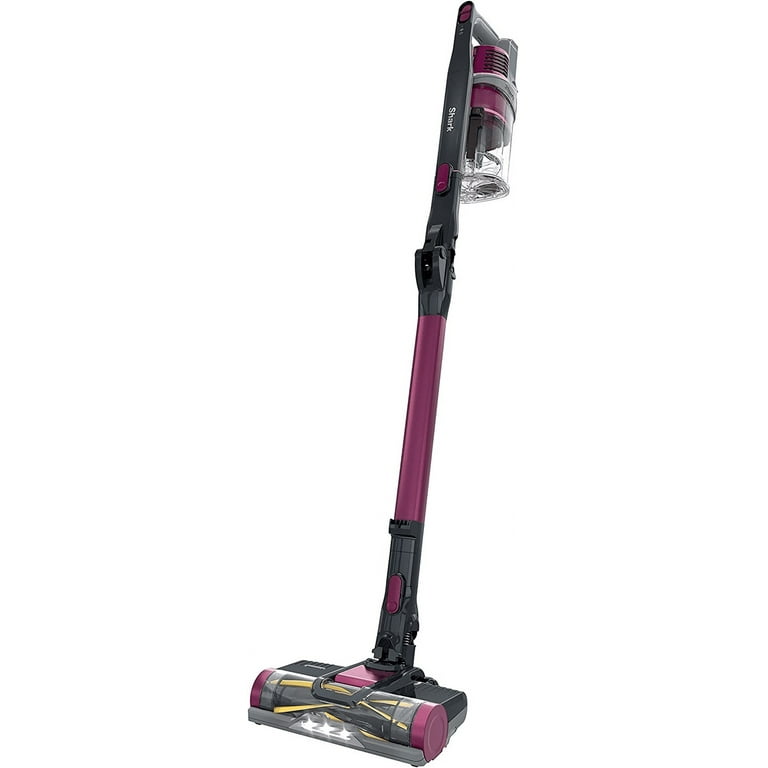
Vacuum cleaners are lifesavers for pet owners, and the Shark Rocket Pet Plus is a popular choice because it promises to handle pet hair and dirt with ease. But what happens when it starts losing suction and isn’t cleaning as well as before? This is frustrating, especially when you expect a reliable clean. The truth is, many users face this problem, and it’s usually fixable with some smart troubleshooting. Let’s dive into the common reasons why your Shark Rocket Pet Plus may be losing suction and how you can get it back to peak performance.
Common Causes Of Suction Loss
Suction problems with the Shark Rocket Pet Plus rarely happen overnight. Most often, the issue builds up over time. If you notice your vacuum is not picking up as much debris or it leaves behind pet hair, these are warning signs. Here are the main reasons your vacuum might be losing suction:
1. Full Or Clogged Dust Cup
The dust cup on the Shark Rocket Pet Plus collects dirt, dust, and pet hair. When it becomes too full, air cannot flow freely. A dust cup packed with debris can block the vacuum’s airflow, causing a noticeable drop in suction. Emptying the cup regularly and making sure it’s reattached properly are simple but effective steps.
2. Dirty Or Blocked Filters
Vacuum cleaners use filters to trap fine dust and allergens. Over time, these filters can become clogged. The Shark Rocket Pet Plus has two main filters—a foam filter and a felt filter—and both need regular cleaning. If you forget to clean or replace them, suction will suffer.
3. Obstructions In The Hose Or Wand
Pet hair, socks, or small toys can easily get stuck in the hose or wand. Even a small blockage can reduce suction dramatically. Sometimes, hair wraps around the inside or debris builds up in corners, which is easy to overlook.
4. Brushroll Blockages
The brushroll (the spinning brush at the bottom) helps lift dirt and pet hair from carpets. If long hair, threads, or string wrap around the brushroll, it can’t spin freely. This leads to poor pickup and weak suction.
5. Leaky Seals Or Connections
The Shark Rocket Pet Plus has several connections—between the wand, floor nozzle, and dust cup. If these are not clicked in tightly or if the seals are damaged, air can escape. Even a small leak reduces suction strength.
6. Incorrect Suction Settings
Some versions have adjustable suction settings or power modes. If the setting is too low, you might think the vacuum is broken, but it’s just using less power than needed for carpets or pet hair.
7. Motor Problems
Rarely, the motor itself may be failing. If you hear unusual noises or smell burning, stop using the vacuum and get professional help. Motor issues usually require a replacement or repair.
How To Fix Suction Loss: Step-by-step Guide
When your Shark Rocket Pet Plus starts to lose suction, don’t panic. In most cases, you can solve the problem at home without special tools. Here’s how to get your vacuum working like new:
1. Empty And Clean The Dust Cup
- Unplug the vacuum for safety.
- Remove the dust cup and empty all contents into the trash.
- Rinse the dust cup with warm water and let it dry completely before reinstalling.
- Make sure no dirt is blocking the cup’s exit port.
2. Wash Or Replace Filters
- Remove both the foam and felt filters.
- Rinse them gently under lukewarm water (no soap needed).
- Squeeze out excess water and let them air dry for at least 24 hours.
- Never put wet filters back in the vacuum.
- For best results, clean filters every month. Replace them every 6-12 months or sooner if worn out.
3. Check And Clear The Hose And Wand
- Detach the hose and wand from the vacuum.
- Shine a flashlight through to check for blockages.
- Use a straightened coat hanger or a flexible brush to gently push out any stuck debris.
- Inspect for cracks or holes that could leak air.
4. Clean The Brushroll
- Flip the vacuum over and remove the brushroll cover (follow the manual for instructions).
- Cut away any hair or string using scissors, being careful not to damage the bristles.
- Spin the brushroll by hand to ensure it moves freely.
5. Inspect All Connections And Seals
- Check the seals and gaskets for cracks or wear.
- Reconnect all pieces firmly, listening for a “click.”
- Replace any damaged seals to prevent air leaks.
6. Set The Correct Suction Power
- Make sure you’re using the right setting for your floor type.
- For deep carpets or heavy pet hair, use the highest suction mode.
7. Listen For Motor Issues
- If you hear grinding, rattling, or a burning smell, stop immediately.
- A failing motor is rare but serious—contact Shark customer support or a qualified repair center.
Table: Common Causes And Solutions For Suction Loss
Here’s a handy comparison of problems, signs, and solutions:
| Problem | Typical Sign | Quick Solution |
|---|---|---|
| Full dust cup | Weak suction, visible debris left behind | Empty and clean dust cup |
| Clogged filters | Fine dust blowing out, loss of suction | Wash or replace filters |
| Blocked hose/wand | Little to no suction, strange noises | Remove blockage |
| Brushroll blockage | Poor carpet cleaning, brush not spinning | Remove hair/thread from brushroll |
| Leaky connections | Whistling sounds, weak suction | Check and tighten seals |
| Wrong suction setting | Poor pickup, especially on carpet | Increase suction power |
| Motor problems | Burning smell, loud noise | Seek professional repair |
How Often Should You Clean Your Shark Rocket Pet Plus?
Keeping your vacuum in good shape is about routine care. Here are some simple schedules to follow:
- Dust cup: Empty after every use
- Filters: Clean every month; replace every 6–12 months
- Brushroll: Check and clean once a week if you have pets
- Hose and wand: Inspect monthly or if you notice suction loss
Table: Maintenance Frequency For Key Parts
| Part | Maintenance Action | Recommended Frequency |
|---|---|---|
| Dust cup | Empty and wash | After every use |
| Foam & felt filters | Wash | Monthly |
| HEPA filter | Replace | Yearly |
| Brushroll | Clean hair/debris | Weekly |
| Hose/wand | Check for blockages | Monthly |
Tips For Preventing Suction Loss
A little prevention goes a long way. Here are some tips to keep your Shark Rocket Pet Plus in top shape:
- Empty the dust cup regularly. Overfilling puts strain on the vacuum.
- Wash filters on schedule. Dirty filters are the #1 cause of weak suction.
- Keep the brushroll clean. Remove hair and threads before they build up.
- Avoid vacuuming large debris. Items like socks or toys can block the hose.
- Store the vacuum properly. Keep it in a dry area to prevent mold in filters.
- Inspect connections and seals. Replace any worn parts quickly.
Two Key Insights Most Owners Miss
Many Shark Rocket Pet Plus users overlook these two points:
- Drying time for filters is critical. Even slightly damp filters can attract more dust, leading to fast clogging and even mold growth. Always let filters dry for a full 24 hours.
- Brushroll end caps can hide hair. Sometimes hair and debris get stuck under the removable end caps of the brushroll, which are easy to ignore. Cleaning here can restore lost suction.
When To Replace Parts
All vacuums need occasional part replacements to work their best. Look for these signs:
- Filters: If they look dark, worn, or stay dirty after washing, it’s time to replace.
- Brushroll: If bristles are missing or the roll won’t spin freely, buy a new one.
- Hose: Cracks or holes mean a new hose is needed.
- Seals: Worn or cracked seals should be replaced to keep strong suction.
Replacement parts are usually available from Shark’s official website or major retailers. Using genuine parts helps maintain suction and protects your warranty.

Table: Signs You Need To Replace Shark Rocket Pet Plus Parts
| Part | Sign to Replace | Effect on Suction |
|---|---|---|
| Filters | Worn, damaged, or won’t clean | Major drop in suction |
| Brushroll | Worn bristles, won’t spin | Poor pickup, especially on carpets |
| Hose | Cracks, holes, or leaks | Air escapes, weak suction |
| Seals/gaskets | Loose, cracked, missing | Loss of suction power |
When To Call For Professional Help
Most suction problems can be fixed at home. But if you’ve checked every part and the vacuum still doesn’t work, it’s time for expert help. Look for these warning signs:
- Unusual noises from the motor
- Burning smells
- Electrical issues (vacuum won’t turn on or keeps shutting off)
Contact Shark’s customer service or a trusted repair center. If your vacuum is under warranty, repairs or replacements may be free. For more tips, the official Shark website offers useful guides and troubleshooting support.

Frequently Asked Questions
Why Does My Shark Rocket Pet Plus Have Weak Suction After Cleaning?
It’s possible that the filters are still damp or not reinstalled correctly. Even a small amount of moisture can block airflow. Make sure filters are fully dry and fitted tightly.
How Often Should I Change The Filters In My Shark Rocket Pet Plus?
For best results, wash the foam and felt filters monthly and replace them every 6–12 months, depending on use. HEPA filters should be replaced yearly.
What Should I Do If My Vacuum Still Has No Suction After Cleaning Everything?
Double-check for hidden blockages in the hose, wand, or brushroll end caps. If everything is clear and suction is still weak, the problem may be with the motor or seals. Contact professional repair service.
Can Pet Hair Damage My Shark Rocket Pet Plus?
Pet hair itself won’t damage the vacuum, but if it wraps tightly around the brushroll or clogs the filters, it can cause the motor to work harder and reduce suction. Regular cleaning prevents this.
Is It Safe To Wash All Parts Of The Shark Rocket Pet Plus?
You can safely wash the dust cup and filters, but never submerge the motor, hose (unless it’s fully detachable and allowed by the manual), or electrical parts in water. Always check the user manual for guidance.
A well-maintained Shark Rocket Pet Plus can give years of reliable cleaning. Regular care, quick troubleshooting, and knowing what to watch for will help you avoid most suction problems and keep your home clean and pet-friendly.

