

Curious about the battery life of robotic vacuum cleaners? You’re not alone.
Many wonder just how long these smart devices can run before needing a recharge. Robotic vacuum cleaners have become a staple in many homes. They offer convenience and efficiency, making daily cleaning a breeze. But, understanding their battery life is crucial for optimal use.
Battery life varies depending on the model and usage. In this blog post, we will explore the factors that affect how long a robotic vacuum cleaner battery lasts. From the type of battery to cleaning modes, we will cover everything you need to know to make the most of your robotic vacuum cleaner. So, let’s dive into the details and help you maximize your cleaning sessions.
Battery Life Expectations
Understanding the battery life of a robotic vacuum cleaner is crucial. It helps you know how long your device will serve you efficiently. Let’s dive into the average lifespan and the factors influencing duration.
Average Lifespan
On average, a robotic vacuum cleaner’s battery lasts between one to three years. This depends on the brand and usage. Regular use can wear out the battery faster.
Most robotic vacuum batteries offer about 60 to 120 minutes of cleaning time per charge. This is usually enough to clean an average-sized home.
| Battery Life | Cleaning Time |
|---|---|
| 1-3 years | 60-120 minutes per charge |
Factors Influencing Duration
Several factors can affect how long your robotic vacuum cleaner’s battery lasts. First, the frequency of use plays a big role. More frequent use means more charging cycles, which shortens battery life.
Second, the type of surface being cleaned matters. Carpets require more power than hard floors. This means the battery drains faster on carpeted surfaces.
Third, the quality of the battery itself is significant. High-quality batteries often last longer. They also provide consistent power, ensuring efficient cleaning.
Lastly, proper maintenance is key. Keeping the vacuum clean and free from debris helps the battery perform better. Make sure to follow the manufacturer’s guidelines for battery care.
- Frequency of use
- Type of surface
- Battery quality
- Proper maintenance

Credit: www.ecovacs.com
Types Of Batteries
Understanding the types of batteries in robotic vacuum cleaners can help you choose the right one. The battery type affects performance, longevity, and charging time. Let’s look at the two main types: Lithium-Ion and Nickel-Metal Hydride.
Lithium-ion
Lithium-Ion (Li-Ion) batteries are common in many modern electronic devices. They are popular for their high energy density and long battery life. Li-Ion batteries are lightweight and charge quickly. This makes them suitable for robotic vacuum cleaners.
Here are some key features of Li-Ion batteries:
- Longer battery life compared to other types
- Faster charging times
- Lightweight and compact
A typical Li-Ion battery can last up to 2-3 years. It depends on how often you use the vacuum. They also have a low self-discharge rate. This means they can hold a charge for a longer period when not in use.
Nickel-metal Hydride
Nickel-Metal Hydride (NiMH) batteries are another option found in some robotic vacuums. They are less expensive than Li-Ion batteries but offer some unique benefits.
Here are some key features of NiMH batteries:
- More affordable than Li-Ion
- Environmentally friendly
- Lower risk of overheating
NiMH batteries tend to have a shorter lifespan. They usually last between 1-2 years. They also take longer to charge and are heavier. This can affect the vacuum’s performance and runtime.
| Battery Type | Pros | Cons |
|---|---|---|
| Lithium-Ion | Long life, fast charging, lightweight | More expensive |
| Nickel-Metal Hydride | Affordable, eco-friendly, safe | Shorter life, longer charging, heavier |
Selecting the right battery type depends on your needs and budget. Li-Ion batteries offer better performance but come at a higher cost. NiMH batteries are more budget-friendly but may need more frequent replacements.
Usage Patterns
Understanding the usage patterns of your robotic vacuum cleaner can help you determine how long its battery will last. Different factors, such as daily use and the size of the area being cleaned, can significantly impact battery life. Below, we will explore these factors in detail to help you make the most out of your robotic vacuum cleaner.
Daily Use Impact
Using your robotic vacuum cleaner daily can shorten its battery life. The battery drains faster due to frequent charging cycles. Consistent use requires the battery to be recharged more often. This leads to a gradual decline in battery capacity over time. To extend battery life, consider using the vacuum cleaner every other day. This reduces the number of charging cycles and prolongs battery longevity.
Effect Of Large Spaces
Cleaning large spaces can also impact battery life. The vacuum cleaner must cover more ground, which means it needs to run longer. Longer cleaning sessions deplete the battery faster. If your home has expansive areas, the vacuum cleaner may not complete cleaning in one charge. In this case, the vacuum will need to return to its charging station more frequently. This increases the number of charge cycles, reducing battery lifespan. To manage this, you can divide large spaces into smaller sections. Clean one section at a time to minimize battery strain.
Maintenance Tips
Maintaining your robotic vacuum cleaner can extend its battery life. Proper care ensures it runs efficiently and lasts longer. Let’s explore some essential maintenance tips.
Proper Charging Habits
Proper charging habits can significantly impact battery life. Always use the original charger provided by the manufacturer. Avoid using third-party chargers, as they may not be compatible. Here are some key points to remember:
- Charge the vacuum in a cool, dry place.
- Avoid overcharging. Remove the vacuum from the charger once fully charged.
- Don’t let the battery completely drain. Recharge it when the battery level is low.
Cleaning And Care
Regular cleaning and care can prevent battery strain. Keep the vacuum’s components in good condition. Here’s how:
| Task | Frequency | Details |
|---|---|---|
| Clean the Brushes | Weekly | Remove hair and debris from brushes. |
| Empty the Dustbin | After Each Use | Ensure the dustbin is empty to avoid overworking the motor. |
| Check the Wheels | Monthly | Inspect wheels for dirt and clean them. |
Following these maintenance tips can help your robotic vacuum cleaner’s battery last longer. Proper charging habits and regular cleaning are key to a healthy battery.
Signs Of Battery Degradation
Understanding the signs of battery degradation in your robotic vacuum cleaner can save you from unexpected interruptions. Batteries lose efficiency over time, but knowing the indicators helps you act before problems escalate.
Decreased Runtime
One of the first signs of battery degradation is a decreased runtime. If your robotic vacuum cleaner used to run for 90 minutes but now only lasts 60 minutes, the battery is likely losing its capacity.
Keep track of the runtime duration. Create a simple log:
| Week | Runtime (minutes) |
|---|---|
| 1 | 90 |
| 4 | 80 |
| 8 | 70 |
| 12 | 60 |
Noticing a pattern of decreasing runtime helps you identify battery issues early.
Frequent Recharging
Another sign of battery degradation is the need for frequent recharging. Initially, your vacuum might clean your entire home on a single charge. Over time, if it needs to recharge multiple times for the same area, the battery is deteriorating.
Consider these steps to monitor recharging frequency:
- Note how often the vacuum returns to the dock
- Compare with past recharging patterns
- Assess if cleaning performance is consistent
If your vacuum’s performance drops while recharging needs increase, it is a clear sign of battery degradation.

Credit: www.amazon.com
Battery Replacement
The battery life of a robotic vacuum cleaner is a key concern for many users. Over time, the battery may not hold a charge as well as it used to. This is where battery replacement becomes important. Knowing when to replace the battery and how to choose the right one can keep your vacuum running smoothly.
When To Replace
You may notice your robotic vacuum cleaner losing power quickly. It might not finish cleaning tasks as it did before. These are signs that the battery needs replacement. Typically, robotic vacuum batteries last between one to two years. Frequent usage and charging cycles can shorten this lifespan.
A good rule of thumb is to replace the battery if you see a significant drop in performance. If your vacuum fails to return to its charging dock, this is another sign. Regular maintenance checks can help you spot these issues early.
Choosing The Right Battery
Selecting the right battery is crucial for your vacuum’s performance. Always refer to the user manual for recommendations. Ensure the battery type and voltage match the original. Some brands offer high-capacity batteries for longer runtime.
Consider purchasing from reputable sources to avoid counterfeit products. Check reviews and ratings to ensure quality. Investing in a good battery can extend your vacuum’s life and efficiency.
Maximizing Battery Efficiency
Maximizing battery efficiency in robotic vacuum cleaners is essential for optimal performance. By understanding how to save energy and schedule cleanings, you can extend battery life. This ensures your vacuum operates effectively for longer periods.
Energy-saving Modes
Many robotic vacuum cleaners come with energy-saving modes. These modes reduce power consumption. They adjust the vacuum’s speed and suction power. Use these modes during regular maintenance cleanings. This can help conserve battery life.
Switch to maximum power only for deep cleaning sessions. This balance keeps the battery from draining quickly. Energy-saving modes are especially useful for daily upkeep. They help maintain a clean home without exhausting the battery.
Optimal Cleaning Schedules
Set cleaning schedules that match your home’s needs. Frequent, shorter cleanings are better for the battery. Long cleaning sessions can drain the battery fast. Schedule cleanings when dirt levels are lower. This helps the vacuum work efficiently.
Consider cleaning every other day. This routine keeps your home clean and reduces battery strain. Use the vacuum’s scheduling feature to set these times. Consistent, manageable cleaning sessions help prolong battery life.
Expert Recommendations
Choosing a robotic vacuum cleaner can be a daunting task. Battery life is a crucial factor. Experts suggest that you consider several aspects. These include brand reliability, user experiences, and longevity. In this section, we delve into expert recommendations.
Top Brands For Longevity
Some brands stand out for their battery life. Here are the top brands known for their long-lasting batteries:
- iRobot Roomba: Known for its high-quality build and reliable battery life. Most models offer up to 2 hours of cleaning on a single charge.
- Eufy RoboVac: Offers a good balance between price and battery life. Users report up to 100 minutes of cleaning time.
- Neato Robotics: Known for robust performance and long battery life. Some models last up to 120 minutes per charge.
- Shark Ion: Provides strong suction and decent battery life. Most models offer around 90 minutes of cleaning.
User Reviews And Experiences
User reviews provide valuable insights into battery performance. Many users highlight the following points:
- Consistency: A consistent battery life is crucial. Users prefer vacuums that maintain their performance over time.
- Charging Time: Faster charging times are a plus. Users favor models that recharge quickly.
- Durability: A durable battery is essential. Users appreciate batteries that last for years without significant degradation.
Here are some experiences shared by users:
- “My Roomba has been running strong for over two years. Still gets 90 minutes on one charge.”
- “Eufy’s battery life is impressive for the price. I get a full 100 minutes easily.”
- “Neato’s battery hasn’t lost its touch even after a year of daily use.”
- “Shark Ion recharges quickly, which is great. I can run it twice a day.”
In summary, expert recommendations emphasize brand reliability, user experiences, and battery longevity. Following these tips can help you choose the best robotic vacuum cleaner for your needs.
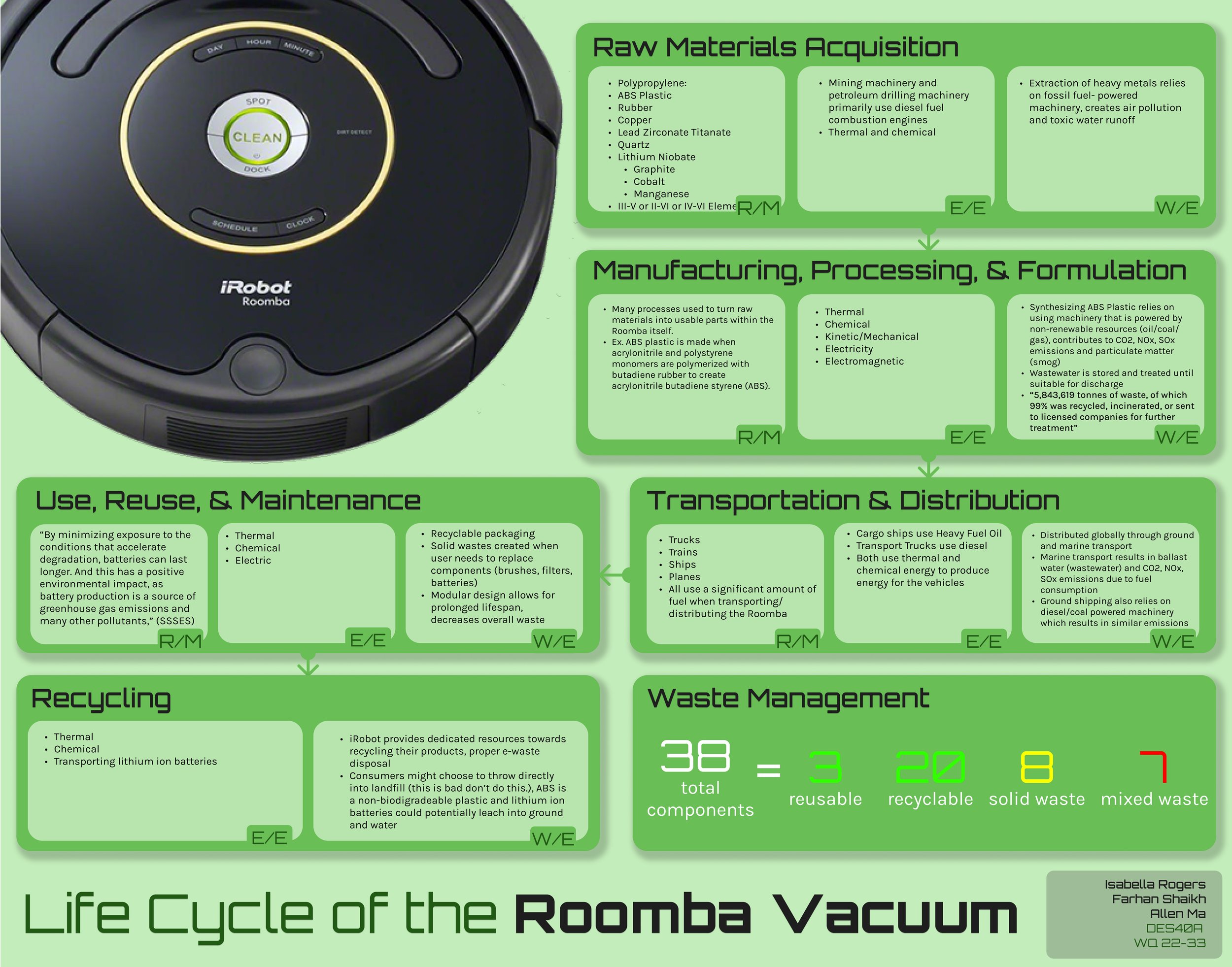
Credit: www.designlife-cycle.com
Frequently Asked Questions
How Long Does A Robotic Vacuum Battery Last?
A robotic vacuum battery typically lasts 60 to 120 minutes per charge. This depends on the model and usage.
How Often Should I Charge My Robot Vacuum?
Charge your robot vacuum after every cleaning cycle. This ensures it’s ready for the next use.
Can I Replace My Robot Vacuum Battery?
Yes, most robotic vacuums have replaceable batteries. Follow the manufacturer’s instructions for replacement.
How To Extend Robot Vacuum Battery Life?
To extend battery life, clean the brushes and filters regularly. Avoid overcharging and store in a cool place.
Conclusion
A robotic vacuum cleaner’s battery life varies by model and usage. Generally, batteries last between one to two hours. Regular maintenance can extend battery life. Always follow the manufacturer’s guidelines. Replace batteries when performance drops. Investing in a quality robot vacuum can save time and effort.
Prioritize battery life when choosing your device. This ensures longer cleaning sessions and better efficiency. Happy cleaning!

