

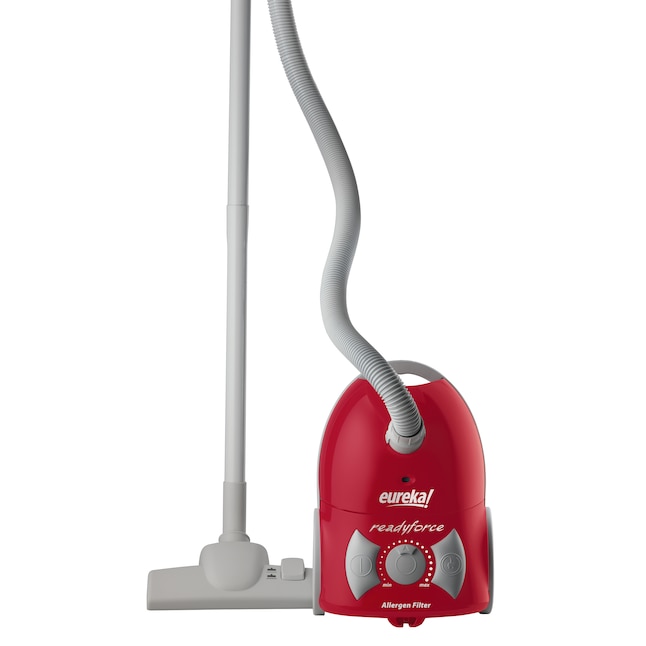
Eureka ReadyForce vacuum problems usually come from clogs, dirty filters, brush issues, or airflow loss.
If you are dealing with Eureka ReadyForce Vacuum Troubleshooting, you are in the right place. I have seen this vacuum act up in the same few ways over and over, and the good news is that most fixes are simple once you know where to look. In this guide, I’ll walk you through the most common causes, the fastest checks, and the practical fixes that can save you time, money, and a lot of frustration.
Why your Eureka ReadyForce vacuum is not performing well
When a vacuum loses suction, sounds odd, or stops working right, it usually means one of a few parts is blocked, dirty, or worn out. The Eureka ReadyForce vacuum is no different. In my experience, people often assume the motor is failing when the real issue is much smaller, like a full dust cup or a filter packed with fine dust.
A vacuum is a lot like breathing through a straw. If air cannot move in and out freely, performance drops fast. That is why Eureka ReadyForce Vacuum Troubleshooting starts with airflow, brush movement, and power checks.
Common signs include:
- Weak suction
- Strange noise
- Brush roll not spinning
- Vacuum shutting off
- Dust blowing back into the room
- Hard-to-push movement on carpet
These symptoms point to a few likely trouble spots, and most can be checked at home with basic care.
Basic Eureka ReadyForce vacuum troubleshooting checks
Before opening anything up or assuming the worst, start with the basics. I always recommend these first because they solve a surprising number of problems.
Check the power source
Make sure the vacuum is plugged in firmly and the outlet works. If the machine has no power at all, test the outlet with another device. Also inspect the cord for cuts, bends, or damage.
If your model uses a reset or thermal protection feature, let it cool down before trying again. Vacuums can shut off when they overheat, especially after long cleaning sessions.
Empty the dust cup
A full dust cup can choke airflow and make the vacuum feel weak. Even if the cup does not look packed tight, fine dust can block movement inside the chamber.
Try to empty it after each use. That habit keeps performance steady and makes Eureka ReadyForce Vacuum Troubleshooting much easier later.
Inspect the filter
Dirty filters are one of the biggest causes of weak suction. If the filter is clogged with dust, the motor has to work harder, and airflow drops.
Check whether your filter is washable or replaceable. Let washable filters dry fully before putting them back. A damp filter can cause odor and reduce suction.
Look for blockages
Clogs can hide in the hose, wand, floor nozzle, or around the brush area. Small debris like hair ties, paper bits, and pet hair can build up in places you do not notice right away.
Use a flashlight and check the full air path. If you find a clog, remove it carefully before testing the vacuum again.
How to fix weak suction on a Eureka ReadyForce vacuum
Weak suction is the number one complaint I hear with upright vacuums. It usually comes down to airflow problems, not a serious failure.
Start with the dust cup and filter, then move to the hose and floor head. That order matters because airflow issues often stack up.
Steps to restore suction
- Empty the dust cup completely.
- Clean or replace the filter.
- Remove and clear the hose.
- Check the intake opening for stuck debris.
- Inspect the nozzle and brush area for tangles.
- Test the vacuum on hard flooring first.
If suction improves on hard floors but not carpet, the brush roll or height setting may be the issue. If suction stays low everywhere, you likely still have a blockage or airflow restriction.
What I have learned from real use
One mistake I see people make is washing the filter and using it too soon. That traps moisture and can make the vacuum smell musty. I’ve done this once myself, and the machine sounded weaker until the filter dried fully.
Another lesson is not to trust the dust cup by eye alone. Fine dust can coat the inside like flour in a bowl, and that thin layer can hurt suction more than you think.
What to do if the brush roll is not spinning
If the brush roll stops moving, the vacuum may still turn on, but it will clean poorly on carpet. This is a common Eureka ReadyForce Vacuum Troubleshooting issue, especially when hair and string wrap tightly around the roller.
Check for tangled debris
Turn off and unplug the vacuum before touching the brush roll. Remove hair, thread, pet fur, and string from the roller and end caps.
Use scissors carefully if needed, but avoid cutting the bristles. Damaged bristles can reduce pickup on carpets.
Inspect the belt
Many upright vacuums use a belt to power the brush roll. If the belt is loose, stretched, or broken, the brush will not spin correctly.
Signs of belt trouble include:
- Burning smell
- Brush not turning
- Loud squealing
- Intermittent brushing on carpet
If the belt looks worn, replace it with the correct part for your model. This is one of the most useful fixes I have seen in everyday vacuum repair.
Check the brush housing
Sometimes the brush roll is fine, but the housing is packed with hair and dust. Clean the cavity around the brush and test again.
If the roller spins freely by hand but not during use, the problem is usually belt-related or tied to a jammed end cap.
How to handle strange noises during operation
Odd sounds often tell you where the problem is. A high-pitched squeal can mean belt trouble. A rattling sound may mean something hard is stuck in the hose or nozzle.
Common noise causes
- Loose brush roll
- Jammed debris
- Worn belt
- Fan obstruction
- Cracked housing parts
If the vacuum makes a grinding sound, stop using it right away. That kind of noise can mean a moving part is damaged or rubbing where it should not.
I always tell people to treat new noises like a warning light in a car. If you catch the issue early, the repair is usually cheap and simple.
How to fix overheating and sudden shutoff
Overheating is common when airflow is blocked or the vacuum is pushed too long without a break. Many vacuums have thermal protection that shuts the unit off to protect the motor.
Main causes of overheating
- Full dust cup
- Clogged filter
- Blocked hose
- Dirty brush roll
- Long cleaning sessions on thick carpet
If the vacuum shuts off, unplug it and let it cool for at least 30 minutes. Then clean the filters, clear the airflow path, and test again.
A vacuum motor is like a runner trying to breathe through a blocked nose. It can work for a while, but it will wear out fast if the airflow stays restricted.
How to clean the Eureka ReadyForce vacuum the right way
Regular cleaning is the best way to prevent repeat problems. In my experience, steady maintenance cuts troubleshooting time in half.
Routine care checklist
- Empty the dust cup after each use
- Clean filters based on the manual
- Remove hair from the brush roll weekly
- Check the hose for blockages
- Wipe the outside housing with a dry cloth
- Replace worn parts when needed
If you vacuum pet hair, you may need to clean the brush roll more often. Pet hair wraps around the roller quickly and can slowly drag performance down.
Helpful maintenance tips
- Keep spare filters on hand if your model uses washable ones
- Let all washed parts dry fully before reassembly
- Store the vacuum in a dry place
- Do not overfill the dust cup
- Avoid vacuuming large debris that can clog the intake
Small habits matter. A few minutes of care can prevent a major performance drop later.

When the problem is likely a part failure
Most Eureka ReadyForce Vacuum Troubleshooting issues are simple, but sometimes a part really is worn out. The key is knowing when the machine has moved from cleaning trouble to repair trouble.
Parts that can wear out
- Belt
- Brush roll
- Filter
- Hose
- Dust cup latch
- Motor thermal protection system
If you have already cleaned the vacuum and the issue stays the same, inspect these parts more closely. A cracked hose or broken latch can create air leaks that reduce suction.
Signs you may need replacement parts
- Suction stays weak after cleaning
- Brush roll still will not spin
- Vacuum shuts off often even when clean
- Plastic parts are cracked
- Motor smell or electrical odor is present
If you hear a sharp burning smell, stop using the vacuum. That could mean the belt is slipping or the motor is under stress.
Simple troubleshooting by symptom
Sometimes it helps to match the symptom to the likely cause. This makes Eureka ReadyForce Vacuum Troubleshooting faster and less stressful.
Vacuum has no suction
- Empty the dust cup
- Clean the filter
- Check for hose clogs
- Inspect the floor nozzle
- Look for cracks in the air path
Vacuum turns on but brush does not spin
- Remove tangled hair
- Check the belt
- Make sure the brush is seated properly
- Clean the brush chamber
Vacuum shuts off after a few minutes
- Let it cool down
- Clean filters
- Clear all blockages
- Check for motor strain
Vacuum smells bad
- Wash or replace the filter
- Empty the cup after use
- Clean hidden dirt in the hose
- Check for wet debris left inside
These simple symptom checks often point you straight to the fix without wasting time.
Practical tips from real-world use
After working through many vacuum issues over the years, I’ve learned that people usually skip the easiest step first. They jump to the belt, motor, or brush roll before checking the filter. That is why a calm, step-by-step approach works best.
A few real-world lessons stand out:
- Always unplug the vacuum before inspecting moving parts
- Do not force parts apart if they resist
- Dry washable filters fully, even if that means waiting overnight
- Check the hose from both ends because clogs can hide in the middle
- Replace damaged parts sooner rather than later
I also learned that cleaning the vacuum on a schedule saves more time than emergency fixes. Think of it like brushing your teeth. A little routine care prevents a much bigger problem later.
When to contact support or consider repair help
Some problems are not safe or practical to fix at home. If the vacuum has electrical damage, a burnt smell, or repeated shutdowns after cleaning, professional help may be the better choice.
Reach out for repair support if:
- The cord is damaged
- The motor does not start at all
- The vacuum sparks
- There is a strong burning odor
- The machine loses power repeatedly
If the vacuum is still under warranty, check that coverage before buying parts. That can save you money and avoid unnecessary repairs.
Frequently Asked Questions of Eureka ReadyForce Vacuum Troubleshooting
Why does my Eureka ReadyForce vacuum have weak suction?
Weak suction usually comes from a clogged filter, full dust cup, or blocked hose. Start with those three areas, since they cause most airflow problems.
Why is the brush roll not spinning on my Eureka ReadyForce vacuum?
A tangled brush, worn belt, or jammed housing is usually the cause. Unplug the vacuum first, clean the roller, and inspect the belt for damage.
Why does my vacuum shut off after a few minutes?
The vacuum may be overheating because airflow is blocked or the filter is dirty. Let it cool down, then clean the cup, filter, and hose before testing again.
How often should I clean the filter?
That depends on use, but many homes benefit from cleaning it every few weeks. If you have pets or heavy dust, you may need to do it more often.
Why does my Eureka ReadyForce vacuum smell bad?
A bad smell often means dust, pet hair, or moisture is trapped inside the vacuum. Empty the dust cup, clean the filter, and let every washable part dry fully before reuse.
Can I wash every part of the vacuum?
No, not every part is washable. Usually the dust cup and some filters can be cleaned with water, but the motor housing and electrical parts should never be exposed to moisture.
Conclusion
Eureka ReadyForce Vacuum Troubleshooting is usually much easier than it seems. Most issues come from basic airflow problems, tangled brush rolls, dirty filters, or a worn belt rather than a major failure. Once you know the common signs and fixes, you can solve many problems at home with confidence.
The best approach is simple: start with the dust cup, move to the filter, check the hose, then inspect the brush roll and belt. That step-by-step habit keeps your vacuum running better and helps you avoid unnecessary repairs.
If this guide helped you, try these fixes on your own machine and see which one brings it back to life. For more practical vacuum care tips, keep learning, stay consistent, and do not wait until a small issue becomes a big one.


1 Comment
Pingback: 12 Best ICU Hospital Bed With Adjustable Height 2026: Top Picks Reviewed - Vacuum Cleaner Tips