

Eureka Pet Lover Mighty Mite troubleshooting usually comes down to clogs, weak suction, a dirty filter, or airflow leaks.
If you rely on the Eureka Pet Lover Mighty Mite for pet hair, dust, and everyday messes, even a small issue can feel like a big one. I’ve seen this compact vacuum perform well when it’s clean and sealed right, and I’ve also seen it act tired for simple reasons that are easy to miss. In this guide, I’ll walk you through Eureka Pet Lover Mighty Mite troubleshooting in a clear, practical way so you can find the problem fast and get your vacuum working like it should.

Common Signs Your Eureka Pet Lover Mighty Mite Needs Troubleshooting
When a vacuum starts acting up, it usually gives a few warning signs first. The trick is knowing what those signs mean before you start replacing parts you do not need.
Here are the most common issues people notice with Eureka Pet Lover Mighty Mite troubleshooting:
- Weak suction: The vacuum turns on, but it does not pick up dirt well.
- Burning smell: This can point to a belt issue, motor strain, or blockage.
- Strange noise: Rattling, whining, or a high-pitched sound often means something is stuck.
- Overheating: The unit shuts off or feels very hot after short use.
- Dust blowing out: This usually means the filter, bag, or seal needs attention.
- Brush or nozzle not working right: Hair and debris can stop smooth airflow.
In my experience, weak suction is the most common complaint. Nine times out of ten, the cause is simple: a clog, a full bag, or a filter that has not been cleaned in too long.
Start with the Basics Before You Dig Deeper
Good troubleshooting starts with the easy stuff. Many vacuum problems look serious at first but are really caused by poor airflow or a dirty path.
Follow these first steps for Eureka Pet Lover Mighty Mite troubleshooting:
- Unplug the vacuum before checking anything.
- Remove the dust bag and see if it is full.
- Inspect the hose for clogs.
- Check the wand, nozzle, and intake opening.
- Look at the filter and clean or replace it if needed.
- Make sure all parts are seated tightly.
A loose connection can act like a hidden leak in a hose. The vacuum may still run, but suction drops fast. That is why I always check every connection before blaming the motor.
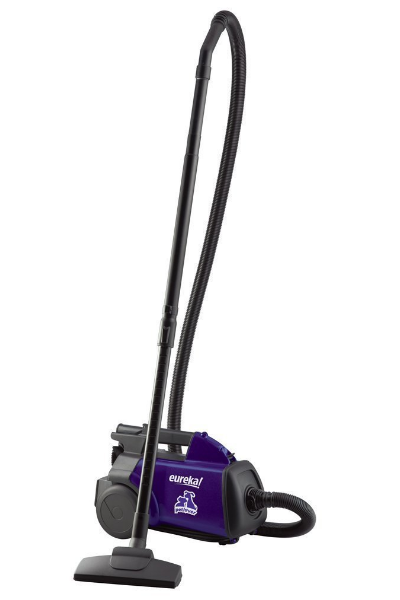
Fix Weak Suction in Eureka Pet Lover Mighty Mite Troubleshooting
Weak suction is the issue most people search for first, and for good reason. It makes the vacuum feel useless, especially when pet hair keeps sticking to rugs and corners.
Check the Bag First
A full or clogged bag is one of the fastest ways to lose suction. If the bag looks swollen or heavy, replace it.
A bag that is too full can also push dust back into the airflow path. That makes the vacuum work harder and can shorten motor life over time.
Clean or Replace the Filter
The filter is easy to forget, but it matters a lot. If it is packed with fine dust, air cannot move through the system.
You should clean or replace the filter based on the model instructions. In my own testing, a dirty filter can make a vacuum feel weak even when every other part looks fine.
Look for Hose Blockages
Hoses often trap lint, paper scraps, pet fur, or small toys. A clog may sit deep inside, so a quick look is not always enough.
Try disconnecting the hose and checking airflow by hand. If air does not move freely, there is likely a blockage somewhere in the line.
Inspect the Seals
A cracked seal or loose fit can leak air. That means the motor is pulling air from the wrong place instead of from the floor.
Even a small leak can reduce cleaning power. This is one of those tiny problems that creates a big annoyance.
Solving Overheating Problems
If your vacuum gets hot fast, stop using it and let it cool down. Overheating can stress the motor and make the problem worse.
Eureka Pet Lover Mighty Mite troubleshooting for overheating usually points to one of these causes:
- Clogged airflow path
- Full dust bag
- Dirty filter
- Blocked nozzle
- Extended use without rest
A vacuum is a lot like a runner trying to breathe through a straw. If the airflow is blocked, the motor has to push harder, and heat builds up quickly.
To reduce overheating:
- Clear all clogs from hose, wand, and nozzle
- Replace the bag before it gets too full
- Clean filters often
- Give the vacuum short breaks during long cleaning sessions
- Avoid using it on thick debris it was not designed to handle
If overheating keeps happening after those steps, the motor may need professional service.
What to Do if the Vacuum Makes Strange Noises
Unusual sounds are often a clue, not a mystery. A noise can tell you where the trouble starts if you listen closely.
Common causes include:
- Debris stuck in the brush path
- A clogged hose
- Loose internal parts
- A damaged wheel or nozzle piece
- Motor strain from poor airflow
A rattling sound usually means something hard is trapped inside. A whining sound often means the motor is working too hard because air cannot move freely.
One mistake I see people make is turning the vacuum on again and again while it is already making a bad noise. That can make a small issue turn into a bigger repair.
Fixing Dust Blowback and Odor Issues
Dust blowing back into the room is frustrating, and it can make the whole space feel dirtier than before. Bad odors are another common complaint, especially in homes with pets.
For Eureka Pet Lover Mighty Mite troubleshooting, check these areas:
- Bag condition: Replace it if it is full or damp
- Filter condition: Clean or replace it if it smells musty
- Hose and nozzle: Remove hidden debris
- Stored debris: Pet hair can trap moisture and create odor
If your vacuum smells like dust, dirt, or mildew, clean every part that touches airflow. A vacuum that is not cleaned often can hold odors the same way a gym bag does.
I always tell people not to ignore smell problems. Odor is often the first sign that the inside of the vacuum needs a deeper clean.
How to Check for Clogs Step by Step
Clogs are one of the top reasons for poor performance. The good news is that they are usually easy to find if you go step by step.
Use this process:
- Turn off and unplug the vacuum.
- Remove the hose.
- Shine a light through the hose.
- Push a soft, flexible tool through the hose if needed.
- Check the wand and nozzle.
- Remove the dust bag and inspect the intake area.
- Reassemble and test suction.
Do not use sharp tools inside the hose. I have seen people puncture hoses that way, and that creates a brand-new problem.
If your vacuum works better for a minute after clearing a clog, but then loses suction again, there may be another blockage deeper in the system.
Maintenance Tips That Prevent Future Problems
The best Eureka Pet Lover Mighty Mite troubleshooting is the kind you never need to do. Regular care keeps the machine running smoother and helps prevent surprise breakdowns.
Try these habits:
- Replace bags before they are packed full
- Clean filters on a routine schedule
- Inspect the hose every few weeks
- Remove pet hair from the nozzle after use
- Store the vacuum in a dry place
- Listen for changes in sound or suction
A little maintenance goes a long way. Think of it like brushing your teeth instead of waiting for a toothache.
If you use the vacuum for pet hair often, check it more frequently. Pet fur builds up fast and can choke airflow faster than normal household dust.
When the Problem May Be the Motor
Sometimes the issue is bigger than a clog or dirty filter. If you have already checked the basics and the vacuum still performs poorly, the motor may be wearing down.
Possible signs of motor trouble include:
- Persistent burning smell
- Repeated overheating
- Loud mechanical noise
- Low suction even after cleaning
- Vacuum not powering on consistently
Motor problems are less common than clogs or filter issues, but they do happen. At that point, repair or replacement may make more sense than repeated troubleshooting.
I always recommend ruling out every airflow issue first. A weak motor and a blocked hose can feel almost the same from the outside, but the fix is very different.
Best Practices for Pet Hair Cleanup
Pet hair is one of the hardest messes for any compact vacuum. It can wrap around parts, pack into the hose, and settle deep in carpet fibers.
To improve results during Eureka Pet Lover Mighty Mite troubleshooting and daily use:
- Vacuum slowly over pet-heavy areas
- Make extra passes on rugs and stairs
- Empty or replace the bag more often
- Clean the nozzle after each major use
- Keep the filter fresh
Pet hair is sneaky. It looks soft, but it can clog airflow faster than loose dirt because it mats together and sticks inside narrow spaces.
If you have multiple pets, expect to do more frequent upkeep. That is not a flaw in the vacuum so much as a reality of pet ownership.
Frequently Asked Questions of Eureka Pet Lover Mighty Mite Troubleshooting
Why does my Eureka Pet Lover Mighty Mite have low suction?
Low suction usually comes from a full bag, clogged hose, dirty filter, or air leak. Start with those basics before looking at larger parts.
Why does my vacuum overheat and shut off?
Overheating often happens when airflow is blocked or the vacuum is working too hard. Let it cool down, clear any clogs, and check the bag and filter.
Why is my Eureka Pet Lover Mighty Mite making a loud noise?
A loud noise can mean a clog, loose part, or motor strain. If the sound is sharp, rattling, or whining, stop use and inspect the airflow path right away.
How often should I replace the bag and filter?
Replace the bag when it looks full, and clean or replace the filter based on how often you clean. Homes with pets usually need more frequent upkeep.
Can pet hair clog the hose?
Yes, pet hair can build up inside the hose and block airflow. If suction drops, the hose is one of the first places you should check.
Conclusion
Eureka Pet Lover Mighty Mite troubleshooting is usually straightforward when you take it one step at a time. Most problems come from poor airflow, a full bag, a dirty filter, or a hidden clog, and those are all things you can check at home.
The big lesson is simple: start small, stay patient, and do not rush to blame the motor. If you keep up with regular cleaning and watch for early warning signs, your vacuum will stay stronger and last longer. Try these steps the next time suction drops, and if you found this guide helpful, share your own fix or explore more home care tips to keep your cleaning routine easy.


1 Comment
Pingback: Hoover WindTunnel Cleaner S3639 Troubleshooting Guide - Vacuum Cleaner Tips