

Most Roomba i3+ EVO issues come from power, app, bin, brush, or docking problems.
If your iRobot Roomba i3+ EVO robot vacuum not working, you are not alone. I’ve seen this model act up in the same few ways over and over, and the good news is that most fixes are simple once you know where to look. In this guide, I’ll walk you through the real causes, the best troubleshooting steps, and the mistakes that often make the problem worse so you can get your Roomba back on track fast.

Common reasons your iRobot Roomba i3+ EVO robot vacuum not working
When an iRobot Roomba i3+ EVO robot vacuum not working, the problem usually falls into one of a few buckets: power, charging, connectivity, cleaning parts, or software. In my experience, people often think the vacuum is “dead,” when it is really just stuck in a small issue like a dirty charging contact or a jammed brush.
Here are the most common causes:
• The battery is drained or not charging properly
• The Clean Base or dock is not making a good connection
• Debris is stuck in the brush or wheel assembly
• The dust bin is full, missing, or not seated right
• The app, Wi-Fi, or firmware is causing a sync issue
• Sensors are dirty, which confuses navigation and docking
• The robot is in an error state after a clogged path or brush jam
A helpful way to think about it is this: the Roomba is like a busy worker with lots of tiny tasks. If one small part is off, the whole job can stall.
First steps to try when the Roomba i3+ EVO is not working
Before opening anything up, start with the basics. I’ve found that half the time, the issue clears up after a simple reset, a clean dock contact, or a better battery charge.
Try these steps in order:
-
Check the battery and charge time
Place the robot on the charger and leave it there for at least 2 to 3 hours. If the battery was deeply drained, it may need more time before it responds. -
Confirm the dock has power
Look for the dock light or power indicator. If the base is unplugged or the outlet is off, the robot will never charge correctly. -
Clean the charging contacts
Wipe the metal charging contacts on both the robot and the Clean Base with a dry cloth. Even a thin layer of dust can block charging. -
Empty and reseat the dust bin
Make sure the bin is fully locked in place. If it is loose or full, the robot may stop or refuse to run. -
Restart the robot
A restart can clear temporary software glitches. On many Roomba models, holding the buttons long enough to reboot can help, though the exact method may vary by model version.
If your iRobot Roomba i3+ EVO robot vacuum not working after these checks, move to a deeper inspection.
Check the battery and charging system
Battery problems are one of the top reasons an iRobot Roomba i3+ EVO robot vacuum not working. If the robot does not turn on, dies quickly, or keeps returning to the base, the battery may be weak, not seated well, or failing.
Things to check:
• Let it charge fully before testing again
• Make sure the battery compartment is clean and dry
• Inspect the charging contacts for dust or corrosion
• Use the original dock and power adapter if possible
• Watch for repeated docking without a full charge, which can point to battery wear
In real use, I’ve noticed that a battery issue often looks like a navigation problem at first. The robot starts a job, then gives up early, which makes people chase the wrong fix.
If the battery is old, replacement may be the most practical answer. Rechargeable lithium-ion batteries lose capacity over time, and that is normal wear, not a defect.
Inspect the brushes, wheels, and suction path
If your iRobot Roomba i3+ EVO robot vacuum not working during cleaning, the brushes and wheels are the next place to look. Hair, string, pet fur, and lint can jam the brush roll or side brush and make the vacuum stop.
Check these parts carefully:
• Main brush roll
• Side brush
• Front caster wheel
• Drive wheels
• Suction inlet and air path
• Bin filter
What I tell people is simple: if a vacuum cannot breathe or roll, it cannot clean. It’s like trying to run with shoelaces tied together.
Remove tangled hair from the brush. Clean the wheel wells with a dry cloth. If the robot has a clogged suction channel, clear it gently using your fingers or a soft brush.
Make sure the Clean Base is working
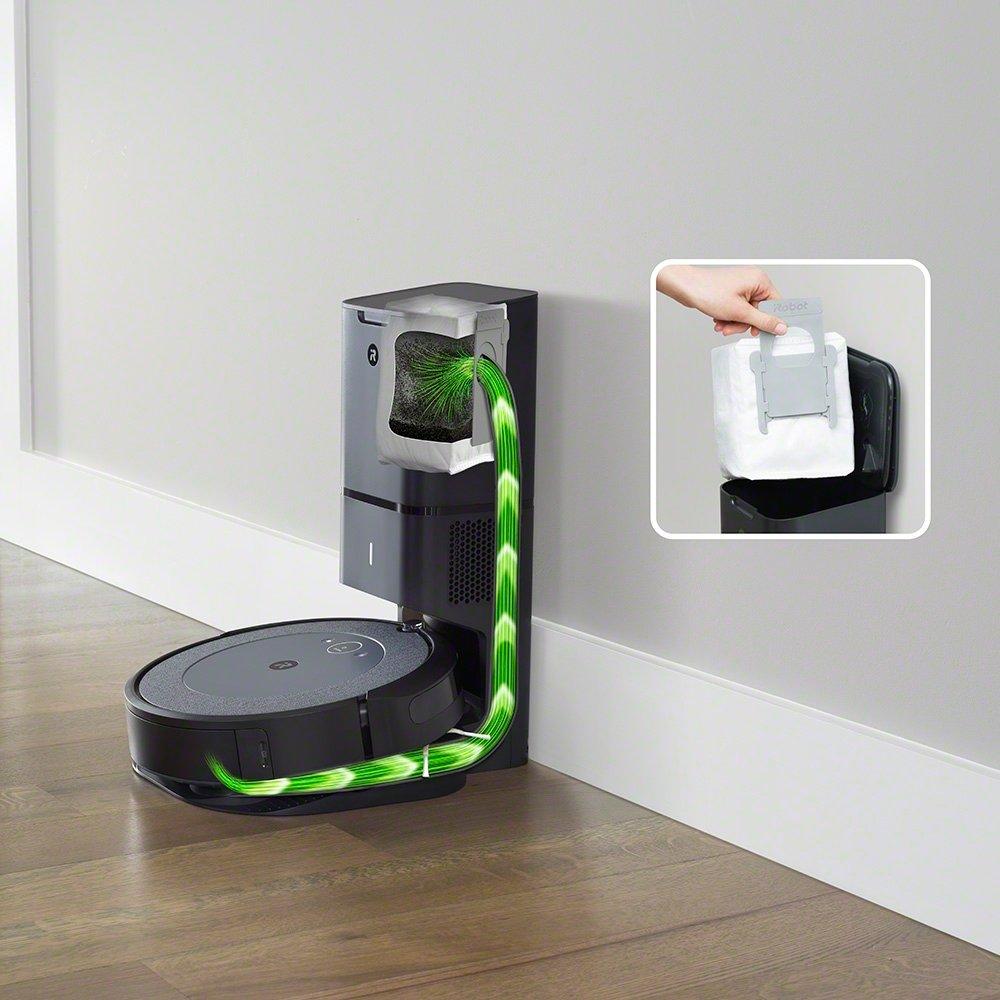
Since the i3+ EVO uses a self-emptying base, problems with the Clean Base can make the whole system seem broken. Sometimes the robot itself is fine, but the base is not emptying, charging, or recognizing the vacuum correctly.
Check the following:
• The base is plugged in securely
• The outlet has power
• The dust bag is not full
• The bag is installed correctly
• The air path in the base is not blocked
• The robot docks fully and sits straight on the contacts
If the self-emptying feature stops, the robot may still clean manually, but the convenience is gone. That’s one reason people notice the iRobot Roomba i3+ EVO robot vacuum not working only after the bin fills up or the base starts making strange noises.
Fix app, Wi-Fi, and firmware issues
Sometimes the vacuum is physically fine, but the app makes it look broken. Connection issues are a common frustration, especially after router changes, app updates, or home network glitches.
Try these fixes:
• Confirm your Wi-Fi is 2.4 GHz if your model requires it
• Move the dock closer to the router for pairing tests
• Update the iRobot app
• Check for firmware updates
• Sign out and sign back in to the app
• Reconnect the robot if it disappears from the app
I’ve seen this happen after a simple router reset. The robot is still alive, but the app loses the connection and makes it seem like the iRobot Roomba i3+ EVO robot vacuum not working.
If the app shows errors, do not assume the hardware is dead. Always test the robot’s buttons and charging behavior first.
Clean the sensors and contact points
Dirty sensors are a sneaky cause of trouble. The Roomba relies on sensors to detect walls, floors, cliffs, dirt, and the dock. When those sensors get dusty, the robot can behave in strange ways.
Clean these areas:
• Cliff sensors underneath
• Front bumper area
• Docking sensors
• Charging contacts
• Camera or navigation windows if present on your unit
Use a dry microfiber cloth. Avoid spraying liquid directly onto the robot. Moisture can create new issues, and I’ve seen people turn a small sensor problem into a bigger repair just by using too much cleaner.
A clean robot is often a better robot. That sounds almost too simple, but it is true more often than not.
Reset and recover from error states
If the iRobot Roomba i3+ EVO robot vacuum not working after a clog or jam, it may be stuck in an error state. The robot can hold onto that state until it is restarted or power-cycled.
What to do:
- Remove the robot from the dock
- Clear all visible debris and tangles
- Put it back on the charger
- Restart it using the recommended button sequence for your model
- Test it in a small area first
If it still fails, remove the battery for a minute only if your model instructions allow it. Always follow the manufacturer’s care guide, because forcing parts can cause damage.
A reset is not magic, but it often works like a fresh start after a long, noisy day.
When the robot still will not work
If you have gone through the basics and the iRobot Roomba i3+ EVO robot vacuum not working, the issue may be hardware-related. That could mean a worn battery, failing motor, bad charging dock, or internal board problem.
At that point, consider:
• Testing with a different outlet
• Trying a full manual clean of brushes and wheels
• Checking for visible damage to the dock cable
• Looking for unusual blinking lights or error codes
• Contacting customer support if the unit is under warranty
From my experience, repeated dock failure or sudden power loss after a full charge often points to a battery or charging path issue. If the vacuum is newer, warranty service is usually the smartest move.
How to prevent future problems
The best fix is the one you do not need to repeat. Regular care can keep your iRobot Roomba i3+ EVO robot vacuum working longer and more reliably.
Use these habits:
• Empty and inspect the bin often
• Remove hair from brushes every week
• Wipe charging contacts once in a while
• Keep cords, socks, and loose items off the floor
• Clean sensors monthly
• Update the app and firmware when needed
• Replace worn filters and brushes on schedule
This is the kind of maintenance that saves time later. It is like brushing your teeth before the cavity, not after the pain starts.
A little upkeep goes a long way, especially if you have pets or carpeted rooms that collect debris fast.
Frequently Asked Questions
Why is my iRobot Roomba i3+ EVO not turning on?
A dead battery, bad charging contact, or dock power issue is usually the cause. Start by charging it for a few hours and cleaning the metal contacts on both the robot and the base.
Why does my Roomba i3+ EVO keep stopping during cleaning?
It may be jammed, clogged, or low on battery. Check the brush roll, side brush, and wheels for hair or debris, then make sure the bin is fully seated.
Why is my Roomba i3+ EVO not connecting to the app?
Wi-Fi settings, router changes, or app sync issues are common reasons. Reconnect the robot, confirm your network settings, and check for app or firmware updates.
Why is the Clean Base not emptying the bin?
The dust bag may be full, misaligned, or blocked by debris. Also confirm that the base is powered and that the robot is docking properly.
Can I reset the Roomba i3+ EVO myself?
Yes, in many cases a restart or power cycle can clear temporary errors. Follow the model’s instructions carefully so you do not damage the battery or settings.
How often should I clean my Roomba i3+ EVO?
Weekly cleaning is a good rule if you use it often, especially with pets. Brushes, filters, sensors, and contacts all benefit from regular care.
Conclusion
When your iRobot Roomba i3+ EVO robot vacuum not working, the fix is often simpler than it first looks. Most problems come from charging issues, clogged brushes, dirty sensors, app connection trouble, or a dock that needs attention.
The best approach is to start small, check the basics, and work step by step. That saves time, lowers stress, and helps you avoid unnecessary repairs or replacements.
If your Roomba is still acting up, use the troubleshooting tips above, keep up with routine care, and reach out for support when the signs point to a hardware problem. And if this guide helped, explore more smart home repair tips or share your own Roomba experience in the comments.

