

Empty the Roomba i7 bin by pressing the release button, lifting out the bin, and dumping debris into a trash can.
If you have a Roomba i7, you already know how nice it is to let it handle daily messes with very little effort. But even a smart robot needs a little help sometimes, and knowing how to empty Roomba i7 bin the right way keeps suction strong, prevents odors, and helps your robot last longer. I’ve used the i7 enough to see how a simple bin emptying routine can make a big difference, especially in homes with pets, dust, or lots of foot traffic.
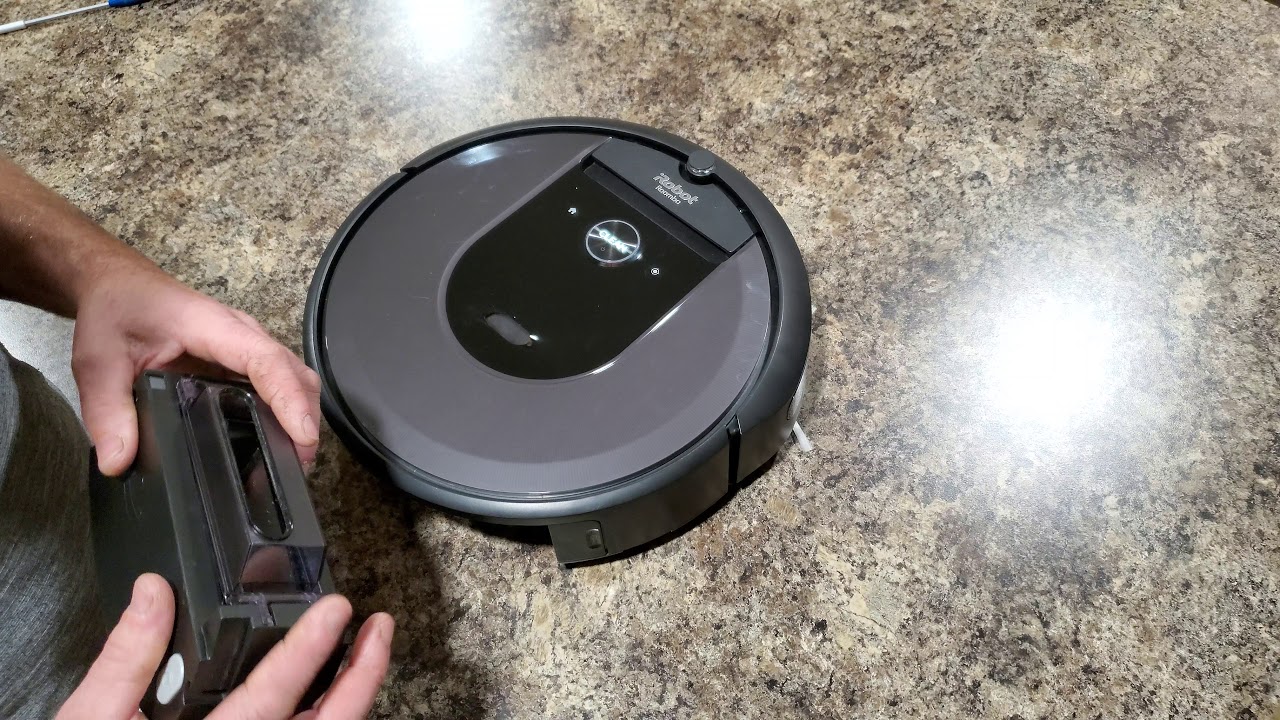
Why emptying the Roomba i7 bin matters
Emptying the Roomba i7 bin is not just a cleanup chore. It is part of keeping the vacuum working the way it should. When the bin gets too full, airflow drops, suction weakens, and dirt can start to pack into corners of the container.
I learned this the hard way after ignoring the bin for a few extra runs. The robot still moved around fine, but it stopped picking up the fine dust it usually handled well. Once I emptied the bin and cleaned the filter, the difference was obvious right away.
A clean bin also helps:
• Reduce dust buildup and pet hair odors
• Prevent clogs in the air path
• Keep the sensor readings more reliable
• Extend the life of the filter and dust container
• Improve overall cleaning performance
The Roomba i7 is designed for hands-off cleaning, but the bin still needs regular attention. For most homes, that means checking it after each cleaning cycle or every few runs, depending on how much debris your floors collect.
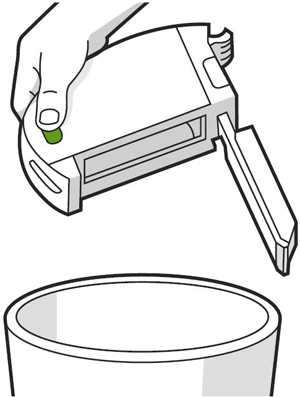
How to empty Roomba i7 bin step by step
Emptying the Roomba i7 bin is simple once you know the process. The bin is designed to come out easily, so you do not need tools or special skills.
Here is the easiest way to do it:
- Turn off the Roomba if needed and place it on a flat surface.
- Press the bin release button on the back of the robot.
- Pull the bin straight out with a gentle motion.
- Hold the bin over a trash can and open the bin door or latch.
- Tap out the dirt, hair, and debris.
- Close the bin securely before putting it back into the robot.
- Slide the bin back in until it clicks into place.
If debris is stuck inside, lightly tap the bin against the inside of the trash can. Avoid shaking it too hard, since that can spread dust into the air. A small handheld brush can also help loosen packed hair or lint.
A good habit is to check the bin every time the Roomba finishes a job. That small routine saves time later and helps keep cleaning quality consistent.
How to empty Roomba i7 bin with the Clean Base
If your Roomba i7 works with an Automatic Dirt Disposal Clean Base, the robot can empty itself after cleaning. Still, the base bag needs occasional attention, and the robot bin may sometimes need a manual check.
Here is what usually happens:
• The Roomba returns to the Clean Base after a job
• The base pulls debris from the robot bin into a sealed bag
• The robot bin stays mostly empty, but not always perfectly clean
• Fine dust or pet hair can still linger inside
If the bin still has debris, remove it as usual and give it a quick empty. Sometimes clumped hair, wet dirt, or larger particles do not transfer well into the base. That is normal.
You should also inspect the Clean Base bag and replace it when it gets full. iRobot recommends watching the bag indicator and replacing it before it overfills. That keeps suction strong and prevents messy backups.
How often should you empty the Roomba i7 bin?
The right schedule depends on your home. A small apartment with little foot traffic may need fewer emptying sessions than a busy house with kids and pets.
A simple rule works well in most homes:
• Empty after every cleaning if you have pets
• Empty every 1 to 3 cleanings for moderate dust
• Check more often during shedding season
• Empty sooner if the bin looks packed or the robot seems weaker
In my experience, homes with carpets fill the bin faster than homes with mostly hard floors. Carpets tend to hold more dust and hair, so the bin can look full even after one run. If you wait too long, you may also notice more odor or weaker pickup near the end of the cycle.
Best way to clean the bin for better performance
Knowing how to empty Roomba i7 bin is only part of the job. A quick cleanup of the bin itself helps the robot stay efficient over time.
Try this simple routine:
• Wipe the inside of the bin with a dry cloth
• Remove hair wrapped around the intake area
• Check the filter for dust buildup
• Let the bin dry fully if you ever rinse it
• Make sure all parts are completely reassembled
The filter is especially important. A dirty filter can make the robot act like it is working hard but getting nowhere, similar to trying to breathe through a thick scarf. According to vacuum maintenance guidance from appliance manufacturers, airflow issues are one of the most common reasons for reduced pickup.
Do not wash every part unless the manual says it is safe. The Roomba i7 bin is built for easy maintenance, but the filter and electronic areas should be handled carefully.
Common mistakes to avoid when emptying the Roomba i7 bin
I have seen a few avoidable mistakes come up again and again. They are small, but they can affect performance over time.
Avoid these habits:
• Forcing the bin out instead of using the release button
• Emptying it too roughly and scattering dust
• Forgetting to close the bin door fully
• Reinstalling a damp bin
• Ignoring the filter when the bin looks clean
• Letting pet hair pack into corners for too long
One mistake I made early on was not checking the latch after emptying. The bin was back in the robot, but not seated quite right. The Roomba still moved, but pickup was worse and I spent extra time trying to figure out why. A quick click check would have saved me the trouble.
Signs your Roomba i7 bin needs attention
Sometimes the robot tells you it needs help, even before you check the bin. Paying attention to these signs can save you from weak cleaning runs.
Watch for:
• Reduced suction or missed debris
• A full-bin indicator in the app or on the robot
• Strange odors from trapped dirt
• Loud or strained motor sounds
• Visible buildup around the bin opening
• More dust left on the floor after cleaning
If you notice these signs, stop and inspect the bin before running another cycle. A clogged or overloaded bin can make the Roomba i7 look less effective than it really is. Most of the time, the fix is quick.
Extra maintenance tips for Roomba i7 owners
The bin is important, but it works best as part of a larger maintenance routine. A robot vacuum runs better when all the small parts stay clean.
Helpful habits include:
• Clean the filter regularly, based on usage
• Remove hair from the brush roll
• Check the side brush for tangles
• Wipe the sensors with a dry microfiber cloth
• Empty the bin before storing the robot for long periods
If you live with pets, this routine matters even more. Pet fur can build up fast and create a kind of soft clog that does not look dramatic at first, but quietly hurts performance. A few minutes of maintenance can make the Roomba i7 feel brand new again.
Why this simple habit saves time and money
Emptying the Roomba i7 bin regularly may seem minor, but it prevents bigger problems. When dirt builds up, the robot works harder, the filter clogs faster, and parts wear out sooner.
That means this small habit can help you:
• Get better cleaning results
• Reduce the chance of clogs
• Lower wear on the motor and filter
• Avoid extra replacement costs
• Keep the robot ready when you need it
I like to think of it like clearing the sink strainer. It is a tiny task, but if you skip it, the whole system slows down. The same idea applies here.
Frequently Asked Questions of How to Empty Roomba i7 Bin
How do I remove the bin from the Roomba i7?
Press the bin release button on the back of the robot and pull the bin straight out. It should come out smoothly without much force.
Can I wash the Roomba i7 bin?
You can clean parts of the bin if the user manual allows it, but make sure everything is completely dry before reinstalling it. Do not wash any part that contains electronics or is not marked as washable.
How often should I empty the Roomba i7 bin?
For best performance, empty it after each cleaning if you have pets or a dusty home. In lighter-use homes, every one to three runs is often enough.
Why is my Roomba i7 bin hard to remove?
Dirt, hair, or poor alignment can make the bin feel stuck. Press the release button fully and pull gently in a straight motion.
What happens if I do not empty the bin?
A full bin can reduce suction, trap odors, and make the robot clean less effectively. Over time, it can also put extra strain on the filter and airflow system.
Conclusion
Learning how to empty Roomba i7 bin is one of those small home habits that pays off fast. It keeps your robot cleaning well, helps prevent clogs, and makes your whole vacuum routine easier.
If you build this into your normal cleaning rhythm, the Roomba i7 will do a better job with less fuss. Try checking the bin after each run for a week and see how much better the robot performs. If this guide helped, explore more maintenance tips, subscribe for updates, or leave a comment with your own Roomba i7 routine.

