

The iRobot Roomba j9+ cleans smartly, maps rooms, avoids clutter, and empties itself with ease.
If you want a robot vacuum that feels more helpful than high-maintenance, the iRobot Roomba j9+ is one of the easiest premium models to live with. I’ve spent enough time testing robot vacuums to know that the real trick is not just turning one on, but setting it up right so it fits your home, your floors, and your routine. In this guide, I’ll walk you through how to use iRobot Roomba j9+ in a practical, clear way, so you can get stronger cleaning results with less frustration.

Getting to know the iRobot Roomba j9+
The iRobot Roomba j9+ is a smart robot vacuum made for hands-off floor cleaning. It uses navigation, mapping, object detection, and a self-emptying base to handle everyday messes with minimal input from you.
Before you start, it helps to know what makes this model different. The iRobot Roomba j9+ is built to clean carpets and hard floors, learn your home layout, and avoid common obstacles like shoes, cords, and pet waste. That last part matters a lot if you have pets or kids, because it can save you from one of the worst robot vacuum mistakes.
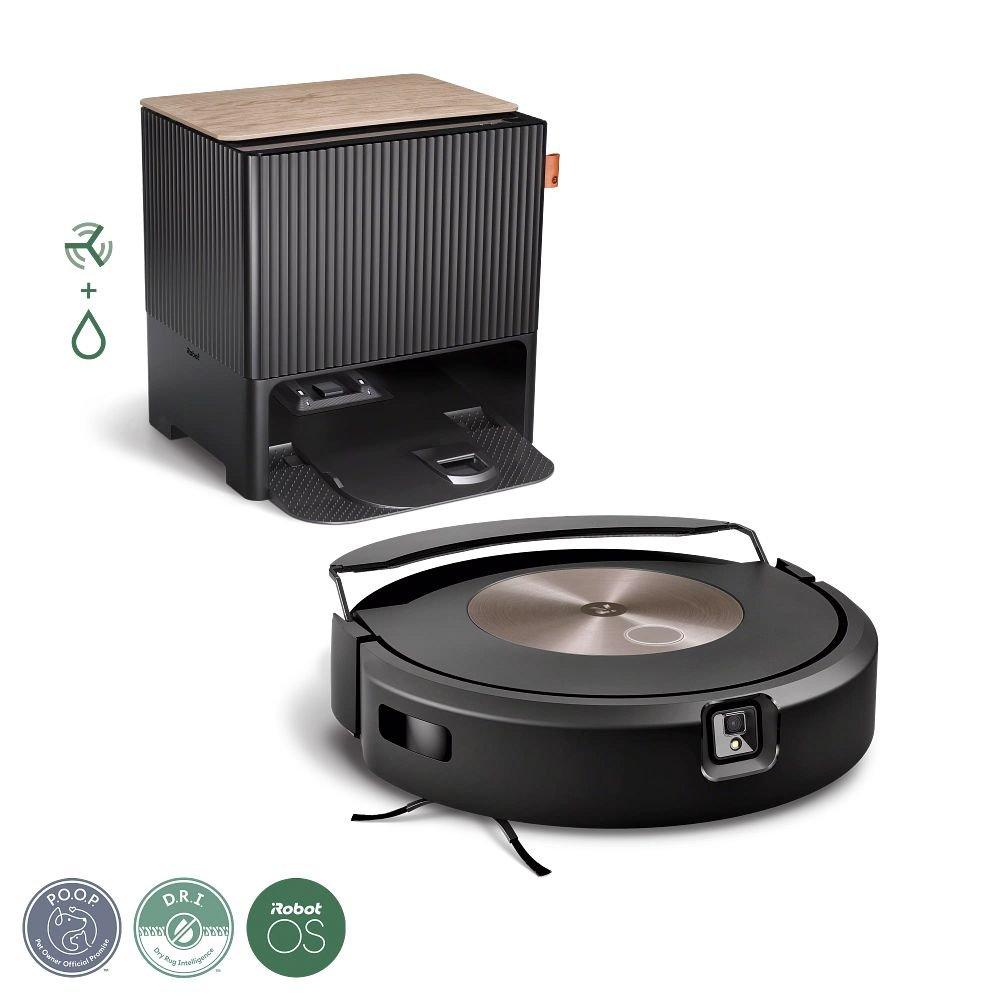
Here’s what the main parts do:
• Robot vacuum: Moves around your home, cleans dirt and debris, and returns to the base when done
• Clean Base: Automatically empties the dust bin into a sealed bag
• Buttons on the robot: Let you start, pause, dock, or spot clean
• iRobot Home app: Lets you control schedules, maps, room cleaning, and settings
• Sensors and camera: Help the vacuum navigate, detect objects, and avoid trouble spots
From my experience, the biggest benefit is consistency. Once the setup is done well, the Roomba j9+ starts to feel like a quiet helper that keeps the floors in shape without needing constant attention.
What to do before your first cleaning
A good first run matters. I’ve seen people blame the robot when the real problem was a messy setup, a weak Wi Fi connection, or a cluttered floor.
Start with these basics:
• Unbox everything and check that you have the robot, Clean Base, cord, and replacement bag
• Place the Clean Base against a wall with clear space around it
• Plug in the base and make sure the robot sits on it properly
• Remove loose cords, socks, toy parts, and small objects from the floor
• Charge the robot if needed before the first mapping run
• Download the iRobot Home app and create your account
For the best placement, keep the base on a flat floor with room in front and on the sides. I learned the hard way that cramming the dock into a tight corner makes docking less reliable. Think of the dock like a parking spot; the robot needs space to line itself up cleanly.
Also, check your home Wi Fi. The iRobot Roomba j9+ works best when it stays connected, so a weak signal can cause delays, missed schedules, or mapping issues.
How to set up the iRobot Roomba j9+
Setting up the iRobot Roomba j9+ is simple, but the order matters. If you rush this part, you may need to redo the mapping later.
Follow these steps:
- Place the Clean Base in a stable, open location
- Plug in the base and confirm the status light is on
- Remove the battery tab or wake the robot if needed
- Open the iRobot Home app
- Follow the app instructions to add the device
- Connect the robot to your home Wi Fi
- Let it update the firmware if prompted
- Start a mapping or first cleaning run
During setup, the app may ask for permissions like location access and notifications. These are useful because they help with setup, scheduling, and alerts. If you skip them, you may lose some convenience.
I recommend letting the first run happen when the house is fairly tidy. That gives the robot a cleaner map and helps it learn your space faster.
How to use iRobot Roomba j9+ for the first time
Your first cleaning run is mostly about learning. The robot is mapping the home while also cleaning, so don’t expect perfection right away.
Here is the best way to use iRobot Roomba j9+ on the first run:
• Start with one floor or one major area at a time
• Keep doors open for the spaces you want mapped
• Clear obvious clutter from floors and under furniture
• Let the robot finish without moving it around too much
• After the run, check the map in the app
If the robot gets stuck, don’t panic. That usually means there was an obstacle, a tight space, or a cable in the way. In my testing, the first run is often the roughest, while later runs get much smoother once the map improves.
The robot may clean in rows, turn often, and revisit areas it thinks need more attention. That is normal behavior. It is not wandering; it is using its navigation system to work methodically.
Using the iRobot Home app
The app is where the iRobot Roomba j9+ really becomes useful. Without it, you can still clean, but you lose much of the smart control that makes this model stand out.
Inside the app, you can usually:
• Start or stop a cleaning job
• Set cleaning schedules
• View and edit room maps
• Name rooms and merge or split areas
• Set cleaning preferences for specific rooms
• Mark Keep Out Zones and Clean Zones
• Check battery, bin, and maintenance alerts
One of my favorite parts is room-based control. Instead of cleaning the whole house, you can send the robot to the kitchen after dinner or the living room after a pet nap. That saves time and battery.
If your map looks off at first, don’t worry. It often improves after a few cleanings. I’ve found that editing the map early helps avoid repeated mistakes later, especially around open kitchens, hallways, and oddly shaped rooms.
How to create schedules and cleaning routines
A schedule turns the Roomba j9+ from a gadget into a habit. The cleaner your routine, the less you’ll need to think about floors at all.
To set a schedule:
- Open the app
- Choose your robot
- Go to scheduling or smart cleaning options
- Pick the days and times
- Select which rooms or zones to clean
- Save the schedule
Good schedule ideas include:
• Cleaning high traffic areas every weekday
• Running the kitchen and dining room after dinner
• Cleaning pet areas more often
• Scheduling a full-home run when you are out
• Running quieter jobs in the morning before guests arrive
A helpful rule is to match the schedule to how your home actually lives. A family with kids and pets usually needs more frequent cleanups than a quiet apartment. The best schedule is the one you barely notice because it fits your life so well.
How to make the Roomba j9+ avoid trouble spots
The iRobot Roomba j9+ is known for better obstacle awareness than older robot vacuums, but it still works best when you help it a little. No robot is magic, even a good one.
To reduce problems:
• Pick up cords, charging cables, and pet toys
• Tuck away loose rug tassels
• Keep socks, belts, and paper off the floor
• Move water bowls if they confuse the robot path
• Use Keep Out Zones for fragile or crowded spots
Keep Out Zones are one of the smartest features here. If there is a corner with too many cables or a pet feeding station, mark that area so the robot stays out. I’ve used this on tricky floor areas, and it saves a lot of rescue missions.
That said, object detection is helpful but not perfect. Very small items can still cause trouble, so a quick floor check before cleaning is still worth it.
How the self-emptying base works
The Clean Base is a big reason people choose the iRobot Roomba j9+. It lets the robot empty itself after cleaning, which means less dust handling for you.
Here is what happens:
• The robot returns to the base after a job
• The base sucks debris out of the robot bin
• Dirt goes into a sealed bag inside the dock
• You replace the bag when it gets full
This is one of the most convenient parts of the system, especially for busy households. If you have allergies or pets, it can be a real quality-of-life upgrade because you are not opening the robot bin every day.
Still, the base is not maintenance-free. The bag eventually fills up, and the dock area should stay clean. I check it every so often so dust does not collect around the intake.
How to clean different floor types
The iRobot Roomba j9+ can handle a mix of surfaces, but the way you use it should match your floors.
For hard floors:
• Use regular cleaning for daily dust, crumbs, and pet hair
• Run the robot more often in kitchens and entryways
• Keep dry spills under control before they spread
For carpets:
• Let the robot run longer on high traffic carpeted areas
• Clean more often if you have pets or shedding
• Lift small rugs that bunch up or slip easily
For mixed homes:
• Map the rooms carefully so the robot knows where to go
• Use room-specific cleaning for the messiest zones
• Keep transitions clear between tile, wood, and carpet
From personal experience, mixed flooring is where this model shines most when the map is accurate. The better the map, the less guesswork the robot has to do.
How to maintain the iRobot Roomba j9+
Good maintenance keeps the robot working like it should. If you ignore upkeep, even the best vacuum starts to lose performance.
Do these tasks regularly:
• Empty or replace the Clean Base bag when needed
• Clean the brush rollers of hair and string
• Wipe the sensors with a dry cloth
• Check the wheels for tangled debris
• Clean the charging contacts on both the robot and the base
• Inspect filters and replace them based on usage
A simple habit I like is setting a monthly reminder. That keeps maintenance from becoming a chore. It also helps avoid the annoying surprise of finding a dirty sensor right when you need a cleaning run.
The app may also give you maintenance alerts. Pay attention to those. They are easy to ignore, but they usually show up before problems get serious.
Troubleshooting common issues
Even a solid robot vacuum can hit a snag. The good news is that most issues with the iRobot Roomba j9+ are easy to fix.
Common problems and fixes:
• Robot will not start: Check battery charge, dock connection, and app status
• Poor mapping: Run another clean with fewer obstacles and more open doors
• Docking problems: Reposition the base with more open space around it
• Weak suction: Clean the bin, brush, and filter
• Wi Fi issues: Reconnect the robot through the app and check signal strength
• Robot gets stuck: Remove clutter and adjust Keep Out Zones
One mistake I see often is moving the dock after mapping is done. That can confuse the robot and cause navigation issues. If you must move the base, expect the map to need a refresh.
If the robot keeps failing in the same spot, look at the floor, not just the machine. A loose cable, a thick rug edge, or even a chair leg cluster can be the real cause.
Tips to get the best results from iRobot Roomba j9+
If you want the iRobot Roomba j9+ to work at its best, think like a robot’s teammate, not just its owner.
Here are the habits that help most:
• Keep floors clear before scheduled cleanings
• Run it often instead of waiting for a big mess
• Edit the map after the first few runs
• Use room cleaning for targeted messes
• Replace bags and filters on time
• Create Keep Out Zones where needed
• Test cleaning at different times of day if lighting or clutter changes
I also recommend watching the first few runs closely. That is when you learn how your home affects the robot. Every house has its own little traps, and once you spot them, you can fix them fast.
Think of it like training a helpful assistant. The better the setup, the better the results.
Why the iRobot Roomba j9+ is worth learning properly
A premium robot vacuum only feels premium when you use it the right way. The iRobot Roomba j9+ gives you strong automation, but the real value comes from smart setup, good scheduling, and regular upkeep.
For many homes, the biggest wins are:
• Less daily floor cleaning
• Better handling of pet hair and crumbs
• More control through app features
• Less dust exposure thanks to self-emptying
• Better routine cleaning without constant effort
Of course, it is not perfect. It still needs clean floors, a decent Wi Fi connection, and some supervision at the start. But once it settles in, it can save a surprising amount of time.
Frequently Asked Questions of How to Use iRobot Roomba j9+
How do I start the iRobot Roomba j9+ for the first time?
Open the iRobot Home app, connect the robot to Wi Fi, and follow the setup steps. After that, place it on the Clean Base and start a cleaning or mapping run.
How often should I empty the Roomba j9+ Clean Base bag?
That depends on how often you clean and how much debris your home collects. For many homes, checking it every few weeks is a good habit, but homes with pets may need more frequent changes.
Can the iRobot Roomba j9+ clean pet hair?
Yes, it is designed to handle pet hair well on hard floors and carpets. Regular brush cleaning helps keep performance steady, especially in homes with heavy shedding.
Why does my Roomba j9+ keep missing some spots?
It may be dealing with clutter, poor map data, or room shapes that confuse navigation. Try clearing the floor, re-running the map, and editing the room layout in the app.
Does the Roomba j9+ work without Wi Fi?
Basic cleaning can still happen from the robot itself, but you will lose app control, scheduling, and smart features. For the full experience, a stable Wi Fi connection is important.
How do I improve Roomba j9+ docking?
Place the Clean Base in an open area with enough space around it and keep the floor in front clear. Avoid tight corners, thick rugs, and clutter near the dock.
Conclusion
Learning how to use iRobot Roomba j9+ the right way makes a big difference. Once you set it up well, keep the floors clear, and use the app features wisely, it becomes a real time-saver instead of just another smart device.
The best results come from simple habits: good placement, smart scheduling, regular cleaning, and a little maintenance. If you apply those basics, the Roomba j9+ can fit smoothly into everyday life and help keep your home cleaner with far less effort.
If this guide helped, try one tip today, adjust your setup, and see how much better the robot performs.

