

A Shark Navigator vacuum can be a lifesaver when it comes to keeping your floors clean. But nothing is more frustrating than when your vacuum suddenly loses suction. Many people experience this, and the solution is not always obvious. If you’ve noticed your Shark Navigator isn’t picking up dirt like it used to, you’re not alone. There are a few common causes—and some less obvious ones—that can make your vacuum lose power. Understanding why this happens, and how to fix it, can save you money and help your vacuum last longer.
Main Reasons Shark Navigator Loses Suction
Several things can cause your Shark Navigator to lose suction. Let’s look at the main reasons, with practical advice on how to check and solve each problem.
1. Clogged Filters
The pre-motor and HEPA filters in your Shark Navigator trap dust and allergens. Over time, these filters fill up and block airflow. When this happens, suction drops fast.
- How to check: Remove the filters (usually foam and felt pads) and inspect them. If they look gray or packed with dust, they need cleaning.
- Solution: Wash foam and felt filters with water, let them dry fully (at least 24 hours), and reinstall. Replace the HEPA filter if it’s still dirty after washing.
Non-obvious tip: Even if the filter looks clean, fine dust can block airflow. Washing regularly—even before they look dirty—helps keep suction strong.
2. Blocked Hoses Or Wand
A common but overlooked cause is a clog inside the hose or the wand. Small objects, pet hair, or debris can get stuck, restricting airflow.
- How to check: Detach the hose and wand. Shine a flashlight through them to look for blockages.
- Solution: Use a broom handle or flexible cleaning brush to gently push out clogs.
Extra insight: Objects like bottle caps, socks, or even large pieces of cereal can block the hose, but you may not see them from outside.
3. Full Or Improperly Installed Dust Cup
If the dust cup is full, your vacuum will not work well. Sometimes, the cup is not seated properly, letting air escape.
- How to check: Remove and empty the dust cup even if it’s not full. Reinstall it firmly.
- Solution: Empty the dust cup after each use and make sure it clicks back in place.
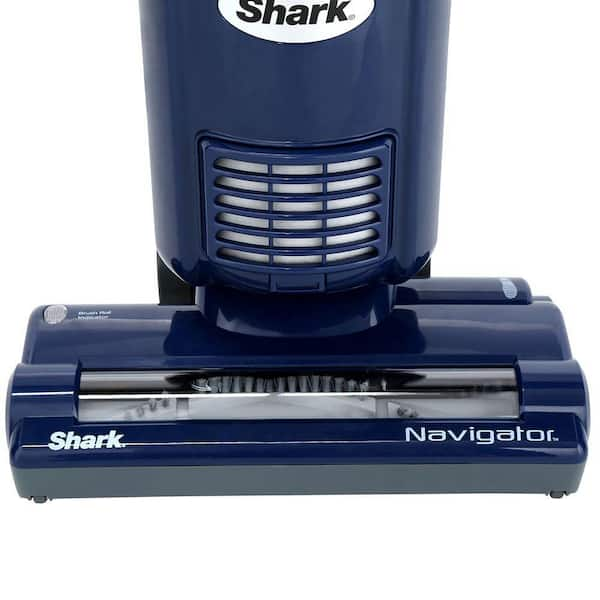
4. Dirty Or Clogged Brush Roll
The brush roll at the bottom of your Shark Navigator helps lift dirt. Hair, string, or debris can wrap around it, stopping it from spinning.
- How to check: Turn off and unplug the vacuum. Flip it over and inspect the brush for tangled hair or debris.
- Solution: Cut away hair and remove any stuck objects. Some models allow you to remove the brush roll for deep cleaning.
Pro tip: Clean the brush roll regularly, especially if you have pets or long hair in your home.
5. Air Leaks
Air leaks reduce suction. These leaks can be at the hose connections, the dust cup, or even cracks in the vacuum body.
- How to check: Listen for hissing sounds or feel for air escaping while the vacuum is running.
- Solution: Make sure all parts are tightly connected. Replace damaged hoses or seals.
Hidden issue: Tiny cracks in the hose can cause big suction loss, even if they are hard to see.
6. Incorrect Settings
Sometimes, the vacuum setting is not right for the floor type or cleaning task.
- How to check: Look at the suction control and height adjustment settings.
- Solution: Adjust to the correct setting for carpet or hard floor as needed.
7. Motor Issues
If the motor is failing, you may notice a burning smell, loud noise, or very weak suction.
- How to check: If you’ve cleaned everything else and suction is still weak, the motor may be the problem.
- Solution: Motors are hard to repair at home. Contact Shark customer service or a professional repair shop.
Comparison: Common Causes Of Suction Loss
Here’s a quick reference to help you diagnose the problem based on signs you notice.
| Symptom | Most Likely Cause | Easy Fix? |
|---|---|---|
| Poor suction, dusty filters | Clogged filters | Yes, clean/replace filters |
| No debris picked up, brush not spinning | Clogged brush roll | Yes, clean brush roll |
| Vacuum shuts off quickly | Overheated due to blockages | Yes, remove blockages |
| Hissing sound, weak suction | Air leak | Sometimes, check connections |
| All else fails | Motor problem | No, needs repair |

Step-by-step Troubleshooting
If you want to get your Shark Navigator working again, follow these steps in order. This will help you find and fix the most common issues.
Step 1: Unplug And Inspect
Always unplug before inspecting or cleaning your vacuum. This keeps you safe and prevents accidental damage.
Step 2: Check And Clean Filters
Remove all filters and wash them with lukewarm water. Let them dry completely before reinstalling. Never put damp filters back, as this can damage the motor.
Step 3: Inspect Hoses And Wand
Detach the hose and wand. Look for obstructions and remove them. Reattach everything securely.
Step 4: Empty And Reinstall Dust Cup
Take out the dust cup, empty it, and ensure it clicks back into place. Wipe the cup with a dry cloth if needed.
Step 5: Clean The Brush Roll
Remove hair, string, and other debris from the brush roll. Make sure it spins freely.
Step 6: Check For Air Leaks
Examine all seals and connections. Replace any cracked or torn hoses.
Step 7: Test Vacuum
Plug in and turn on your vacuum. Test suction with your hand at the hose. If it’s strong, reattach the floor head and test on your floor.
Step 8: Seek Professional Help (if Needed)
If suction is still weak after these steps, the motor or internal parts may need repair. Contact Shark support or a qualified technician.
Understanding Shark Navigator’s Suction Technology
The Shark Navigator uses cyclonic suction. This design spins air quickly, separating dust from the airflow and keeping filters cleaner. However, even this advanced system can be blocked by common issues.
Cyclonic Vs. Traditional Suction
Let’s compare how the Shark Navigator’s technology stands out.
| Feature | Cyclonic (Shark Navigator) | Traditional Vacuum |
|---|---|---|
| Dust Separation | Uses spinning air | Relies on filters only |
| Filter Clogging | Slower to clog | Clogs faster |
| Suction Loss | Usually less frequent | More common |
Real-world Examples
Consider a home with two dogs and a mix of carpet and hardwood floors. Pet hair can clog filters and wrap around the brush roll quickly. A user might notice their Shark Navigator losing suction after just a week if they don’t clean the filters and brush roll regularly.
Another example: In homes with small children, toys or socks often get sucked into the hose. The owner may think the vacuum is broken, but a simple hose inspection solves the problem.
Maintenance Tips To Prevent Suction Loss
You can avoid most suction problems by following these tips:
- Clean filters every month (or more often if you vacuum a lot).
- Empty the dust cup after each use.
- Check the hose and brush roll weekly for blockages.
- Replace filters every 6–12 months.
- Inspect for air leaks if you notice a drop in suction.
- Store the vacuum indoors to avoid hose cracks from temperature changes.
Often overlooked: Many people skip filter cleaning, thinking it is not needed until suction drops. Regular maintenance keeps your vacuum working well and extends its life.

When To Replace Parts
Some parts of your Shark Navigator wear out and need regular replacement. Here’s a quick reference:
| Part | Replacement Frequency | Signs It’s Time |
|---|---|---|
| Foam/Felt Filters | 6–12 months | Dirty after washing, torn, or crumbling |
| HEPA Filter | Yearly | Stays gray or dusty after cleaning |
| Brush Roll | 1–2 years | Bristles worn down, won’t spin |
| Hose | 2–5 years | Cracks, holes, or leaks |
Why Regular Maintenance Matters
Ignoring maintenance will lead to suction loss, motor strain, and even permanent damage. Keeping your Shark Navigator clean isn’t just about performance—it saves you money by avoiding costly repairs or early replacement.
Key insight: Even a small blockage makes the motor work harder, raising the chance of a breakdown. Spending five minutes on maintenance can add years to your vacuum’s life.
What If Suction Is Still Weak?
If you’ve checked filters, hoses, brush roll, and cup, but your Shark Navigator still has weak suction, the problem might be:
- Internal clog in the main body (rare, but possible)
- Motor failure
- Faulty seals inside the vacuum
At this point, it’s best to contact Shark support or visit a certified repair center. Attempting to open the main body yourself can void the warranty and cause more damage.
For more technical details, you can also check the manufacturer’s support page: Shark Clean Official Support.
Frequently Asked Questions
Why Does My Shark Navigator Keep Shutting Off During Use?
This often means the vacuum is overheating due to a blockage in the filter, hose, or brush roll. The motor has a safety shut-off. Clean all filters and remove any debris, then let the vacuum cool for 30 minutes before using again.
How Often Should I Replace Shark Navigator Filters?
Replace foam and felt filters every 6–12 months and the HEPA filter yearly. If you vacuum often or have pets, replace filters more frequently for best suction.
Can Using The Wrong Floor Setting Cause Suction Problems?
Yes. If the height or suction setting is wrong for your floor type, the vacuum may not pick up dirt well. Always check that the settings match your cleaning surface.
What Should I Do If The Vacuum Hose Is Clear But Suction Is Still Weak?
Check for tiny air leaks in the hose or connections, clean all filters, and make sure the dust cup is installed correctly. If suction is still weak, the problem could be inside the vacuum body or the motor.
Where Can I Get Genuine Shark Navigator Replacement Parts?
Always buy from authorized Shark retailers or the official Shark website to avoid fake or low-quality parts. For more details, visit SharkClean Parts.
A Shark Navigator vacuum is a reliable tool, but like all machines, it needs regular care. With the steps and insights above, you can fix most suction problems yourself and keep your vacuum running strong for years.

