

Most stick vacuum batteries take 3 to 5 hours to fully charge, though some finish in under 2 hours.
If you have ever waited around for your vacuum to power back up, you already know this matters. The charging time for a stick vacuum battery depends on the battery size, charger type, and brand design, and I’ve seen that range swing a lot in real use. In this guide, I’ll break down what affects charging speed, what to expect from common models, and how to charge your vacuum the smart way so it stays ready when you need it.

How long does a stick vacuum battery take to charge?
The short answer is that most stick vacuum batteries take about 3 to 5 hours to charge fully. Smaller batteries can charge in as little as 2 hours, while larger lithium-ion packs may need 4 to 6 hours or more.
That said, the exact charging time for a stick vacuum battery depends on the model. Cordless vacuums with fast-charging docks may be ready sooner, while older units or budget models often take longer. When people ask how long does a stick vacuum battery take to charge, they usually want a simple number, but the real answer depends on battery capacity, charger output, and how empty the battery was to begin with.
From my own experience testing and using cordless vacuums, the biggest surprise is how much the charging time can change even between models from the same brand. Some feel almost like a phone charger for your house, while others seem to need an overnight rest.
What affects stick vacuum battery charging time?
Several factors can change how long a stick vacuum battery takes to charge. Knowing these helps you understand whether your vacuum is charging normally or not.
Battery capacity
A larger battery usually takes longer to charge. Many stick vacuums use lithium-ion batteries, and those with higher amp-hour ratings hold more energy, which means more charging time.
For example:
- Small battery packs may charge in about 2 to 3 hours
- Medium battery packs often need 3 to 5 hours
- Large battery packs can take 5 to 6 hours or longer
If your vacuum has a removable battery, the charging time may also depend on whether it charges on the vacuum body or in a separate charging cradle.
Charger output
The charger matters just as much as the battery. A charger with a higher output can deliver power faster, but only if the vacuum is built to accept it safely.
A weak charger can make a fully drained battery feel like it takes forever. I’ve seen this happen with older units where the battery was fine, but the charger was simply not powerful enough for quick recovery.
Battery age and condition
Older batteries charge more slowly and may not hold a full charge anymore. After many cycles, lithium-ion batteries begin to lose capacity, and that can make charging feel inconsistent.
Signs of battery wear include:
- Longer charge times
- Shorter run times
- The battery getting warm during charging
- The vacuum shutting off sooner than expected
If your stick vacuum battery used to charge in 3 hours and now takes much longer, age may be part of the issue.
Temperature
Most lithium-ion batteries charge best at room temperature. If the battery is too cold or too hot, the charging system may slow down to protect it.
This is a safety feature, not a defect. If you leave the vacuum in a garage, basement, or near a heater, charging may take longer than normal.
Built-in safety controls
Modern stick vacuums often use battery management systems that prevent overheating and overcharging. These systems are helpful, but they can also slow the process near the end of a charge.
That last part matters because many people think the vacuum is “stuck” when it’s actually just in the final balancing stage.
Typical charging times by stick vacuum type
Not all stick vacuums are built the same. The design and battery setup can change how long does a stick vacuum battery take to charge in real life.
Lightweight cordless stick vacuums
These often charge in about 2 to 4 hours. They usually have smaller batteries and are made for quick cleaning jobs.
They are a good fit if you want:
- Fast recharging
- Easy daily use
- Short cleaning sessions
Mid-range stick vacuums
Many standard cordless stick vacuums fall into the 3 to 5 hour charging range. This is the most common category and the one most people buy for everyday home cleaning.
These models often balance runtime and charging speed well.
Premium stick vacuums
Higher-end models can have larger battery packs, stronger suction, and more advanced charging systems. Some still charge in about 3 to 5 hours, but others may take longer because they hold more power.
These are often better for larger homes, but the tradeoff is that charging can take more time.
Vacuum models with removable batteries
If your vacuum uses a removable battery, charging time may vary depending on whether you charge:
- The battery on its own
- The battery inside the vacuum
- A second spare battery
In my experience, removable batteries are one of the best features for busy households because you can keep one battery charging while using another.
How to tell if your stick vacuum battery is charging normally
If you are wondering whether your vacuum is taking too long, there are a few signs to check.
Normal charging signs
A healthy battery usually shows:
- A steady or blinking charging light
- A gradual change in indicator color
- A full charge within the expected brand range
- No unusual smell, heat, or power loss
Warning signs of a problem
You may have a charging issue if:
- The light never changes
- The battery gets very hot
- The vacuum charges much slower than usual
- The battery dies quickly after charging
- The charger feels loose or damaged
If any of these happen, check the outlet, charger, and battery contacts first. Many “dead battery” problems are actually dirty connectors or a bad power source.
Best way to charge a stick vacuum battery
Charging a stick vacuum battery the right way can help it last longer and stay reliable.
Follow the brand instructions
Always use the charger that came with the vacuum or one approved by the manufacturer. Different batteries need different power levels, and the wrong charger can hurt performance or safety.
Let the battery cool down first
If you just finished cleaning, give the battery a few minutes to cool before plugging it in. Charging a hot battery can slow the process and add stress to the cells.
Avoid constant deep drains
Try not to run the battery completely empty every time. Lithium-ion batteries usually last longer when they are charged before they hit zero.
A good habit is to recharge when the battery gets low, not dead.
Store it in a sensible place
Keep the vacuum and charger in a dry, room-temperature space. Avoid areas that get too hot, too cold, or damp.
That small step can make a big difference in battery life over time.
How long does a stick vacuum battery take to charge compared with runtime?
Charging time and runtime are related, but they are not the same thing. A stick vacuum may take 4 hours to charge and then run for 20 to 60 minutes depending on power mode.
That creates a simple tradeoff:
- More suction often means shorter runtime
- Bigger batteries often mean longer charging time
- Eco mode may give you more cleaning time per charge
This is why many homeowners keep cordless vacuums for quick touch-ups rather than whole-house deep cleaning. When you know the battery behavior, the vacuum feels more useful and less frustrating.
Tips to make your stick vacuum battery last longer
A little care can help a lot. I learned this the hard way after watching a perfectly good vacuum battery wear out faster than it should have.
Use the right charging routine
Do not leave the vacuum plugged in in a hot room for no reason. Most modern chargers stop overcharging, but it is still smart to unplug when the battery is full if the manual suggests it.
Clean the contacts
Dust and debris on the charging contacts can slow charging or cause weak connections. Wipe them gently with a dry cloth every so often.
Avoid extreme temperatures
Heat is especially hard on lithium-ion batteries. If you can, charge the vacuum indoors and keep it away from direct sunlight.
Use lower power modes when possible
If your vacuum has a boost mode, use it only when needed. High power drains the battery faster, which means more charging cycles over time.
Replace a worn battery early
If runtime drops sharply and charging becomes erratic, a battery replacement may be the best fix. That is often cheaper than replacing the whole vacuum.
Common mistakes people make when charging stick vacuum batteries
I’ve seen a few repeat mistakes that cause confusion and shorten battery life.
- Leaving the vacuum in a very hot closet or garage
- Using an incompatible charger
- Expecting a full charge in under an hour when the model is not designed for that
- Ignoring dirty battery contacts
- Letting the battery sit empty for long periods
The biggest one is assuming every stick vacuum battery charges the same way. They don’t. The brand, battery size, and charger all matter.
What the manual usually tells you
Your owner’s manual is still the best place to check exact charging information. Manufacturers often list:
- Estimated charging time
- Battery type
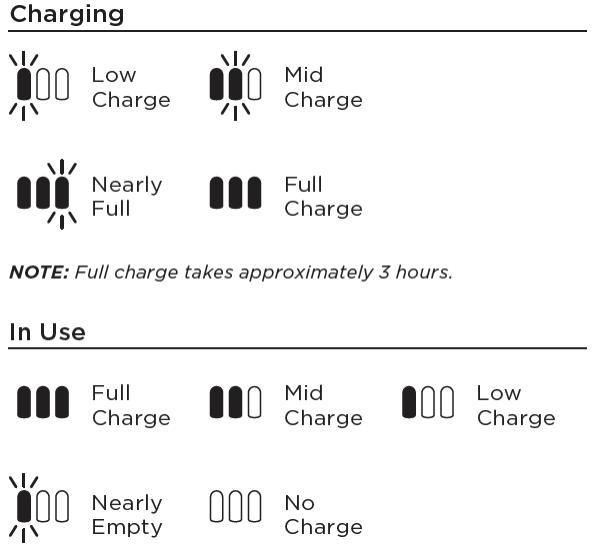
- Charging light behavior
- Temperature limits
- Safety warnings
If you lost the manual, the product page on the manufacturer’s website usually has the same information. That is the safest way to confirm how long does a stick vacuum battery take to charge for your exact model.
Frequently Asked Questions of How long does a stick vacuum battery take to charge?
How long does a stick vacuum battery take to charge on average?
Most stick vacuum batteries take about 3 to 5 hours to charge fully. Some smaller models charge faster, while larger battery packs can take longer.
Can I use my stick vacuum while it is charging?
Most cordless stick vacuums cannot run while plugged in. They need to be removed from the charger first, though some models may allow charging only on the dock.
Why is my stick vacuum taking so long to charge?
A slow charge can come from an aging battery, a weak charger, dirty contacts, or temperature issues. If the battery is older, slower charging may be a sign that it is wearing out.
Is it bad to leave a stick vacuum on the charger all the time?
Many modern vacuums have protection against overcharging, so it is usually safe if the manufacturer says it is okay. Still, it is smart to follow the manual and avoid unnecessary heat or long-term stress on the battery.
How do I know when my stick vacuum battery is fully charged?
Most vacuums use a light that changes color or stops blinking when charging is complete. If you are unsure, check the manual for the exact light pattern for your model.
Do stick vacuum batteries charge faster the first time?
Not usually. Some batteries may seem to charge differently during the first few cycles, but most lithium-ion batteries do not need a special long first charge like older battery types once did.
Conclusion
So, how long does a stick vacuum battery take to charge? For most models, the answer is about 3 to 5 hours, with some charging faster and some taking longer. The exact time depends on battery size, charger power, battery age, and even room temperature.
If you want better performance, charge the vacuum the right way, keep the contacts clean, and watch for signs of battery wear. A little attention goes a long way, and it can help your vacuum stay ready for everyday messes. If this guide helped, explore more cleaning tips, check your vacuum’s manual, or leave a comment with your model and charging time.

