

Keeping your Roborock Qrevo Edge 2 clean is more important than most users realize. A well-maintained robot vacuum not only runs smoother but also lasts longer and delivers better cleaning results. Dust, hair, and water minerals can build up over time, causing blockages, weaker suction, smelly mop pads, or even sensor errors.
Many Qrevo Edge 2 owners neglect regular maintenance, assuming their smart vacuum will take care of itself. While the Qrevo Edge 2 is advanced, it still needs a helping hand to perform its best.
This guide explains how to clean your Roborock Qrevo Edge 2 step by step. Whether you are new to robot vacuums or just want to keep your investment in top shape, you’ll find everything you need here—clear instructions, pro tips, and common mistakes to avoid.
Understanding Your Roborock Qrevo Edge 2
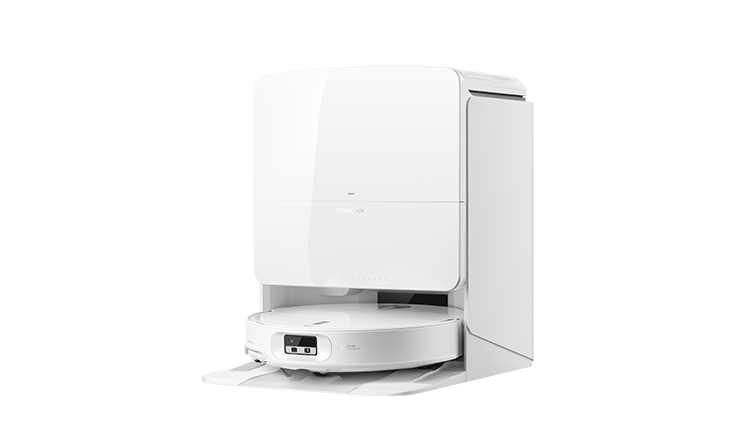
Before diving into cleaning, it helps to know what parts need attention. The Qrevo Edge 2 stands out for its dual mop system, self-cleaning dock, and strong suction power. Each feature brings unique cleaning needs.
Key components to clean include:
- Main brush (underneath, picks up dirt)
- Side brush (sweeps edges and corners)
- Dustbin (holds vacuumed debris)
- Filter (traps fine particles)
- Mop pads (removes floor stains)
- Water tanks (clean and dirty water)
- Sensors and charging contacts
- Self-cleaning dock parts
Over time, hair can wrap around brushes, dust can clog filters, and mop pads can get smelly. Taking care of these parts keeps your Qrevo Edge 2 running like new.
How Often Should You Clean Each Part?
A regular schedule prevents problems. The following table shows how often to clean or replace key components:
| Part | Clean | Replace |
|---|---|---|
| Main Brush | Weekly | Every 6-12 months |
| Side Brush | Weekly | Every 3-6 months |
| Dustbin | After each use | — |
| Filter | Weekly | Every 3-6 months |
| Mop Pads | After each use | Every 3-6 months |
| Water Tanks | Weekly | — |
| Sensors & Contacts | Monthly | — |
| Dock Base | Monthly | — |
Tip: If you have pets or a lot of dust, increase cleaning frequency for brushes and filters.
Essential Tools And Supplies
Cleaning your Qrevo Edge 2 doesn’t require fancy equipment. Most items are already in your home. Here’s what you’ll need:
- Soft, damp cloths (for wiping surfaces)
- Small brush (like a toothbrush, for tight spots)
- Scissors (for cutting hair from rollers)
- Mild dish soap (for mop pads)
- Clean, dry towels
- Cotton swabs (for sensors)
- Access to clean water
Roborock sometimes includes a small cleaning tool with the vacuum. Keep it handy; it’s designed for this job.
Step-by-step: Cleaning Each Part Of Your Qrevo Edge 2
Let’s break down each area, so you know exactly what to do.
1. Main Brush
The main brush is under the robot. Dirt, hair, and threads can tangle here, reducing cleaning power.
- Press the release tabs to remove the brush cover.
- Lift out the brush. Use scissors to carefully cut away hair or threads.
- Use a small brush or your fingers to pull off dust.
- Wipe the brush and holder with a damp cloth.
- Let everything dry before reassembling.
Pro tip: Check the ends of the brush. Hair often winds around the bearings, which can cause noise or even motor damage over time.
2. Side Brush
The side brush sweeps corners and edges.
- Gently pull off the side brush (it pops off).
- Remove any tangled hair with your fingers or scissors.
- Wipe it clean with a damp cloth.
- Snap it back in place.
If the brush is bent, soak it in warm water for a few minutes to help it return to shape.
3. Dustbin
Emptying the dustbin after every use avoids bad smells and keeps suction strong.
- Press the button to release the dustbin.
- Open the lid and dump contents into the trash.
- Rinse the bin with water. Do not use hot water, as it may warp the plastic.
- Dry it completely before reinserting.
Never put the dustbin in a dishwasher. Hand wash only.
4. Filter
The filter traps fine dust particles. If it clogs, cleaning power drops.
- Remove the filter from the dustbin.
- Tap it gently to remove loose dust.
- Wash it under cool, running water. Do not use soap.
- Let it air dry for at least 24 hours.
A wet filter in the robot can cause mold or damage. Always check that it’s dry.
5. Mop Pads
Mop pads get dirty fast, especially in homes with pets or heavy traffic.
- Detach the mop pads from the holders.
- Rinse with warm water and a little mild soap.
- Rub gently to remove stains.
- Rinse out all soap.
- Air dry fully before reattaching.
Insider tip: Avoid fabric softener. It leaves residue that can reduce cleaning performance.
6. Water Tanks
Your Qrevo Edge 2 uses two tanks: one for clean water, one for dirty water. Keeping them clean prevents odors and blockages.
- Remove both tanks from the dock.
- Empty any remaining water.
- Rinse each tank thoroughly with clean water.
- Use a bottle brush to scrub inside if needed.
- Dry completely, especially before storage.
7. Sensors And Charging Contacts
Sensors help your robot navigate. Dirty sensors cause navigation errors.
- Locate sensors on the front, sides, and underside.
- Use a dry cotton swab or microfiber cloth to gently wipe them.
- For stubborn dirt, slightly dampen the cloth (never soak sensors).
- Wipe the charging contacts on both the robot and dock base.
Avoid using alcohol or harsh cleaners, as they may damage sensor surfaces.
8. Self-cleaning Dock Base
The dock is where your Qrevo Edge 2 charges and cleans its mops. If the base gets dirty, mop cleaning is less effective.
- Unplug the dock before cleaning.
- Wipe exterior surfaces with a damp cloth.
- Check the mop cleaning tray for hair or debris and remove it.
- Clean the tray with warm, soapy water if it smells or looks dirty.
- Dry everything well before plugging back in.
Quick Reference: Cleaning Actions And Times
For easy planning, here’s a summary of how long each task takes:
| Cleaning Task | Time Needed |
|---|---|
| Main Brush | 5-10 min |
| Side Brush | 2-3 min |
| Dustbin & Filter | 5 min (+24h drying for filter) |
| Mop Pads | 5 min (+drying time) |
| Water Tanks | 5 min |
| Sensors & Contacts | 3 min |
| Dock Base | 10 min |
Preventing Common Problems
Many users make mistakes that can shorten their robot’s life. Here’s how to avoid them:
- Not letting filters dry: Using a damp filter causes bad smells and can break the motor.
- Skipping mop pad cleaning: Dirty pads just spread dirt around.
- Ignoring the dock: A dirty dock means less effective mop cleaning.
- Using harsh chemicals: Stick to mild soap and water. Strong cleaners can ruin sensors or plastic.
- Neglecting sensors: If your robot bumps into things more often, check for dirty sensors.
- Overfilling water tanks: Too much water can spill and damage electronics.
Expert insight: Sometimes, even after cleaning, the robot may still show error messages. Try resetting the robot or checking for hidden debris in the wheels or brush bearings.
How To Deep Clean Your Roborock Qrevo Edge 2
Sometimes, regular cleaning isn’t enough—especially if you notice odors, reduced performance, or strange noises. A deep clean can restore your robot.
Steps for a deep clean:
- Disassemble all removable parts: Brushes, mop pads, dustbin, filter, tanks.
- Wash each part as described above, but take extra care with crevices and joints.
- Use a toothpick or cotton swab for stubborn dirt in corners.
- Inspect wheels for hair or string.
- Clean the underside of the robot, especially near sensors and the main brush area.
- Let all parts dry for at least 24 hours before reassembling.
Deep cleaning every 1–2 months is usually enough for most homes.

When To Replace Parts
Cleaning extends part life, but some pieces wear out. Replace if you notice:
- Main brush: Bristles are missing, bent, or the brush is noisy.
- Side brush: Bent arms or visible damage.
- Filter: Torn, very dirty, or smells even after washing.
- Mop pads: Frayed edges, holes, or loss of cleaning power.
Genuine Roborock parts are best, but some third-party replacements work too. Always check compatibility.
How To Store Your Qrevo Edge 2 Properly
If you won’t use your robot for a while, clean it first. Empty and dry the water tanks, dustbin, and mop pads. Store in a cool, dry place with the battery partially charged (about 50%). This prevents battery damage and mold growth.

Troubleshooting After Cleaning
Sometimes, cleaning reveals new issues. For example, if the robot won’t start, check:
- All parts are dry and fully reassembled.
- Water tanks are seated correctly.
- No error codes on the display.
For persistent problems, the official Roborock Support page has detailed guides and firmware updates.
Frequently Asked Questions
How Do I Stop My Qrevo Edge 2 From Smelling?
Smells are often caused by dirty mop pads, wet filters, or stagnant water in tanks. Clean and dry these parts after every use. Air out the robot and dock if possible.
Can I Use Cleaning Solution In The Water Tank?
Roborock recommends only using water. Some mild, non-foaming floor cleaners are safe, but harsh chemicals may damage the robot. Always check the manual for approved products.
What Should I Do If The Robot Leaves Streaks On My Floor?
Streaks usually mean dirty mop pads or hard water buildup. Wash the pads thoroughly and use distilled water if your tap water is hard.
Why Is My Qrevo Edge 2 Making Loud Noises After Cleaning?
Check for reassembled parts that are misaligned, or leftover debris in the main brush or wheels. Also, ensure the brush bearings are clean and free-spinning.
How Can I Tell If The Sensors Are Clean Enough?
If your robot navigates poorly or bumps into furniture, sensors may be dirty. Wipe them gently with a dry cloth. Avoid liquids unless absolutely necessary.
Taking care of your Roborock Qrevo Edge 2 doesn’t have to be complicated. With a little regular effort, you’ll keep your robot running smoothly for years. A clean robot not only keeps your home spotless but also saves you repair costs and headaches.
Happy cleaning!

