

The Dolphin E10 is a popular robotic pool cleaner. It simplifies pool maintenance.
But what happens when it stops working? Troubleshooting your Dolphin E10 can feel overwhelming. Many issues can be easily fixed with the right guidance. From power problems to cleaning inefficiencies, knowing where to start is key. This guide aims to help you identify common problems and simple solutions.
By understanding your Dolphin E10 better, you can enjoy a cleaner pool with less hassle. Whether it’s a minor glitch or a significant issue, we will walk you through the steps. Dive into our troubleshooting tips and keep your pool sparkling all season long.
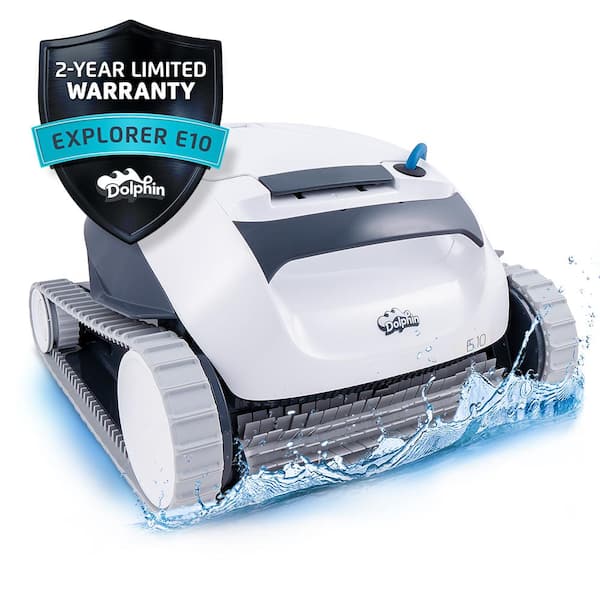
Credit: www.homedepot.com
Power Issues
Experiencing power issues with your Dolphin E10 can be frustrating. Whether your unit won’t power on or the power is inconsistent, identifying the problem is the first step to a solution. Let’s explore common power issues and how to troubleshoot them.
No Power
If your Dolphin E10 has no power at all, follow these steps:
- Check the Power Supply: Ensure the power supply is plugged in and the outlet is functioning.
- Inspect the Cord: Examine the power cord for any visible damage or wear. Replace if necessary.
- Reset the Unit: Sometimes, a simple reset can resolve power issues. Unplug the unit for a few minutes and then plug it back in.
If the above steps don’t work, there may be an internal issue. Consider contacting customer support for further assistance.
Intermittent Power
Intermittent power issues can be tricky to diagnose. Here are some steps to troubleshoot:
- Check Connections: Ensure all connections are secure and not loose.
- Inspect the Outlet: Test the outlet with another device to confirm it’s not the source of the problem.
- Monitor the Unit: Run the Dolphin E10 and observe if it loses power after a specific time or action.
Keep a log of when the power cuts out. This can help identify patterns or specific triggers. If the problem persists, you might need professional help.
Movement Problems
Are you experiencing movement problems with your Dolphin E10 robotic pool cleaner? This section will guide you through common issues and how to fix them. Movement issues can prevent your Dolphin E10 from cleaning your pool effectively. Let’s dive into the common problems and their solutions.
Stuck Wheels
Wheels can get stuck due to debris or mechanical issues. Here’s how to troubleshoot:
- Check for debris: Inspect the wheels for leaves, twigs, or other debris. Remove any obstructions.
- Inspect the drive system: Look at the drive belts and gears. Ensure they are not worn or broken.
- Test the motor: If the wheels still don’t move, check the motor. Listen for unusual sounds or vibrations.
If these steps don’t help, consider contacting customer support for further assistance.
Slow Movement
Slow movement can impact the cleaning efficiency of your Dolphin E10. Here are some steps to troubleshoot:
- Check the filters: Dirty filters can slow down the cleaner. Clean or replace them as needed.
- Inspect the brushes: Worn-out brushes can cause slow movement. Replace them if they are frayed or damaged.
- Examine the power supply: Ensure the power supply is working correctly. Check for loose connections or damaged cords.
- Test in different pool areas: Sometimes, the pool surface can affect movement. Test the cleaner in various parts of the pool.
If the problem persists, consult the user manual or contact the manufacturer for support.
Cleaning Efficiency
The Dolphin E10 is known for its ability to efficiently clean swimming pools. However, sometimes it might not perform as expected. Understanding the common issues related to cleaning efficiency can help you troubleshoot and resolve these problems quickly.
Poor Suction
If your Dolphin E10 has poor suction, it may not pick up debris effectively. Here are some steps to check:
- Ensure that the power supply is connected properly.
- Check if the propellers are blocked or damaged.
- Inspect the suction ports for any obstructions.
Sometimes, the suction can be affected by external factors. Make sure the pool water level is adequate. Low water levels can cause reduced suction power.
Clogged Filters
Clogged filters are a common issue that can affect the Dolphin E10’s cleaning efficiency. Here’s how you can address this:
- Remove the filter basket and check for debris.
- Rinse the filter with a hose to remove dirt and leaves.
- For stubborn clogs, soak the filter in a mild detergent solution.
Regularly cleaning the filters can prevent clogging and ensure optimal performance. Additionally, replacing filters periodically is important to maintain efficiency.
| Issue | Check | Action |
|---|---|---|
| Poor Suction | Power Supply, Propellers, Suction Ports | Ensure connections, Remove obstructions |
| Clogged Filters | Filter Basket, Debris | Rinse, Soak in detergent |
Keeping an eye on these components can greatly improve the cleaning efficiency of your Dolphin E10. Regular maintenance ensures that your pool stays clean and inviting.
Navigation Errors
The Dolphin E10 robotic pool cleaner is known for its efficiency. But sometimes, you may face navigation errors. These errors can lead to missed spots or random movement. Let’s look at how to troubleshoot these issues.
Missed Spots
Your Dolphin E10 might miss spots due to various reasons. Here’s a simple guide to fix it.
- Check the Filter: A clogged filter can hinder navigation. Clean it regularly.
- Inspect the Brushes: Worn-out brushes affect cleaning. Replace them if necessary.
- Adjust the Settings: Ensure your cleaner is set to the correct cleaning mode.
Random Movement
Is your Dolphin E10 moving randomly? This can be frustrating. Here are some solutions.
- Reset the Cleaner: Turn off the device and restart it.
- Check the Power Supply: Ensure the power supply is stable and connected.
- Inspect the Cable: A tangled cable can cause random movements. Untangle it.
If these steps don’t resolve the issue, consult the user manual. You can also contact customer support for further assistance.
Brush Malfunctions
The Dolphin E10 is a fantastic pool cleaner, but sometimes the brushes can malfunction. Understanding and troubleshooting these issues can keep your pool cleaner running smoothly. Below are common brush malfunctions and how to address them.
Brush Not Spinning
If the brush is not spinning, your Dolphin E10 might not be cleaning effectively. Here are a few steps to diagnose the issue:
- Check for debris. Sometimes, debris gets stuck in the brushes.
- Inspect the motor. A faulty motor could prevent the brush from spinning.
- Verify the power supply. Ensure the power cord is properly connected.
Debris can often be easily removed. If the motor is faulty, you may need to contact a professional. Ensuring the power supply is consistent can also solve many brush-related problems.
Brush Wear
Over time, the brushes on your Dolphin E10 can wear down. Worn brushes are less effective at cleaning your pool. Here’s how to check for wear:
- Visual inspection: Look for signs of wear and tear.
- Measure the bristles: Compare the bristle length to the original size.
- Performance: Notice if the cleaner is leaving debris behind.
If you find that the brushes are worn, it’s time to replace them. Regular maintenance will keep your Dolphin E10 performing at its best.
Water Quality Issues
Experiencing water quality issues with your Dolphin E10 pool cleaner? It can be frustrating. Let’s break down common problems and their solutions. Addressing cloudy water and debris left behind can help you enjoy a sparkling clean pool.
Cloudy Water
Cloudy water in your pool can be a sign of several issues. Here are some common causes and their solutions:
- Dirty Filter: Check and clean the filter regularly.
- pH Levels: Test and adjust the pH levels to the recommended range (7.2-7.6).
- Algae Growth: Use an algaecide to treat and prevent algae.
Ensure your Dolphin E10 is working properly. A malfunctioning cleaner might not remove all particles. Inspect the unit for any blockages or damage.
Debris Left Behind
If debris is left behind after using your Dolphin E10, there may be several reasons:
- Clogged Filter: Clean or replace the filter.
- Brush Wear: Inspect the brushes for wear and replace if necessary.
- Cycle Time: Increase the cleaning cycle time for better results.
Sometimes, larger debris can clog the intake. Remove any large debris from the pool before using the cleaner.
For better performance, ensure the cleaner is moving freely. Adjust the cable to avoid tangling and ensure it reaches all areas of the pool.
Maintenance Tips
Keeping your Dolphin E10 in top shape ensures its longevity and efficiency. Regular maintenance is key to avoiding common issues. Here are some essential tips to keep your Dolphin E10 running smoothly:
Regular Cleaning
Regular cleaning of your Dolphin E10 is crucial. Follow these steps:
- Remove the filter basket and rinse it under running water.
- Clean the impeller and the brushes to remove debris.
- Inspect the robot for any tangled hair or leaves.
Make sure to clean the robot after every use. This helps prevent clogging and maintains suction power.
Proper Storage
Proper storage extends the lifespan of your Dolphin E10. Consider these tips:
- Store the robot in a cool, dry place when not in use.
- Keep it out of direct sunlight to avoid damage.
- Ensure the cable is coiled neatly to prevent tangling.
Avoid storing the robot in damp areas. This can lead to corrosion and other issues.
When To Seek Professional Help
Is your Dolphin E10 pool cleaner acting up? Sometimes, basic troubleshooting just doesn’t cut it. Knowing when to seek professional help can save you time and money. Let’s dive into some scenarios where expert intervention is necessary.
Persistent Issues
Have you tried all the basic fixes, but the problem persists? If your Dolphin E10 continues to malfunction, it may be time to call a professional. Here are some issues that may need expert attention:
- Motor Problems: If the motor isn’t running smoothly.
- Electrical Faults: If there are recurring electrical issues.
- Software Glitches: If the device is not following its programmed patterns.
These issues often need specialized tools and skills to diagnose and repair.
Warranty Concerns
If your Dolphin E10 is still under warranty, attempting repairs yourself can void it. Here’s what you should keep in mind:
- Check Your Warranty: Always review the warranty terms before taking any action.
- Authorized Service Centers: Use only authorized service centers for repairs.
- Document Everything: Keep records of all repairs and communications.
Following these steps ensures you don’t lose your warranty benefits.
Credit: manuals.maytronics.com
Frequently Asked Questions
How Do I Reset My Dolphin E10?
To reset your Dolphin E10, unplug it from the power source. Wait a few minutes, then plug it back in. This can help resolve minor issues and refresh the system.
Why Is My Dolphin E10 Not Moving?
If your Dolphin E10 is not moving, check for obstructions in the wheels or tracks. Ensure the power supply is properly connected and functioning.
What To Do If Dolphin E10 Stops Mid-cycle?
If the Dolphin E10 stops mid-cycle, check for tangled cables or debris. Make sure the filter is clean and the power supply is stable.
How Often Should I Clean Dolphin E10 Filters?
Clean the Dolphin E10 filters after every use. Regular cleaning ensures optimal performance and longevity of your robotic pool cleaner.
Conclusion
Troubleshooting your Dolphin E10 can be simple with the right tips. Regular maintenance helps avoid many issues. Always check the power supply and filters first. For persistent problems, consult the manual or contact support. Keeping your Dolphin E10 in good shape ensures a clean pool.
Remember, a well-maintained cleaner saves time and effort. Happy swimming!

