Is your robotic pool vacuum refusing to charge? You rely on it to keep your pool clean without any hassle, so when it stops working, it can be frustrating.
Don’t worry—you’re not alone, and there’s usually a simple reason behind the problem. You’ll discover the common causes why your robotic pool vacuum won’t charge and easy steps you can take to fix it. Keep reading to get your pool cleaning routine back on track fast.

Common Charging Issues
Robotic pool vacuums need proper charging to work well. Common charging issues can stop your vacuum from cleaning your pool. These problems often come from simple causes. Fixing them can bring your vacuum back to life fast.
Below are the most common reasons why your robotic pool vacuum may not charge. Checking these areas can save time and money.
Power Supply Problems
The power supply is the first place to check. Sometimes the outlet has no power. Test the outlet with another device to be sure. The power cord or plug may also be damaged. A loose connection can stop charging completely. Make sure the charger is plugged in tightly and the cord is not broken.
Dirty Charging Contacts
Charging contacts connect the vacuum to the charger. Dirt, debris, or corrosion can block this connection. Clean the contacts gently with a soft cloth. Avoid harsh chemicals that can damage the contacts. Keeping them clean ensures the vacuum charges properly every time.
Battery Malfunctions
The battery inside the vacuum can wear out over time. It may not hold a charge or fail to charge at all. If the battery is old, replacing it might be necessary. Some batteries need professional help to change. Check the battery condition regularly to avoid surprises.
Troubleshooting Steps
Troubleshooting a robotic pool vacuum that won’t charge can be simple. Start by checking basic parts. Small issues often cause charging problems. Follow these steps to find the cause and fix it fast.
Check The Power Outlet
First, make sure the power outlet works. Plug in another device to test it. Sometimes the outlet is off or faulty. Check for a tripped circuit breaker or loose plug. A working outlet is key for charging.
Clean The Charging Ports
Dirty charging ports can block power flow. Look for dirt, debris, or corrosion on the contacts. Use a soft cloth or brush to clean them gently. Clean ports ensure a good connection. This step often solves charging issues.
Inspect The Battery Health
The battery may be old or damaged. Check for swollen or leaking battery cells. If the battery does not hold charge, replacement might be needed. Healthy batteries keep your vacuum running longer. Testing battery health helps decide the next steps.
Quick Fixes To Try
Robotic pool vacuums sometimes stop charging. This can be frustrating, but there are quick fixes to try at home. These steps often solve the problem without extra costs. Follow these simple actions to get your vacuum charging again fast.
Reset The Vacuum
Resetting the vacuum clears minor errors. Unplug the charging dock from power. Press the reset button on the vacuum if it has one. Wait for 30 seconds. Plug the dock back in and place the vacuum on it. This simple reset can fix charging issues.
Replace The Battery
Batteries wear out over time. A weak battery may not charge properly. Check your vacuum’s manual for battery type. Buy a new battery matching the specifications. Remove the old battery carefully. Install the new one and test the vacuum’s charging. This often solves the problem.
Adjust The Charging Dock
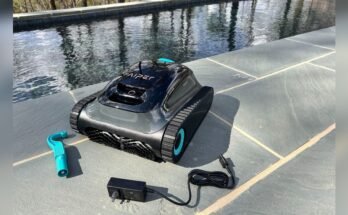
The dock must be correctly positioned. Make sure the vacuum sits firmly on the dock. Clean the charging contacts on both vacuum and dock. Dirt or water can block charging. Move the dock to a dry, flat surface. Proper contact improves charging performance.

Preventing Future Charging Issues
Preventing future charging issues with your robotic pool vacuum saves time and money. Simple habits keep the battery healthy and the device ready. Consistent care stops common problems before they start.
Regular Maintenance Tips
Clean the charging contacts often. Dirt and grime block power flow. Check the battery regularly for damage or wear. Replace old batteries to keep good charge. Inspect cables for cuts or breaks. A smooth, clean connection improves charging speed.
Proper Storage Practices
Store the vacuum in a dry, cool place. Avoid extreme heat or cold that harms the battery. Keep it off the ground to prevent moisture damage. Charge the battery before storing for long periods. Turn off the device completely to save power.
Using Compatible Chargers
Always use the charger made for your model. Different chargers may supply wrong voltage. Wrong voltage can damage the battery or charger. Check the charger’s specifications before use. Using the right charger ensures safe and fast charging.

Frequently Asked Questions
Why Is My Robotic Pool Vacuum Not Charging Properly?
Your robotic pool vacuum may not charge due to a faulty charger, damaged cables, or power supply issues. Check connections and ensure the charger is compatible with your model. Clean charging contacts to avoid dirt interference. Replace any worn parts for optimal charging.
How Do I Fix A Robotic Pool Vacuum That Won’t Charge?
First, inspect the power outlet and charger for damage. Clean the charging contacts on both vacuum and dock. Reset the vacuum by unplugging it for a few minutes. If problems persist, consult the manufacturer or replace the battery.
Can Water Damage Cause Charging Issues In Pool Vacuums?
Yes, water can corrode electrical components and prevent charging. Ensure your robotic vacuum is dry before charging. Regularly check seals and clean the unit to avoid moisture buildup that disrupts the charging process.
How Often Should I Charge My Robotic Pool Vacuum?
Charge your robotic pool vacuum after every cleaning cycle or as recommended by the manufacturer. Avoid overcharging to extend battery life. Regular charging ensures the vacuum is ready for efficient pool cleaning sessions.
Conclusion
A robotic pool vacuum not charging can cause big problems. Check the power source and clean the charging contacts. Look for damaged cords or worn-out batteries. Regular maintenance helps keep your vacuum working well. Small fixes often solve the issue quickly.
Staying patient and careful saves time and money. Your pool stays clean and ready for fun. Don’t ignore charging problems; fix them soon. Simple steps bring your vacuum back to life. Keep it charged, keep it running.