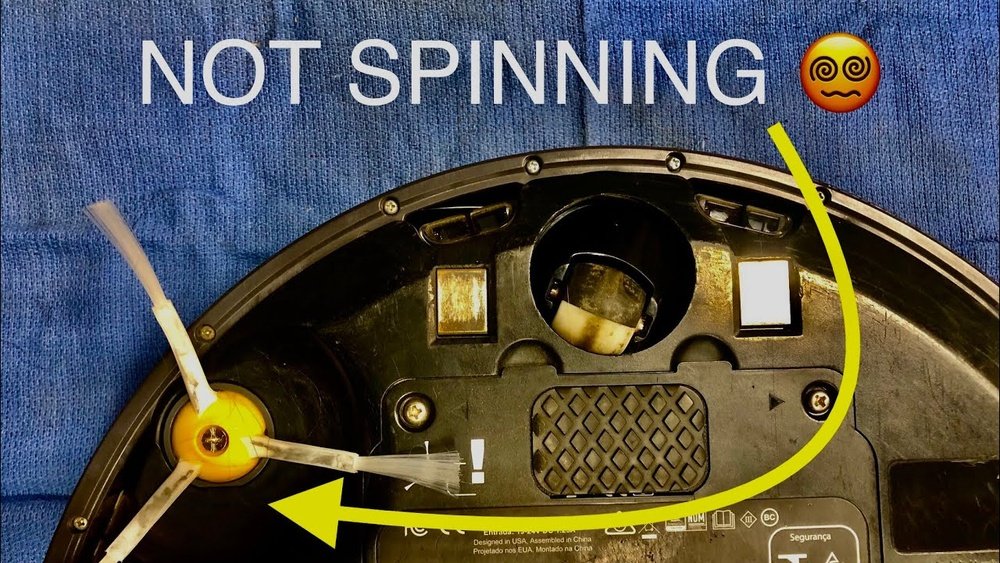
Is your robot vacuum’s brush refusing to spin? This common issue can stop your vacuum from cleaning properly and leave your floors dirty.
But don’t worry—you don’t have to buy a new one or call for expensive repairs. You’ll discover simple, effective ways to fix your robot vacuum brushes quickly. By the end, you’ll know exactly what to check and how to get your vacuum working like new again.
Keep reading to bring your vacuum back to life and enjoy spotless floors without extra hassle.
Common Causes For Brushes Not Spinning
Robot vacuum brushes can stop spinning due to several reasons. Identifying the cause helps fix the problem quickly. Most issues relate to dirt, wear, or power problems. Knowing these common causes saves time and effort during repairs.
Clogged Brush Roll
The brush roll often gets clogged with hair and debris. Dirt wraps around the brush, stopping it from turning. Cleaning the brush roll regularly keeps it spinning smoothly. Remove all hair and dust for better vacuum performance.
Worn Out Bearings
Bearings support the brush roll and allow it to spin freely. Over time, bearings wear out or get damaged. Worn bearings cause the brush to slow down or stop. Replacing old bearings restores the brush roll’s movement.
Obstructed Motor
The motor drives the brush roll. Dust or small objects can block the motor parts. An obstructed motor cannot spin the brush roll properly. Checking and clearing any blockages helps the motor work again.
Battery And Power Issues
Low battery or poor power supply affects brush rotation. Without enough power, the motor struggles to spin the brush. Charging the battery fully or replacing it solves this problem. Ensure the vacuum has steady power for best results.
Tools Needed For Repairs
Fixing robot vacuum brushes that do not spin requires some basic tools. These tools help you clean, open, and replace parts easily. Having the right tools makes the repair process smooth and quick. Below are the essential tools needed for repairs.
Basic Cleaning Supplies
Start with cleaning supplies to remove dirt and hair. Use a soft cloth to wipe the brushes and surrounding parts. A small brush or an old toothbrush helps clean tight spaces. Cotton swabs work well for detailed cleaning. Keep some rubbing alcohol to clean sticky grime gently.
Screwdrivers And Pliers
Screwdrivers are key to opening your vacuum. A set with different sizes and types helps with various screws. Use a Phillips and flathead screwdriver for most models. Needle-nose pliers help pull out stuck debris or hold small parts. These tools give you control and access to inside parts.
Replacement Parts
Brushes wear out over time and need replacing. Keep spare brushes ready for quick swaps. Some models need specific brush types; check your manual. Replacement belts and caps may also be needed. Having these parts saves time and ensures smooth spinning brushes.
Step-by-step Cleaning Process
Cleaning the robot vacuum brushes is key to fixing spinning issues. Dirt, hair, and dust build-up often stop the brushes from turning properly. Follow this simple step-by-step process to clean the brushes and restore their movement.
Removing The Brush Roll
First, unplug your robot vacuum. Turn it upside down and find the brush cover. Usually, you can open it by pressing clips or removing screws. Gently lift the brush roll out. Keep parts safe for reassembly.
Clearing Hair And Debris
Look closely at the brush roll. Cut away tangled hair and threads with scissors. Pull out stuck debris by hand. Clean inside the brush compartment too. Use a dry cloth or compressed air to clear dust.
Cleaning Bearings And Axles
Check the brush roll ends for bearings and axles. Remove any dirt and hair wrapped around them. Wipe with a damp cloth and dry well. Spin the brush roll manually to ensure smooth movement.
Testing And Reinstalling Brushes
Testing and reinstalling the brushes is a key step in fixing a robot vacuum that stops spinning its brushes. This process helps identify if the brushes or their attachments cause the problem. It also ensures the brushes fit correctly for smooth operation.
Checking Brush Spin Manually
First, turn off the robot vacuum and unplug it for safety. Remove the brush cover carefully. Try spinning the brush with your hand. It should spin freely without much resistance. If it feels stuck or hard to turn, dirt or hair might be tangled. Clean the brush thoroughly before testing again.
Check the brush bearings for damage or wear. Damaged bearings can stop the brush from spinning. Replace the brush if bearings do not move smoothly. This simple manual test helps find mechanical issues early.
Reattaching Brush Roll Properly
After cleaning and checking, place the brush roll back into its slot. Make sure it fits tightly without gaps. Align the brush ends with the motor spindle and side slots. Press down gently until you hear a click or feel it lock in place.
Secure the brush cover and tighten any screws. A loose brush roll may not spin correctly. Double-check that the brush can rotate freely after reinstallation. Proper reattachment ensures the vacuum works efficiently and cleans well.
Fixing Motor And Electrical Issues
Fixing motor and electrical issues is key to getting your robot vacuum brushes spinning again. These parts control the brush movement. Problems here often stop the brushes from working properly.
Start by checking the motor and electrical connections. Small problems can cause big troubles. Simple fixes can save you time and money.
Inspecting Motor Function
First, look closely at the motor. Remove the brush cover to access it. Check for dust, hair, or debris blocking the motor. Clean the area gently with a soft brush or cloth.
Try to spin the motor shaft by hand. It should turn smoothly without resistance. If it feels stuck or rough, the motor might be faulty. A motor that does not run at all needs more testing.
Checking Electrical Connections
Next, check all wires and connectors near the motor. Loose or broken wires stop power flow. Make sure all plugs fit tightly into their sockets.
Look for burnt or damaged wires. These need replacing to avoid shorts. Use a multimeter to test if power reaches the motor. No power means a wiring or battery problem.
When To Replace The Motor
Replace the motor if it does not spin after cleaning and checking connections. Motors have a limited life span. Signs include strange noises, burning smells, or no movement at all.
Using a new motor restores brush function. Always buy a motor model that matches your robot vacuum. Proper replacement ensures your vacuum works well again.

Preventive Maintenance Tips
Keeping your robot vacuum brushes spinning smoothly saves time and money. Preventive maintenance helps avoid common problems that stop brushes from working. Small efforts each week keep your vacuum in top shape. Clean brushes move freely and pick up dirt better. Follow these simple tips to extend brush life and improve cleaning results.
Regular Cleaning Schedule
Clean the brushes after every few uses. Remove hair, string, and dust stuck around the bristles. Use a soft brush or cloth to wipe away debris. Check the brush bearings and remove trapped dirt. Regular cleaning stops blockages that slow brush spinning. Set a reminder to keep this task consistent.
Avoiding Common Brush Damage
Do not vacuum sharp objects or thick cords. These can tangle or cut the brushes. Avoid running the vacuum on rough surfaces like gravel. Rough surfaces wear out brushes quickly. Handle the brushes carefully during removal and cleaning. Damaged brushes reduce cleaning power and may stop spinning.
Proper Storage Practices
Store the vacuum in a clean, dry place. Avoid leaving it in damp or dusty areas. Keep brushes away from pets and children. Store brushes in a way that avoids bending or crushing. Proper storage protects the brush shape and motor. This helps maintain smooth spinning over time.

Frequently Asked Questions
Why Are My Robot Vacuum Brushes Not Spinning?
Brushes may stop spinning due to hair or debris buildup. Check for obstructions and clean the brushes regularly. Also, inspect the brush motor and belt for damage or wear.
How Do I Fix A Stuck Robot Vacuum Brush?
Remove the brush and clear any tangled hair or debris. Check the brush bearings and motor for blockages. Replace damaged parts if necessary to restore proper spinning.
Can Worn Brushes Cause Spinning Issues?
Yes, worn or damaged brushes can prevent spinning. Replace old brushes with compatible parts to maintain cleaning efficiency and proper rotation.
How Often Should I Clean Robot Vacuum Brushes?
Clean brushes after every few uses or when you notice reduced performance. Regular cleaning prevents hair buildup and keeps the brushes spinning smoothly.
Conclusion
Fixing robot vacuum brushes that don’t spin can be simple. Check for hair or debris wrapped around the brush. Clean the brush and remove any blockages. Make sure the brush is properly attached. Test the motor and replace it if needed.
Regular cleaning keeps your vacuum working well. Small fixes save money and time. Keep your floors clean with a spinning brush. Follow these steps to keep your vacuum running smoothly.