Are you tired of feeling uncomfortable and restless in your office chair? The secret to a productive and pain-free workday might be simpler than you think.
How you adjust your office chair can make a huge difference in your comfort, posture, and even your focus. You’ll discover easy steps to customize your chair perfectly for your body. Keep reading to learn how small changes can bring big benefits to your work routine and health.
Choose The Right Chair
Choosing the right office chair is the first step to good posture and comfort. A proper chair supports your body and reduces strain during long work hours. Not all chairs fit every person, so select one that suits your size and work style. Focus on key features that improve comfort and health.
Check Seat Height And Depth
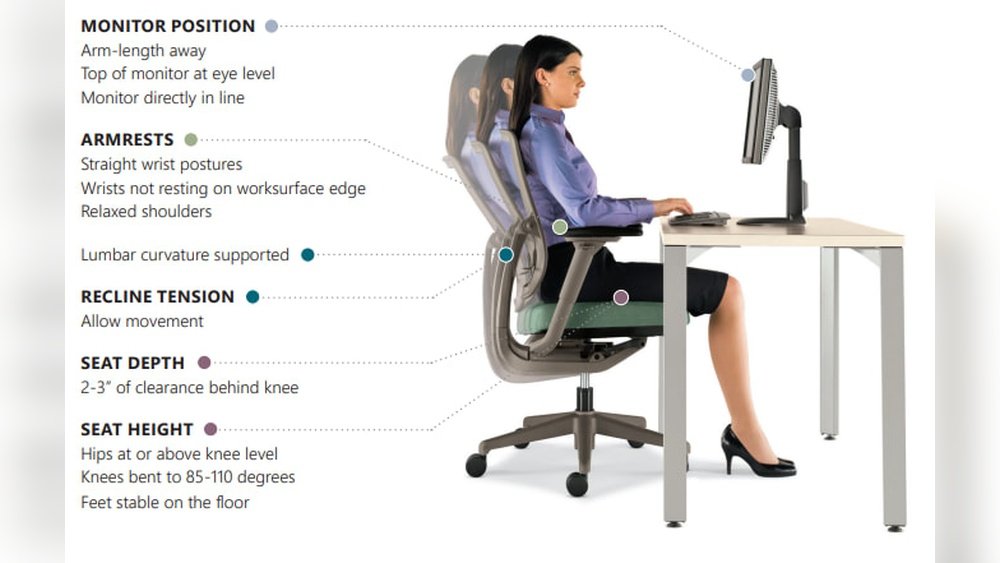
Seat height affects how your feet rest on the floor. Your feet should sit flat with knees at a 90-degree angle. Adjustable height helps find the perfect fit. Seat depth matters too. It should support your thighs without pressing behind your knees. A good seat depth prevents circulation problems and discomfort.
Look For Lumbar Support
Lumbar support keeps your lower back’s natural curve. It reduces pressure on the spine and prevents back pain. Choose a chair with adjustable lumbar support for a custom fit. Proper support encourages healthy posture and less fatigue.
Consider Adjustable Armrests
Armrests support your arms and reduce shoulder tension. Adjustable armrests allow you to set the right height and width. This helps keep your shoulders relaxed. Proper armrest adjustment prevents strain and improves typing comfort.
Set Seat Height Correctly
Setting the seat height correctly is key to comfort and good posture. It helps prevent back pain and keeps you focused. Adjusting the height lets your body rest naturally and reduces strain on muscles and joints.
Start by changing the chair’s height so your legs feel relaxed. The right seat height supports your lower back and helps you sit upright. Small changes can make a big difference in how you feel throughout the day.
Feet Flat On The Floor
Your feet should rest flat on the floor. This supports your body weight evenly. If your feet dangle, it can cause pressure on your thighs. Use a footrest if the floor feels too far away. Proper foot placement improves circulation and stability.
Knees At 90 Degrees
Bend your knees at a right angle. Your thighs should be parallel to the floor. This position reduces stress on your knee joints. Avoid sitting with knees too high or too low. Keeping knees at 90 degrees helps maintain good blood flow and comfort.
Adjust Seat Depth
Adjusting the seat depth of your office chair helps improve comfort and support. It controls how far the seat extends under your thighs. A proper seat depth keeps your legs relaxed and prevents strain during long sitting hours.
Too deep or too shallow seating can cause discomfort and poor posture. Adjust the seat depth to fit your body size and leg length. This simple step can reduce fatigue and improve focus at work.
Maintain 2-4 Inches From Knee
Keep a space of 2 to 4 inches between the seat edge and your knee. This gap allows blood to flow freely in your legs. It prevents numbness and keeps you comfortable over time. Measure the distance while sitting with your back against the chair.
Avoid Pressure Behind Knees
Ensure the seat does not press hard behind your knees. Pressure there blocks circulation and causes discomfort. The seat should support your thighs without pushing into the back of your knees. Adjust the depth until you feel no tightness in that area.
Position Lumbar Support
Properly positioning the lumbar support in your office chair is key to good posture. It helps keep your lower back comfortable during long hours of sitting. This support prevents strain and pain by matching the natural curve of your spine. Adjusting it right makes a big difference for your back health and work focus.
Align With Lower Back Curve
The lumbar support should fit the inward curve of your lower back. Move the support up or down until it matches this curve exactly. It should press gently against your back, not push hard. This alignment keeps your spine in a natural position and reduces pressure on your discs.
Prevent Slouching
Good lumbar support stops you from slouching forward. Slouching strains your back muscles and spine. The support acts as a reminder to sit straight and stay upright. This helps maintain a healthy posture, reducing fatigue and discomfort throughout your workday.
Modify Armrests
Adjusting the armrests on your office chair helps reduce strain on your upper body. Proper armrest height and position keep your arms comfortable. This prevents shoulder and neck pain during long work hours.
Keep Shoulders Relaxed
Set armrests so your shoulders stay relaxed and down. Avoid lifting or hunching your shoulders to reach the armrests. Your arms should rest lightly without causing tension.
Support Elbows At 90 Degrees
Position the armrests to support your elbows at a 90-degree angle. This angle reduces stress on your joints and muscles. Your forearms should rest comfortably parallel to the desk surface.
Tilt And Recline Settings
The tilt and recline settings on an office chair help you stay comfortable while working. Adjusting these settings lets you change how far the chair leans back. This supports your back and reduces strain during long hours.
Many chairs come with options to lock the tilt or let it move freely. Knowing how to use these features improves your sitting posture and comfort.
Find Comfortable Recline Angle
Start by sitting in your chair with your feet flat on the floor. Slowly lean back until you find a position that feels natural. The angle should support your lower back without making you stretch or slouch.
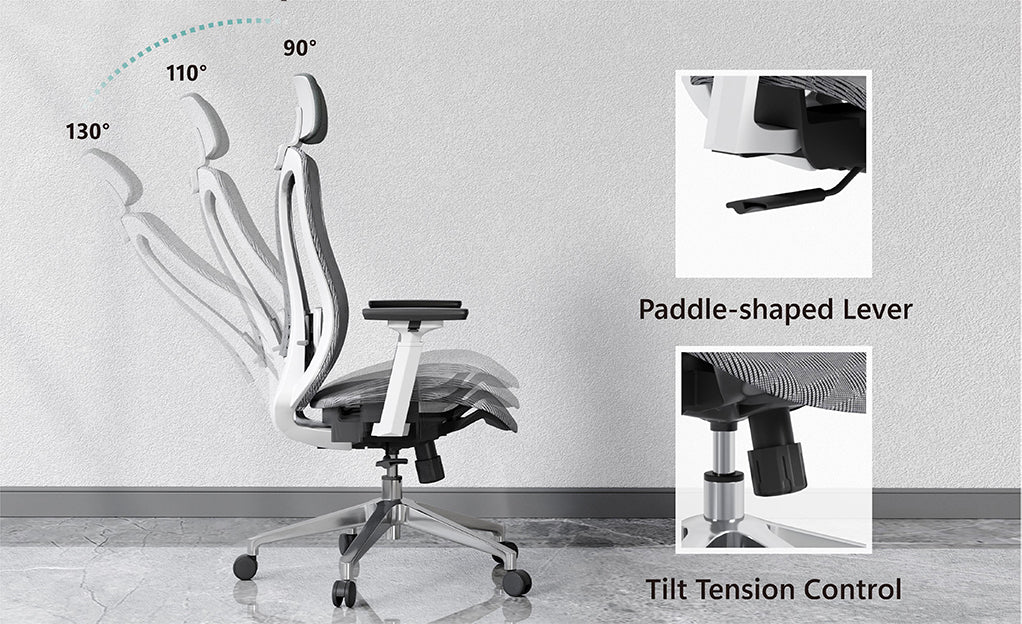
A slight recline of 100 to 110 degrees is good for most people. It helps reduce pressure on your spine. Test different angles to find what works best for you.
Lock Or Free Tilt Options
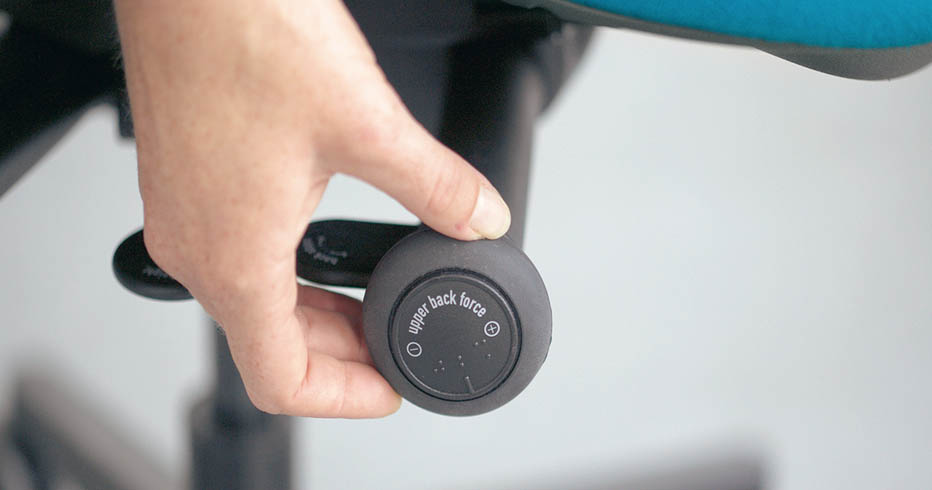
Most office chairs have a lever or knob to lock the tilt. Locking keeps the chair in one position. This is useful during focused tasks.
Free tilt lets the chair move with your body. It allows small movements that reduce stiffness. Use free tilt if you want more flexibility and comfort.
Try both settings to see which feels better during your workday.
Check Headrest Position
Checking the headrest position is important for comfort and health. A well-placed headrest supports your neck and head. It helps reduce strain and prevents stiffness during long work hours. Adjusting the headrest correctly makes sitting easier and safer.
Support Neck And Head
The headrest should touch the back of your head lightly. It supports the natural curve of your neck. This support helps keep your spine aligned. Avoid placing the headrest too high or too low. Proper support stops your neck from bending unnaturally.
Adjust Height And Angle
Change the headrest height so it fits your head size. The middle of the headrest should match the base of your skull. Tilt the headrest angle to follow your head’s shape. A good angle keeps your head stable and relaxed. Adjusting height and angle reduces pressure on neck muscles.
Maintain Good Posture
Maintaining good posture is key to staying comfortable and avoiding pain at work. A properly adjusted office chair supports your spine and keeps your body aligned. This reduces strain on muscles and joints during long hours of sitting. Follow these simple tips to keep your posture healthy and strong.
Sit Back Fully
Always sit with your back fully against the chair’s backrest. This supports your lower spine and helps maintain the natural curve. Keep your shoulders relaxed and avoid slouching forward. Adjust the backrest angle if needed to fit your body shape. Sitting back fully spreads your weight evenly and prevents pressure on your hips.
Avoid Leaning Forward
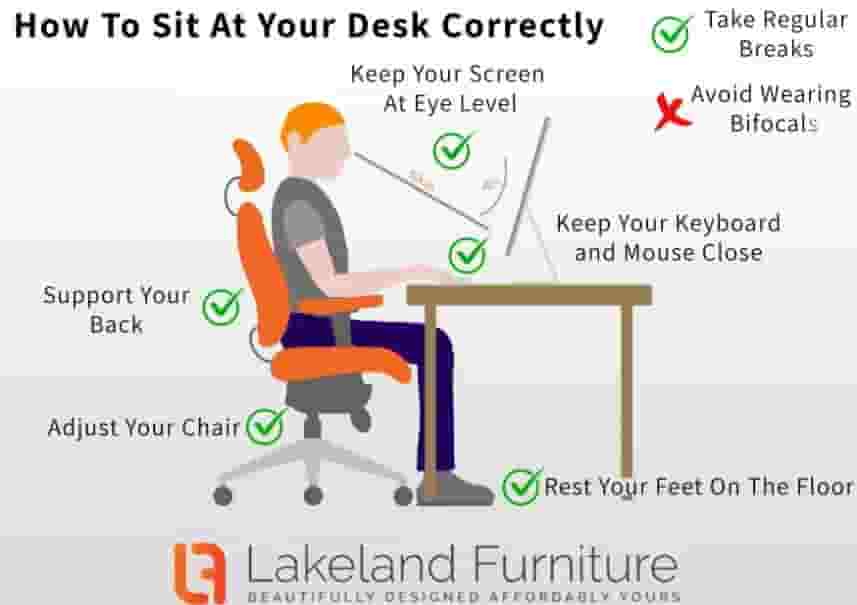
Leaning forward strains your neck and back muscles. Keep your head aligned over your shoulders. Use armrests to support your arms and reduce shoulder tension. Position your screen at eye level to avoid leaning in. Leaning forward often causes discomfort and fatigue, so stay upright for better focus and health.
Regular Chair Maintenance
Regular chair maintenance helps keep your office chair working well. It stops small problems from becoming big issues. A well-maintained chair lasts longer and stays comfortable. Simple care steps can improve your sitting experience every day.
Tighten Screws And Bolts
Check screws and bolts often. They can become loose with daily use. Use a screwdriver or wrench to tighten them. This prevents wobbling and keeps the chair stable. Tight screws also protect the chair parts from damage.
Lubricate Moving Parts
Moving parts need smooth motion. Apply lubricant to wheels, levers, and joints. This reduces noise and friction. Use a silicone-based spray or light oil. Lubrication helps parts move easily and lasts longer. It keeps your chair quiet and comfortable.
Frequently Asked Questions
How Do I Adjust Chair Height For Proper Posture?
Adjust your chair height so feet rest flat on the floor. Knees should be at a 90-degree angle. This promotes good blood circulation and reduces strain on your lower back.
What Is The Best Way To Set Lumbar Support?
Position the lumbar support to fit the natural curve of your lower spine. This helps maintain proper posture and reduces lower back pain during long sitting hours.
How Should Armrests Be Adjusted On An Office Chair?
Set armrests so your shoulders are relaxed and elbows form a 90-degree angle. Proper armrest height prevents shoulder tension and supports your arms comfortably while working.
Why Is Seat Depth Adjustment Important?
Adjusting seat depth ensures your back rests against the chair backrest. It also leaves 2-4 inches between the seat edge and the back of your knees, promoting better circulation.
Conclusion
Adjusting your office chair correctly boosts comfort and focus. It helps prevent back pain and tiredness during work. Small changes, like seat height and backrest angle, make a big difference. Take time to find the best position for your body.
A well-set chair supports good posture all day long. Remember, comfort leads to better work and less stress. Keep these tips in mind for a healthier workspace. Your body will thank you.