Your office chair is more than just a seat—it’s where you spend hours working, thinking, and creating. But how often do you stop to take care of it?
Keeping your office chair in good shape isn’t just about looks; it affects your comfort, posture, and even your productivity. If your chair feels shaky or starts to wear out, it can slow you down without you even realizing it.
You’ll discover simple, practical ways to maintain your office chair so it stays comfortable and reliable for the long haul. Ready to give your chair the care it deserves? Let’s dive in.
Choosing The Right Chair
Choosing the right office chair is key to staying comfortable and productive. It affects your posture and how long you can work without pain. A good chair also lasts longer and saves money over time. Focus on two main points to pick a chair that fits your needs perfectly.
Materials And Build Quality
The materials used in an office chair impact its durability and feel. Strong frames made of metal or high-quality plastic last longer. Look for tight stitching and firm fabric or leather. The padding should be soft but supportive. Avoid cheap foam that flattens quickly. Wheels and base must be sturdy to support your weight safely.
Ergonomics And Comfort
Ergonomic chairs help keep your body in a healthy position. They reduce strain on your back, neck, and shoulders. Features like adjustable height, tilt, and lumbar support are essential. A comfortable seat cushion supports your hips evenly. Armrests should be adjustable to fit your arms well. The chair should allow you to sit with feet flat on the floor and knees at a right angle.

Regular Cleaning Routine
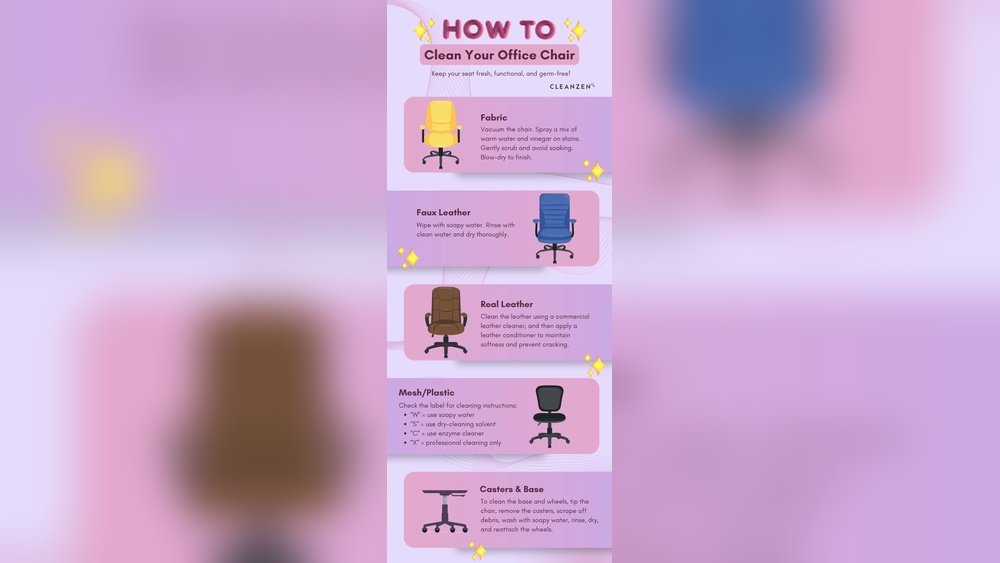
Maintaining an office chair starts with a regular cleaning routine. This keeps the chair looking good and lasting longer. Dirt and dust can build up quickly. Cleaning often stops damage and keeps the chair fresh. A simple routine helps your chair stay comfortable and clean every day.
Dusting And Vacuuming
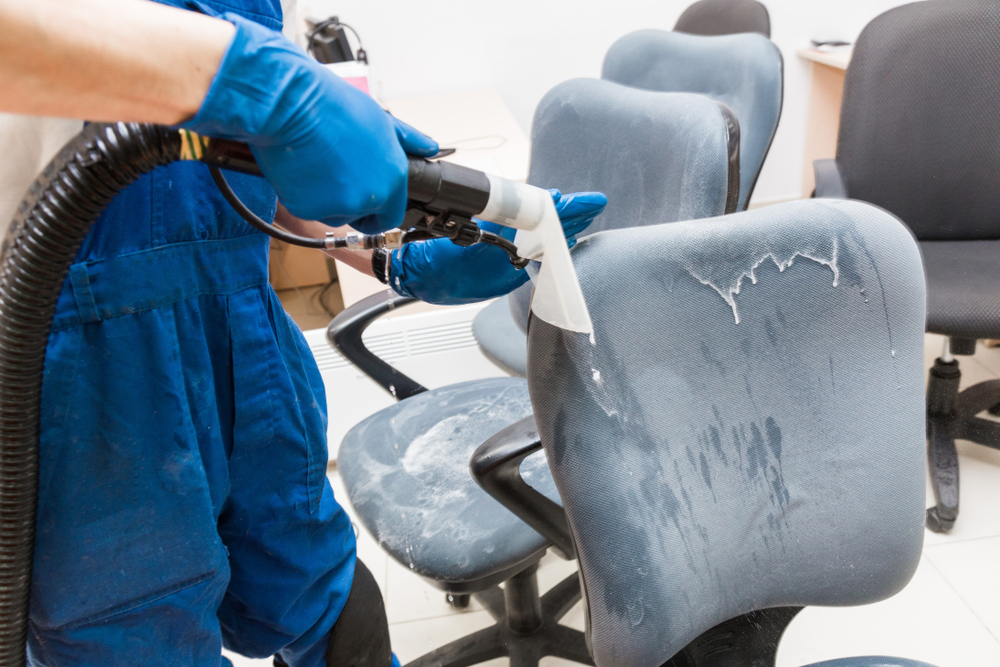
Dust settles on the chair’s surface and in crevices. Use a soft cloth or microfiber duster to wipe down the chair. Pay attention to the armrests, back, and seat. Use a vacuum with a brush attachment to remove dust from hard-to-reach places. This prevents dirt from scratching the material and keeps the chair neat.
Spot Cleaning Stains
Stains can appear from spills or sweat. Clean spots quickly to avoid permanent marks. Use a mild soap solution and a soft cloth. Dab the stain gently; do not rub hard. Rinse with a clean damp cloth and let it air dry. This keeps the chair looking new and prevents stains from spreading.
Lubricating Moving Parts
Lubricating moving parts of an office chair helps it work smoothly. It stops squeaks and keeps the chair easy to move. Regular lubrication also extends the chair’s life. This simple step makes sitting more comfortable. Let’s explore how to do it right.
Identifying Key Components
Focus on parts that move or rub together. Look at the wheels or casters at the base. Check the gas lift cylinder where the height changes. Notice the swivel mechanism under the seat. Also, see the tilt and recline joints. These parts need regular lubrication to stay smooth.
Best Lubricants To Use
Choose lubricants that do not attract dirt. Silicone spray works well for most moving parts. It does not leave sticky residue. WD-40 is good for cleaning old grease but should be followed by silicone. Avoid thick oils that can gum up. Use small amounts to avoid mess and build-up.

Tightening Screws And Bolts
Keeping an office chair sturdy and safe depends a lot on tightening screws and bolts. Over time, these small parts can loosen. Loose screws cause wobbling or noise. This affects comfort and safety. Regular tightening keeps the chair stable and working well.
Tools Needed
To tighten screws and bolts, you need some basic tools. A screwdriver set is essential. Most office chairs use Phillips or flathead screws. An adjustable wrench helps with bolts. Sometimes, an Allen key (hex key) is required. Keep these tools handy for quick fixes.
Frequency Of Checks
Check screws and bolts at least once every three months. Heavy use may require more frequent checks. Tighten any loose parts right away. Regular checks prevent damage and extend the chair’s life. Make it a simple part of your office routine.
Protecting Chair Upholstery
Protecting chair upholstery helps keep your office chair looking new and clean. Upholstery faces daily wear from sweat, dust, and spills. Taking care of it prevents stains and fabric damage.
Simple steps can extend the life of your chair’s fabric. Keep it fresh and comfortable for work every day.
Using Fabric Protectors
Fabric protectors create a shield over the chair’s surface. They stop liquids from soaking into the fabric. Spraying a fabric protector is quick and easy. Let it dry before using the chair. This method reduces stains and makes cleaning easier.
Avoiding Direct Sunlight
Sunlight can fade and weaken fabric fibers. Place your chair away from windows or use curtains. Avoiding direct sunlight keeps colors bright and fabric strong. Protect your chair by limiting sun exposure during the day.
Adjusting For Proper Support
Adjusting your office chair for proper support helps prevent pain and improves comfort. Small changes make a big difference in how you feel at work. Proper support keeps your spine aligned and reduces strain on muscles.
Height And Tilt Settings
Set your chair height so your feet rest flat on the floor. Your knees should be at a 90-degree angle. Adjust the tilt to support your back’s natural curve. A slight recline helps reduce pressure on your lower back. Keep your hips slightly higher than your knees.
Lumbar Support Adjustment
Adjust lumbar support to fit the curve of your lower back. It should fill the gap between your spine and the chair. Proper lumbar support prevents slouching and back pain. Move it up or down to find the most comfortable spot. Good lumbar support keeps your posture healthy all day.
Replacing Worn Parts
Replacing worn parts is key to keeping an office chair comfortable and safe. Over time, parts like wheels, armrests, or gas lifts can break or wear out. Fixing these parts can extend the chair’s life and save money. Simple repairs help avoid buying a new chair too soon.
Identifying When To Replace
Look for signs of damage or wear. Wheels that stick or won’t roll need change. Loose or broken armrests can cause discomfort. If the chair does not hold height, the gas lift may be bad. Squeaky noises also mean parts need checking. Act quickly to avoid more damage.
Where To Find Replacement Parts
Check the chair brand’s website first. Many brands sell parts directly online. Office supply stores also carry common parts like wheels and cushions. Online marketplaces offer a wide range of parts for many chair models. Use the chair’s model number to find the right part. Always choose parts that fit well for safety.
Preventing Common Damage
Preventing common damage to your office chair helps it last longer. Simple habits protect its parts. These habits keep your chair safe and working well. Avoiding damage saves money and effort over time.
Avoiding Overloading
Every chair has a weight limit. Exceeding this limit can break the frame or wheels. Check the chair’s weight capacity before use. Avoid placing heavy items on the chair. Do not lean back too far or put all weight on one side. Overloading stresses the chair and causes damage quickly.
Safe Usage Practices
Use the chair as it was made to be used. Sit properly with your feet flat on the ground. Avoid rocking too much or standing on the chair. Move the chair gently across the floor. Abrupt movements can loosen screws and damage the base. Regularly tighten screws and check parts for wear. These small steps keep your chair stable and safe.
Frequently Asked Questions
How Often Should I Clean My Office Chair?
Clean your office chair every two weeks to prevent dust buildup. Use a soft cloth and mild cleaner for upholstery. Regular cleaning keeps the chair hygienic and extends its lifespan.
What Is The Best Way To Lubricate Chair Wheels?
Use silicone spray or WD-40 to lubricate chair wheels. Apply sparingly to avoid dirt attraction. This ensures smooth movement and prevents squeaking.
How Can I Tighten Loose Office Chair Screws?
Check all screws monthly and tighten them with a screwdriver. Loose screws affect stability and safety. Regular checks keep your chair secure and comfortable.
What Products Are Safe For Cleaning Chair Upholstery?
Use mild soap, water, or specialized upholstery cleaner. Avoid harsh chemicals that damage fabric or leather. Always test on a small area before full cleaning.
Conclusion
Keeping your office chair clean and well-oiled helps it last longer. Tighten screws and check wheels often for smooth movement. Use mild soap and a soft cloth to remove dirt. Avoid harsh chemicals that can damage the chair’s material. Small steps taken regularly prevent big problems later.
A well-maintained chair supports your back and comfort all day. Simple care saves money and keeps your workspace neat. Try these tips to enjoy a better sitting experience every day.