Is your robot vacuum not running as long as it used to? You might be wondering if buying a replacement battery is really worth it.
After all, you want to get the most out of your device without spending too much money or time. You’ll discover the key reasons why replacement batteries can save your robot vacuum—and your wallet. Keep reading to find out how to make the best choice for your cleaning routine and avoid common mistakes that many owners make.

Benefits Of Replacement Batteries
Replacement batteries offer many benefits for robot vacuum owners. They help keep the vacuum working longer and more efficiently. Choosing a replacement battery can be a smart decision for saving money and improving device performance.
Extending Vacuum Lifespan
A new battery gives your robot vacuum a fresh start. It prevents the need to buy a whole new unit. This simple change can add years to your vacuum’s life. The vacuum stays useful without losing power quickly. Regular battery replacement keeps the device ready for daily cleaning tasks.
Cost Savings Compared To New Units
Buying a replacement battery costs much less than a new robot vacuum. It is an affordable way to keep your vacuum working well. This saves money while avoiding waste. You spend less and still get good cleaning performance. A battery swap is a budget-friendly choice that makes sense.
Improved Performance And Runtime
Old batteries lose charge faster and reduce runtime. A fresh battery restores the vacuum’s original cleaning time. This means the vacuum can cover more area in one go. Performance feels like new, with stronger suction power. Replacing the battery keeps your vacuum efficient and reliable.
Types Of Replacement Batteries
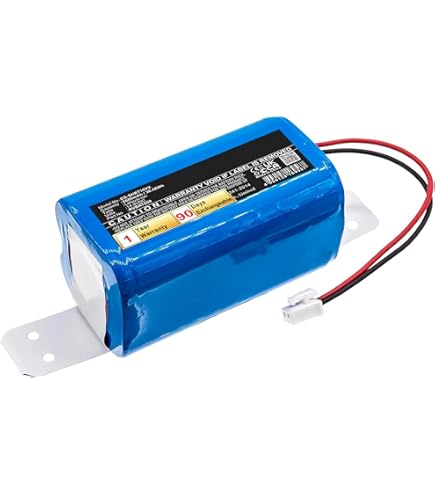
Replacement batteries for robot vacuums come in different types. Choosing the right type can improve your vacuum’s performance. Understanding these types helps you make a smart choice. Below, we explore key categories to know.
Oem Vs Third-party Options
OEM batteries come from the vacuum’s original maker. They fit perfectly and usually last longer. Third-party batteries cost less but vary in quality. Some third-party options work well. Others may not fit or last as long. Check reviews to find reliable third-party brands.
Battery Chemistries Explained
Robot vacuum batteries use different chemistries. Lithium-ion batteries are common. They hold more power and recharge fast. Nickel-metal hydride (NiMH) batteries are older and heavier. They last shorter and charge slower. Lithium-ion batteries offer better performance overall.
Compatibility Considerations
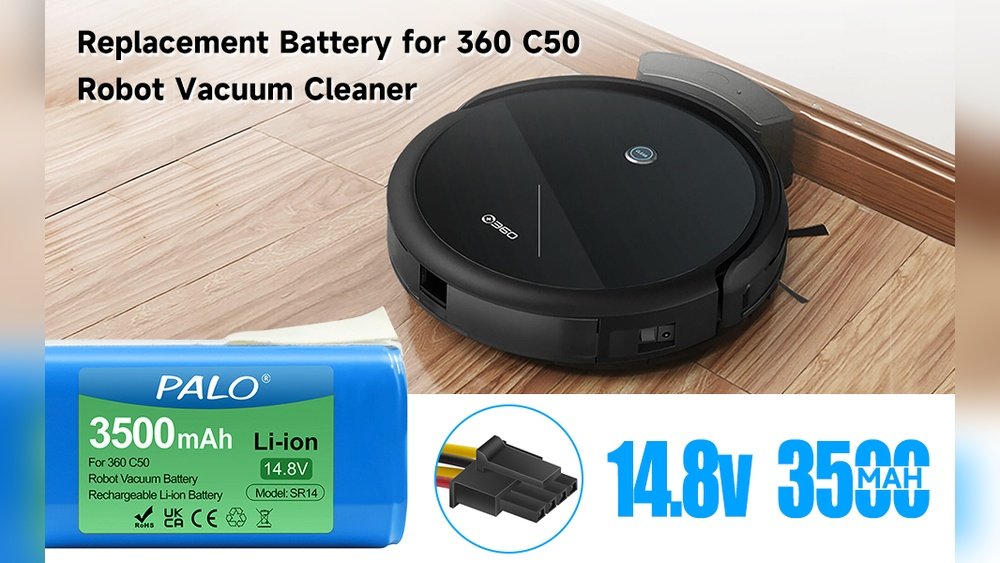
Not all batteries fit all robot vacuums. Check the model number before buying. Voltage and size must match your vacuum. Using the wrong battery can damage the device. Always confirm compatibility with the seller or manual.
Signs You Need A New Battery
Knowing when to replace your robot vacuum’s battery can save you time and money. Batteries wear out over time. They lose power and stop working well. Watching for signs helps keep your vacuum cleaning at its best. Here are some clear signs you need a new battery.
Reduced Cleaning Time
Your robot vacuum should clean for a set time. If it stops cleaning as long as before, the battery may be weak. Shorter cleaning sessions mean the battery cannot hold a full charge anymore. This reduces how much area your vacuum covers.
Frequent Charging Cycles
Charging your vacuum often is a warning. A healthy battery lasts through many cleaning jobs. If you need to charge it after every small job, the battery is losing strength. This also adds wear and shortens battery life.
Vacuum Not Holding Charge
When your vacuum won’t hold a charge, it drains fast or dies quickly. Sometimes it may not charge fully at all. This shows the battery cells are worn out. Your robot vacuum can’t work properly without a strong battery.
Risks And Drawbacks
Buying replacement batteries for robot vacuums can save money. Still, some risks and drawbacks come with these batteries. Knowing these issues helps to make better decisions.
Not all batteries are the same. Some may cause problems with your device or even lead to safety risks. It is important to understand what could go wrong.
Potential Warranty Issues
Using replacement batteries might void your vacuum’s warranty. Manufacturers often require original parts for service. If a problem occurs, repairs may not be covered. This can lead to extra costs later.
Quality Variations In Aftermarket Batteries
Aftermarket batteries vary in quality. Some may have lower capacity or shorter life. Others might not fit well or cause your vacuum to work poorly. Poor quality batteries can harm your device.
Safety Concerns And Handling Tips
Battery safety is important. Low-quality batteries may overheat or leak. This can damage your vacuum or cause fire risks. Always handle batteries carefully. Avoid puncturing or exposing them to heat. Use original or trusted batteries when possible.
Installation And Maintenance Tips
Replacing the battery in your robot vacuum can extend its life and improve performance. Proper installation and care of the new battery ensure the best results. Follow these simple tips to keep your vacuum running smoothly and safely.
Safe Battery Replacement Steps
Turn off the robot vacuum and unplug it from any power source. Use a screwdriver to open the battery compartment carefully. Remove the old battery without forcing it out. Insert the new battery gently, matching the connectors correctly. Close the compartment and tighten the screws securely. Avoid touching the battery terminals with your fingers. Test the vacuum to confirm the new battery works well.
Optimizing Battery Life
Charge the new battery fully before the first use. Avoid overcharging by unplugging once it reaches 100%. Keep the vacuum in a cool, dry place to prevent battery damage. Run the vacuum regularly to maintain battery health. Clean the battery contacts gently with a dry cloth. Avoid letting the battery drain completely before recharging. Follow the manufacturer’s instructions for best care practices.
Proper Disposal Of Old Batteries
Old batteries contain harmful chemicals that can damage the environment. Do not throw them in the regular trash. Find a local battery recycling center or hazardous waste facility. Store old batteries in a cool, dry place until disposal. Tape the terminals to prevent short circuits during transport. Responsible disposal protects nature and follows safety rules. Check community guidelines for battery recycling options near you.
When To Consider A New Robot Vacuum
Deciding when to replace a robot vacuum is important. Sometimes, a battery replacement may not be enough. Other times, a new model offers better value and features. Understanding the key signs helps you make the best choice for your home and budget.
Battery Replacement Cost Vs New Model
Battery replacement costs vary by brand and model. Some batteries are cheap, while others cost almost as much as a new vacuum. If the battery price is close to a new vacuum’s cost, buying a new model makes more sense. Also, a new vacuum often comes with a full warranty.
Upgrading Features And Technology
Newer robot vacuums come with improved sensors and cleaning power. They may map your home better and avoid obstacles more easily. Some models work with smart home devices or have better battery life. Upgrading gives you access to these useful features.
Long-term Value Assessment
Think about how long your current vacuum will last after the battery change. Older models may stop working soon despite a new battery. A new vacuum may last several years with better performance. This saves money and effort in the long run.

Frequently Asked Questions
Are Replacement Batteries Compatible With All Robot Vacuum Models?
Not all replacement batteries fit every model. Check your vacuum’s brand and model number before buying. Using the wrong battery can damage your device or reduce performance. Always buy batteries recommended by the manufacturer or trusted third-party sellers.
How Long Do Replacement Batteries Typically Last?
Replacement batteries usually last 1 to 2 years depending on usage. Proper charging habits and avoiding extreme temperatures can extend battery life. Monitor your vacuum’s performance to know when the battery needs replacement for optimal cleaning.
Can Replacement Batteries Improve Robot Vacuum Performance?
Yes, new batteries can restore your vacuum’s runtime and suction power. Over time, old batteries lose charge capacity, reducing cleaning efficiency. Replacing the battery is a cost-effective way to boost performance without buying a new vacuum.
Is It Cost-effective To Buy Replacement Batteries?
Buying replacement batteries is often cheaper than purchasing a new vacuum. It extends the life of your existing device and maintains cleaning quality. Consider battery cost, vacuum age, and repair options before deciding on replacement.
Conclusion
Replacement batteries can extend your robot vacuum’s life. They help avoid buying a new cleaner too soon. Quality matters—choose batteries made for your model. This saves money and keeps cleaning efficient. Think about how often you use your vacuum. If it runs less, a replacement battery is useful.
Weigh the cost against buying a new vacuum. Replacement batteries offer a practical way to keep your robot working longer. Simple, smart, and cost-effective. Worth considering for any robot vacuum owner.