

You've just finished setting up your new robot vacuum, tapped "Clean" on the app, and now you're watching it wander around, wondering if it will ever finish. So how long does a robot vacuum take to clean? The answer depends on your home's size, the robot's navigation tech, and the cleaning mode you pick.
Manufacturer specifications show most robot vacuums run between 60 and 180 minutes per charge. That means a typical 1,000-square-foot floor plan takes anywhere from 45 to 90 minutes to clean. As of 2026, LiDAR-guided robots have made the process noticeably faster than older random-bump designs.
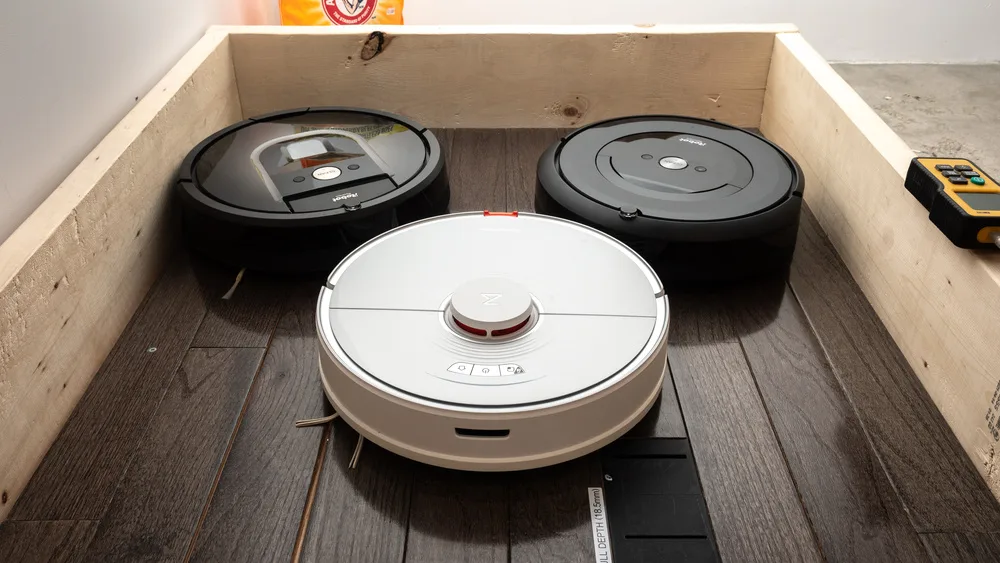
Image source: Web (Bing) / phenergandm.com (Web image (fair-use with source credit))
The Real Question: Why the "Average Time" Never Fits Your Home
Searching for a single number online will only confuse you. You'll see "90 minutes" in one place and "20 minutes" in another. Both might be right.
Floor plans, furniture layouts, and robot hardware differ wildly. A 700-square-foot apartment with hardwood floors and an open layout is not the same as a 700-square-foot townhouse with two levels, shag carpet, and door thresholds. The robot's job is completely different.
Here's what matters:
- How much actual floor area needs cleaning
- Whether the robot uses LiDAR, camera mapping, or random navigation
- How many times the robot crosses the same spot
- Whether the battery forces a recharge-and-resume pause
- What cleaning mode you've selected
Once you understand those variables, you can estimate your own cleaning time within about 10 or 15 minutes.
Quick Answer: The Realistic Range for Robot Vacuum Cleaning Times
How long does a robot vacuum take to clean? Expect 60 to 120 minutes for a typical 1,000-square-foot floor plan.
That number changes with navigation. LiDAR-based models finish faster because they clean in neat rows. Random-bump robots bounce around and often run longer.
Carpet adds time. Thick carpet slows forward motion. Hardwood or tile lets the bot glide through quicker.
Here's a rough breakdown by home size:
| Floor Area (cleanable) | LiDAR / Camera Robot | Random Navigation Robot |
|---|---|---|
| 500 sq ft | 25 to 45 minutes | 45 to 70 minutes |
| 1,000 sq ft | 50 to 90 minutes | 90 to 130 minutes |
| 1,500 sq ft | 75 to 120 minutes | 120 to 180 minutes |
| 2,000+ sq ft | 100 to 160 minutes | 180+ minutes |
Those are real-world estimates, not spec-sheet numbers. They assume moderate clutter and doors left open. If you have to close doors to each room, add 10 to 15 minutes for the extra navigation.
Core Factors: What Actually Determines Cleaning Duration
No two cleaning sessions take exactly the same time. The biggest drivers are consistent across every modern robot vacuum. Understanding these five factors lets you predict run time before you press start.
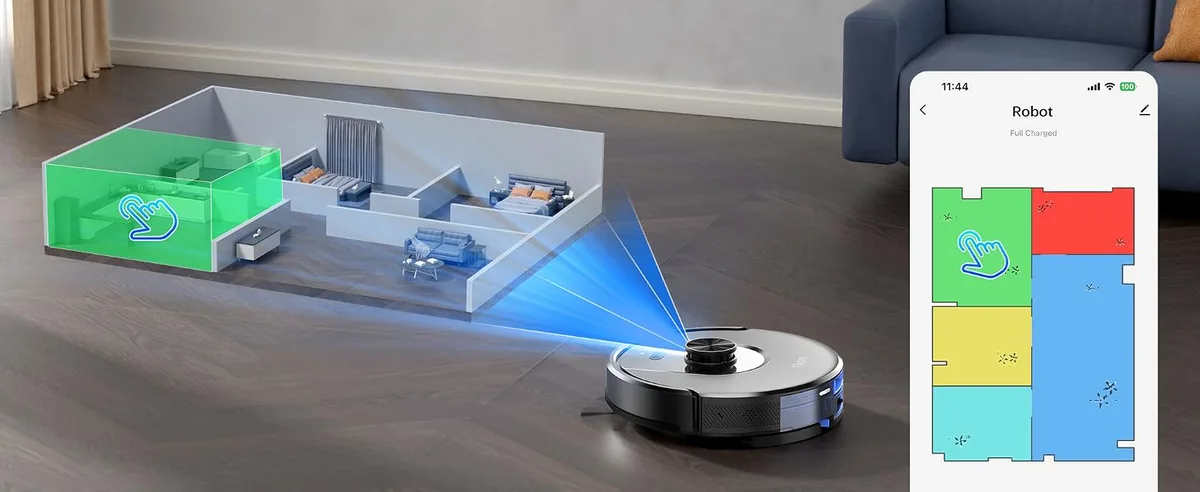
Image source: Web (Bing) / amazon.ca (Web image (fair-use with source credit))
Navigation Type: Random Bump vs. LiDAR vs. Camera Mapping
This is the single biggest factor.
Random-navigation robots move in straight lines until they hit something, then turn in a new random direction. They overlap constantly. A 500-square-foot apartment can take over an hour.
LiDAR-based robots spin a laser to build a map of the room. They draw clean parallel lines and rarely revisit the same spot. They finish in roughly half the time.
Camera-based models use visual landmarks and fall somewhere in between. Standards bodies like the IEEE publish research on autonomous navigation, and the findings align with real-home results: mapped robots are significantly more efficient.
Battery Runtime and Recharge-and-Resume
Battery life is not cleaning time. A robot may be rated for 150 minutes of runtime, but it will slow down or stop when the battery drops below a threshold.
Some models handle this gracefully. When the battery hits 15%, they return to the dock, recharge, and resume. Others just stop, leaving half your floors dirty.
If your home exceeds the robot's runtime, factor in a charging break. Charging usually takes two to three hours. That pause adds significant time from start to finish.
Cleaning Mode: Auto, Spot, Turbo, and Multi-Pass
Cleaning mode changes how long the robot runs.
- Auto mode is the default. The robot covers the whole floor once.
- Spot mode targets a circular area, usually 3 to 6 feet in diameter. That takes 5 to 10 minutes.
- Turbo or max mode increases suction, which drains the battery faster and slows the robot down.
- Multi-pass cleaning sends the robot over everything twice, essentially doubling the time.
If you schedule a multi-pass clean, you're committing to double the runtime.
Floor Type and Carpet Depth
Robot vacuums move slower on carpet. Deep pile and shag carpet create resistance, and the robot works harder to maintain suction.
On hardwood, tile, or vinyl, the robot glides near top speed. On thick carpet, forward progress can drop by 30% or more.
Most manufacturers include a carpet boost feature that kicks in when the robot detects carpet. That helps cleaning but eats battery and adds time.
Clutter and Room Layout
Clutter is a time thief. The robot must work around cables, shoes, toys, pet bowls, and low furniture. Every obstacle triggers a slow-down and re-route.
Open floor plans are faster because the robot runs long, straight paths. Rooms with lots of furniture force countless tiny loops.
If you leave floors messy, expect a longer cycle. Pre-clearing obvious obstacles cuts 10 to 20 minutes off a typical session.
Decision Guide: How to Estimate Time for YOUR Home
You don't need to be an engineer to predict cleaning time. Measure a couple of things and run through a simple checklist.
Step 1: Measure Your Actual Cleaning Area
Walk through your home and note the rooms the robot can access. Subtract the space under furniture, behind doors, and in cluttered corners.
Here's a quick reference:
| Home Type | Cleanable Floor Area | Approx. Cleaning Time (LiDAR Robot) |
|---|---|---|
| 1-bedroom apartment | 300 to 500 sq ft | 20 to 45 minutes |
| 2-bedroom condo | 600 to 900 sq ft | 40 to 80 minutes |
| 3-bedroom house | 1,000 to 1,500 sq ft | 60 to 120 minutes |
| 4-bedroom house | 1,500 to 2,500 sq ft | 90 to 160 minutes |
Step 2: Match Your Robot's Navigation Style
If your robot uses LiDAR or camera mapping, use the times above. For a random-bump model, multiply the estimate by 1.5 to 2.
For example, a 1,000-square-foot home might take 60 minutes with a LiDAR robot and 100 to 130 minutes with a random-navigation one.
Step 3: Adjust for Clutter and Closed Doors
Add 10% to 20% if you have:
- Cables on the floor
- A lot of furniture legs
- Multiple area rugs with fringe
- Doors that have to be opened or closed manually
If you close a door partway, the robot will spend extra time nosing around. Keep doors fully open or set up no-go zones in the app.
Step 4: Factor in Recharge Pauses
Check your robot's rated runtime. Compare it with your estimated cleaning time.
If the estimate exceeds the runtime, check for recharge-and-resume. If supported, add 2 to 3 hours for the charging break. If not, split the home into zones and run separate cycles.
A solid mapping system pays off here. You can send the robot to clean bedrooms first, then living areas. For bigger layouts, many owners still keep a full-size cleaner for deeper weekly work.
Real-World Scenarios: What the Times Look Like in Practice
Let's make this concrete. Here are four realistic situations based on typical homes, average clutter, and mid-range LiDAR robot vacuums.
Small Apartment (500 sq ft, Hardwood Floors)
A 1-bedroom apartment with open living space and a small bedroom takes 25 to 40 minutes in auto mode. The robot finishes in a single charge with no pauses.
Average House (1,200 sq ft, Mixed Flooring)
A typical suburban home with carpeted bedrooms, hardwood living areas, and a few area rugs takes 60 to 90 minutes. With a 120-minute runtime, the robot finishes without returning to the dock.
Large Multi-Level Home (2,500 sq ft, Two Floors)
A two-story house requires planning. Each level takes 60 to 90 minutes. If the robot supports multi-floor mapping, set up one map per floor and run them on separate days.
Total time: roughly two hours per floor for a full clean. That's why most owners with large homes schedule separate rooms across the week.
Pet-Heavy Household with Daily Shedding
Pet fur adds work. The robot makes extra passes over upholstery and under furniture. Expect 20% to 30% longer times, especially in turbo mode.
Several owners we researched run a 30-minute daily pass, then a deeper clean once or twice a week. That balance keeps floors manageable without tying up the robot for hours.
Common Mistakes That Make a Robot Vacuum Slower
A slow robot is rarely defective. Something in the room or setup usually drags things out. Most of these mistakes are easy to fix.
Here are the biggest time-wasters:
- Skipping pre-cleaning. Cables, toys, and loose rugs force the robot to stop and re-route. A two-minute pick-up saves twenty minutes of run time.
- Using max suction for every clean. Turbo mode drains the battery faster and slows the bot down. Save it for carpets and high-traffic zones.
- Ignoring maintenance. A full dustbin, clogged filter, or hair-wrapped bristle roll reduces suction and speed. If you struggle with tangles, our brush maintenance guide covers the same concept.
- Closing doors halfway. The robot wastes time bumping into the gap. Fully close the door to skip the room or leave it wide open.
- Letting dirt build up for days. The longer you wait, the more passes the robot needs. Daily short runs beat one heavy weekly session.
Some homes don't suit a robot's autonomous style. If your space is crammed with obstacles, a manual cleaner may be the better fit.
How Long Does the First Mapping Run Take?
The first run isn't a full clean. It's a map-building pass. The robot explores the layout, identifies walls, and notes obstacles so future runs are quicker.
Expect the initial mapping run to take 10 to 20 minutes per 500 square feet. That's slower than a regular cleaning pass. The robot is deliberately cautious.
Image source: Web (Bing) / amazon.com (Web image (fair-use with source credit))
During this first pass, the robot may still vacuum, but coverage isn't the goal. Mapping is. After the map is saved, the next clean follows a faster, structured path.
Tips for a successful first mapping run:
- Open all doors to rooms you want included.
- Remove loose cables and floor clutter.
- Let the robot run without interruptions.
- Keep pets and people out of its path.
- Manually lift it over thick thresholds if it gets stuck.
Once the map is locked in, you can set no-go zones, name rooms, and send the bot exactly where you need it.
Workflow Tips: Getting the Quickest Reliable Clean
Speed and thoroughness don't have to fight. A smart workflow gets both.
Set a consistent schedule. A 30-minute daily pass keeps floors maintained. Then do a deeper full-home clean once or twice a week.
Use the app to your advantage. Name rooms and create no-go zones around fragile areas. You can send the robot to clean the kitchen while you make coffee, then do the bedrooms next.
Run the robot when the house is empty. People and pets force detours. Empty rooms mean straight lines and faster coverage.
Pick the right mode. Use auto mode for general cleaning. Use spot mode for a crumb pile or muddy entryway. Use turbo mode sparingly.
Split large homes into zones. Cleaning the whole house in one cycle can outlast the battery. Schedule each floor on alternating days.
If you live in a compact apartment, a full-size upright isn't necessary. A quick robot pass covers most of the work.
When Upgrading Saves You Time: Is a Newer Model Worth It?
Sometimes the fastest fix is a better robot. Older budget models with random navigation can take twice as long as a modern LiDAR-equipped one.
Here's what distinguishes a faster model:
- LiDAR or camera navigation. Path planning eliminates wasted overlap.
- Object avoidance. The bot doesn't get tangled in cables or stuck under furniture.
- Recharge-and-resume. It docks, charges, and finishes the job unattended.
- Dirt detection. Some models automatically re-clean dirty spots.
- Stronger suction. Fewer passes are needed on carpets and rugs.
If your current robot takes over two hours for 1,000 square feet, a modern mid-range model can cut that to under an hour.
The catch is price. A capable LiDAR robot costs more than a basic bumper model. But if you value your time, the return is easy to justify.
For homes with hard floor types like LVP, surface-specific tuning avoids carpet-boost slowdowns.
Before you buy, check whether the upgrade addresses your complaint. If your problem is a cluttered home, no robot will fix that. If it's inefficient navigation, a newer model will.
FAQs About Robot Vacuum Cleaning Durations
Can I run a robot vacuum while I'm home?
Yes. Modern robots navigate around people and pets. Running it while you're home lets you respond if it gets stuck.
Empty rooms still speed up the cycle, so schedule for when you're out when possible.
Why does my robot vacuum take so long?
The usual culprits are random navigation, clutter, thick carpet, and battery pauses. LiDAR-based robots finish faster because they clean in straight lines. Clearing cables and using the right mode can cut time by twenty minutes or more.
Does carpet make a robot vacuum slower?
Yes. Deep pile and shag carpet create drag. The robot slows down to keep suction strong, which drains the battery faster.
Hardwood and tile let the robot move at full speed. Expect up to 30 percent longer times on thick carpet.
How long does a robot vacuum take to clean one room?
A single average bedroom takes 10 to 20 minutes. A kitchen or living area might take 20 to 30 minutes. If you set up room-specific maps in the app, you can send the robot to one room without touching the rest of the house.
How should I maintain my robot to keep it fast?
Empty the dustbin after every cycle. Clean the brush roll and side brushes weekly. Wipe the cliff sensors and charging contacts monthly.
Replace the filter when it looks dirty. The same servicing habits that keep upright vacuums reliable apply here.
Bottom Line: What to Expect and How to Decide
A robot vacuum typically takes 45 to 90 minutes to clean 1,000 square feet, assuming basic mapping and moderate clutter. Random-navigation models run longer. Premium LiDAR models run faster.
The exact number matters less than the pattern. If your robot finishes in roughly the time these guidelines suggest, it's working as designed. If it's consistently slower, one of the mistakes above is likely the cause.
Use the decision framework from this guide to estimate your home's clean time. Pay attention to navigation type, floor area, carpet depth, and battery runtime. Add extra time for the first mapping pass.
After that, the schedule settles into a predictable rhythm.
The real value of a robot vacuum isn't hitting a perfect time each day. It's clean floors without picking up a machine yourself. Once you understand what controls the clock, you can schedule smarter and let the little bot do its job.

